Bienvenido! - Willkommen! - Welcome!

Bitácora Técnica de Tux&Cía., Santa Cruz de la Sierra, BO
Bitácora Central: Tux&Cía.
Bitácora de Información Avanzada: Tux&Cía.-Información
May the source be with you!
Showing posts with label browser. Show all posts

Wednesday, October 1, 2008

Strange behavior in the Back Button

Source

Sometimes when you click the Back button in IE6 to return to the previous page it appears that nothing happens. What usually occurs is that the HOSTS file has blocked one or more (<IFrame>) ad pages that are embedded into the web page you are viewing.
To verify this click the small drop-down arrow on the Back button, do you see just an ad server listed? ... well now you know ..... As you can see the first three links are blocked ad servers, simply skip to the valid link. However there are a few exceptions. In some cases the web page can contain a script to prevent the user from returning to a previous page.


Martin Hawes sends along this tip: (IE6)
If you add the "ad servers" you see listed in the Back Button drop-down, to the Restricted Zone this will eliminate the Back button issue.
Editors Note: however if you are using Windows XP SP2, you will be prompted by the "Security Center" about a 3rd party connection. Just click No and continue.


Vista/IE7 users should not see any ad servers listed in the drop-down list of the Back Button if your HOSTS file is working properly.

Tuesday, September 30, 2008

The safest browser in Windows

"Browsers are as good as their users"

The browser is only as safe as the user who use adecuately all the possible security mechanismus of the browser!

Firefox can be very unsafe if someone (who doesnt know anything) does not configure it.


Opera performed better when tried/tested by visiting the "Darkest side of the Net":
i.e. heavily infected Russian, Chinese, XXX sites, etc.
And the rest of browsers: Crashed or frozen.
Special security add-ons as NoScript, AdBlock/Plus, etc. make Firefox the safest browser.
Under Linux and other GNU/Unix variants (all BSDs or perhaps OSX) and their browsers you can explore the web without the typical viral problems of the MS world!

Wednesday, July 23, 2008

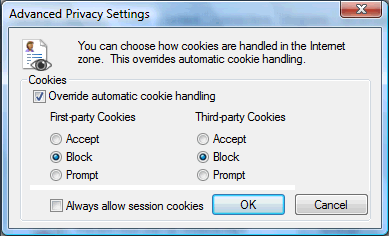
Blocking Unwanted Cookies with IE 7

One of the new features built-in to IE 7 is the ability to accept and/or block any or all cookies if desired.
Recommended Settings
Open Internet Options | Privacy, click on the Advanced button. Place a check in "Override automatic cookie handling".
Set "First Party Cookies" to Block, set "Third Party Cookies" to Block.
Note: you will need to manually Allow certain cookies, you should add: "*.microsoft.com" (no quotes) to the "Always Allow" list to avoid any problems with Windows Update or the many other Microsoft sites, including the MSKB which requires Cookies to be accepted. I would recommend adding any sites that you frequent such as Banking, and any sites that require you to log in, etc.
You'll find that after a while this only requires a very short list.
Read more...

Monday, July 14, 2008

Firefox, the original

The Red Panda, Firefox[1], or Lesser Panda , or Ailurus fulgens ("shining cat"), is a mostly herbivorous mammal, specialized as a bamboo feeder. It is slightly larger than a domestic cat (40 - 60 cm long, 3 - 6 kg weight)
Red Panda is the state animal in the Indian state of Sikkim. It is also the mascot of the Darjeeling international festivals.

El Firefox 3

Friday, March 21, 2008

Navegador de Netscape

Lo que parecía una broma de abril
de Netscape, debe considerarse un hecho real, pues el soporte técnico del navegador 9.0.6 fue ampliado sólo hasta el 01/03/2008
Sólo resta cambiarse totalmente a Firefox y Flock
Netscape Communications Corporation fue adquirido por AOL en 1999.
Pese a todo, la saga de la Fundación Mozilla continúa!

Monday, February 18, 2008

Navegación SEGURA del Internet

Política de Seguridad: Navegación del Internet
Test del navegador de internet para comprobar la seguridad (o inseguridad) de éste ante amenazas informáticas que vulneran un sistema operativo y a la larga los datos del usuario.
Cerrar las aplicaciones críticas y seguir el siguiente vínculo:
TEST de NAVEGADOR o Browser check de Scanit.be

Política de Seguridad: Firewall (hardware o software)
Instalar un firewall gratuito como medida intermedia

Soluciones básicas: Actualización de los parches del sistema operativo y del navegador, analizar y cerrar los puertos abiertos menores a 1023.