Bienvenido! - Willkommen! - Welcome!

Bitácora Técnica de Tux&Cía., Santa Cruz de la Sierra, BO
Bitácora Central: Tux&Cía.
Bitácora de Información Avanzada: Tux&Cía.-Información
May the source be with you!
Showing posts with label firmware. Show all posts

Saturday, October 27, 2012

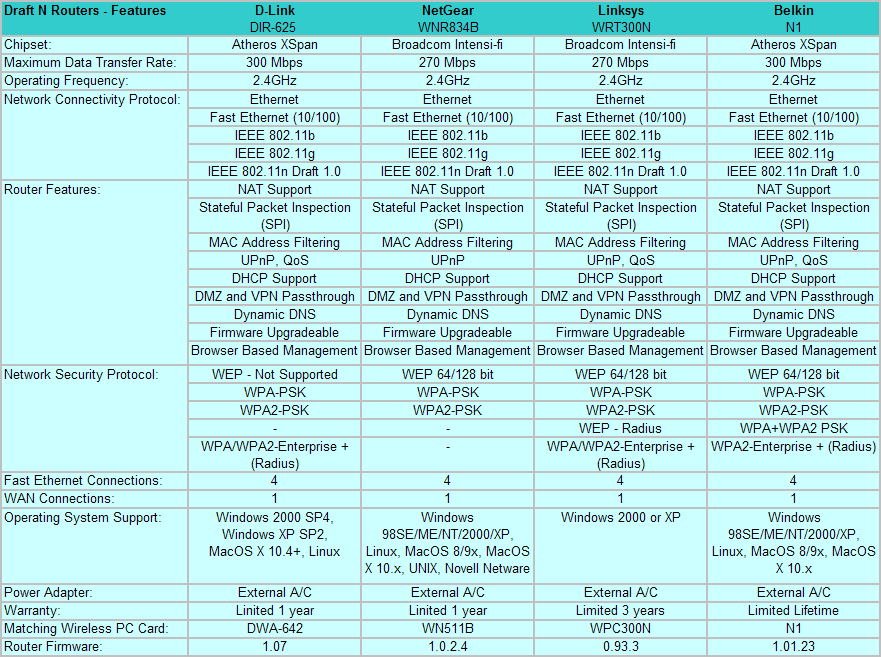
D-Link DIR-615 DIR-625 and DD-WRT

openwrt supports Ubicom RISC processors they are also multithreaded great link to read to find out more about the D-link routers http://linux.sys-con.com/node/969790
dlink.com/us/en/support/product/dir-625-rangebooster-n-router
http://images.anandtech.com/reviews/networking/draftn-part2/features-lg.png
Forum DIR-625
DIR-625 is based on hardware of  Ubicom (no way, there is no Linux support available, then no DD-WRT)
Ubicom(R) Announces OpenWRT Compliant Router Platform
 Ubicom(R), Inc., a leading provider of networking and multimedia processor solutions, announced today the availability of a Linux-based OpenWRT compliant router platform that runs on the Ubicom IP7100 Router Gateway Evaluation board. At Interop 2009, the company will demonstrate the platform that allows OEMs and ODMs to rapidly develop router products for consumer, SOHO, and SMB markets.
The platform includes comprehensive reference router software that is easily customizable. The reference router software also comes with Ubicom's StreamEngine(TM) QoS technology that can automatically classify and prioritize latency-sensitive traffic. Ubicom's rigorous software quality assurance that includes regression, white box and black box testing has been applied to this platform to ensure quality.
"We are excited to be working with Ubicom on a truly unique multi-processing platform. The combination of the Ubicom hardware and OpenWRT platform presents a fascinating glimpse into the future of open source consumer friendly devices; we look forward to future collaboration," said Mike Baker from OpenWRT.
The solution is powered by Ubicom's IP7100 series network processor and includes four Gigabit LAN ports, a Gigabit WAN port, a USB 2.0 port, two MPCI connectors, and a UART console. The IP7100 network CPU can cost effectively deliver up to 1 Gbps of system level performance and features networking interfaces such as RGMII, PCI, and T1/E1, along with on-chip hardware acceleration engines for QoS, VPN, and voice codecs. Tools for configuration enable developers to quickly configure the processor interfaces and functionality, while the GDB debugger can be used to step through code. The advanced Profiler tool leverages the ability of the IP7100 processors to run a profile thread real time non-intrusively and collect rich profile data such as CPU and memory utilization per function.
The Ubicom IP7100 family of network processors featuring the UBICOM32(TM) multithreaded architecture can be clocked at frequencies up to 600MHz. When compared with a single-threaded RISC processor, designers can expect two to three times the performance at the same frequency for most applications. Designers can also use a wide range of interface options via Ubicom's software I/O technology.
Availability
The Ubicom OpenWRT Router Platform is available now. For more information, go to developer.ubicom.com. The IP7100 family of network processors is in volume production. For more information, go to www.ubicom.com/ip7000.
=====================
Guide to DD-WRT (custom firmware) for DIR-615
Intro
Reading this forum one can only reach one conclusion - that people are unhappy with the factory firmware supplied by D-Link for its DIR-615 routers. Which is sad, because in terms of hardware, DIR-615 is a solid product, capable of good performance.
It's true that some problems are solved with a firmware update, when one is available, but more often than not, users are stuck with issues that severely impact their Internet experience and no fix in sight. However, before starting throwing routers out and spending money on new ones (yes, I've read a lot of people saying that), users should be aware that there is another option at their disposal, in the form of a custom open source firmware called DD-WRT.

What is DD-WRT and things to know before running with it
DD-WRT is a custom open source firmware for routers, based on the Linux kernel, which is developed and maintained by a community of programmers. Originally written for the extremely popular WRT54G Linksys router, the software has since evolved to support a wide array of devices from many manufacturers.
DD-WRT is very powerful and unlocks access to advanced networking features that factory firmwares don't provide. It is so popular that some home networking equipment manufacturers like the UK-based Buffalo Technology pre-install a custom version of it on their routers. All of this sounds appealing? Good, but first you should be aware of a few things.
For one, installing a custom firmware on a D-Link device theoretically voids the warranty. I say theoretically, because practically if the router is not completely fried, you should be able to flash the factory firmware back and chances are no-one will tell the difference. Even if it's completely dead I doubt anyone will attempt to repair it and see what you had on it. Chances are, your supplier will just replace it, but don't blame me if that doesn't happen.
Second thing you should know is DD-WRT exposes a lot of settings the average user has no idea about. My advice is not to mess around with anything you don't know and then complain that it doesn't work as expected anymore. Of course, set WAN, wireless security, port forwarding and the usual stuff, but for the rest I learned that default settings work best.

Where do I get DD-WRT from?
Well, it's not that straight-forward as you might think. The DD-WRT developers release individual builds for each router model and/or hardware revision (that's a lot I know). A particular router model/revision is not "officially" supported and added to the DD-WRT database until someone donates such a device to the DD-WRT dev team for development and testing purposes. However, there are unofficial builds for many models/revisions that are tagged as "work in progress" and much of the time they are stable enough to use without any concern of critical bugs.
So now, back to our model of interest - the mighty DIR-615, which D-Link should be congratulated for, because it's a very decent product (hardware-wise) for a very good price. The DIR-615 comes in many "flavors" (hardware revisions or versions). Amongst the ones that I know are: B1, B2, C1, C2, E1, E2, E3, E4, D1, D2, D3, D4, H1, H2, I1.

Here is where to get the DD-WRT build for your particular revision.
B1, B2:  Sorry. No build for you guys. Cry
C1: ftp://dd-wrt.com/others/eko/BrainSlayer-V24-preSP2/[most_recent_date]/dlink-dir615c1/ DO NOT flash r16454! Read warning.
C2: Try the one for C1. It might work, but I don't have confirmation. If you test it and it works post on this topic so I can update this info. DO NOT flash r16454! Read warning.
D1, D2, D3, D4: ftp://dd-wrt.com/others/eko/BrainSlayer-V24-preSP2/[most_recent_date]/dlink-dir615d/
E1: ftp://dd-wrt.com/others/eko/BrainSlayer-V24-preSP2/[most_recent_date]/dlink-dir615e1/
E2: Might work with the one for E1 (above) or the one for E3 (below). Please confirm on this topic if you get it working.
E3: ftp://dd-wrt.com/others/eko/BrainSlayer-V24-preSP2/[most_recent_date]/dlink-dir615e3/
E4: ftp://dd-wrt.com/others/eko/BrainSlayer-V24-preSP2/[most_recent_date]/dlink-dir615e4/
H1, H2: ftp://dd-wrt.com/others/eko/BrainSlayer-V24-preSP2/[most_recent_date]/dlink-dir615h/
I1: ftp://dd-wrt.com/others/eko/BrainSlayer-V24-preSP2/[most_recent_date]/dlink-dir615i1/
Note: The [most_recent_date] is at this time 07-20-12-r19519, so the folder you should be looking in is ftp://ftp.dd-wrt.com/others/eko/BrainSlayer-V24-preSP2/2012/07-20-12-r19519/. However, new builds are constantly released so check the most recent date folder in ftp://dd-wrt.com/others/eko/BrainSlayer-V24-preSP2/ regularly.
WARNING: DO NOT flash r16454 from ftp://dd-wrt.com/others/eko/BrainSlayer-V24-preSP2/2011/03-17-11-r16454/ or your wireless controller will stop working.

How do I install DD-WRT?
In each of the folders corresponding to your router's revision, you will find two or more files. The ones with "factory" in their name, like dlink-dir615d-factory-webflash.bin are for initial flashing from D-Link's factory firmware to DD-WRT. The flash should always be performed over a WIRED and not wireless connection. You can do it in two ways:
1. From the D-Link firmware's Web interface. Go to Tools > Firmware and under "Firmware Upgrade" press Browse, select the DD-WRT file and hit Upload.
2. From the router's Emergency Room Web interface. To access the Emergency Room Web interface follow these steps:

  • Unplug the router's power cord and wait 20 seconds.
  • Get a pin, push the RESET button and KEEP IT PRESSED.
  • Connect the power cord back (while still keeping the reset button pressed)
  • Keep the reset button pressed for an additional 5 seconds after connecting power cord and then release. At this point you should see the power button blinking orange.
  • Connect over a WIRED connection to the router and set your network adapter IP MANUALLY to 192.168.0.2
  • Open http://192.168.0.1 in a browser. You should see a white page with a Browse and Upload button.
If the DD-WRT flash works, reboot your router and set your Ethernet adapter to obtain IP automatically then try to access http://192.168.1.1 .
How do I update to a new DD-WRT build?
In each of the folders corresponding to your router's revision, you will find a .BIN file that does NOT contain "factory" in its name. This file is to be used for update if you already have an older DD-WRT build installed on your router.
From the DD-WRT interface go to Administration > Firmware Upgrade. Hit browse, point to the file, hit upgrade and wait. When it's finished check out the build date in the upper right corner to make sure it updated.
Warning: Leave "Don't Reset" option alone if you don't want all your settings to be reset to defaults.
How do I restore the original D-Link factory firmware?
Obtain the latest firmware for your revision from D-Link's support site for your region. Go into the Emergency Room Web interface using the steps provided above in the installation section of this guide. Flash the firmware file from the Emergency Room Web interface.
Frequently Asked Questions
This will be updated in time with answers to your most common questions.
PS: Excuse my spelling and/or grammar mistakes. English is not my native language. Suggestions and comments are appreciated.
Changelog:
Oct. 11 2012 - Updated the guide with links to the DD-WRT builds for H1, H2 and I1. Also updated the most recent date for DD-WRT releases and the link to the folder.
« Last Edit: October 11, 2012


Thursday, October 25, 2012

Tomato RAF

Español, La versión de Tomato RAF es una modificación hecha por Victek del firmware original Tomato publicado por Jon Zarate. Es un firmware alternativo para los modelos de router Linksys-Cisco/Asus/Netgear/Ovislink. El objetivo de estas modificaciones es ampliar y mejorar las funciones de la versión original.
English, Tomato RAF's version is a mod made ​​by Victek from the original Tomato firmware released by Jon Zarate. It's an alternative firmware for Linksys-Cisco/Asus/Netgear/Ovislink Router model. The purpose of these modifications is to extend the functionality of the original version.
---------------------
The Tomato/Victek's Tomato Firmware Club 
DD-WRT is getting heavier and heavier with all the un-needed stuff. they have included a lot of un-needed stuff and the router tends to hang from time to time because of this (the older ones were just fine tongue.gif). Next I've tried OpenWRT , it rocks but pretty much you'll have to configure everything by hand and it sucks big time for lazy people like me. Then i came across with Tomato. At first after trying it out , it seems to be lacking of something. Eventually , I fell in love with it as its simple , easy to use and has a superb QoS functionality (you'll only get that sort of QoS if you pay for the DD-WRT firmware) and as for OpenWRT you'll have to use SSH/Terminal and do it via the terminal (command prompt). Overall , it seems to be pretty good  

Tomato is a small, lean and simple replacement firmware for Linksys' WRT54G/GL/GS, Buffalo WHR-G54S/WHR-HP-G54 and other Broadcom-based routers. It features a new easy to use GUI, a new bandwidth usage monitor, more advanced QOS and access restrictions, enables new wireless features such as WDS and wireless client modes, raises the limits on maximum connections for P2P, allows you to run your custom scripts or telnet/ssh in and do all sorts of things like re-program the SES/AOSS button, adds wireless site survey to see your wifi neighbors, and more. 
Routers that are known to work with Tomato:
Linksys WRT54G v1-v4, WRT54GS v1-v4, WRT54GL v1.x, WRTSL54GS (no USB support)
Buffalo WHR-G54S, WHR-HP-G54, WZR-G54, WBR2-G54, WBR-G54, WZR-HP-G54, WZR-RS-G54, WZR-RS-G54HP, WVR-G54-NF, WHR2-A54-G54, WHR3-AG54
Asus WL500G Premium (no USB support), WL500GE
Sparklan WX6615GT, Fuji RT390W, Microsoft MN-700 
---------------------
im runnning ddwrt v24 now on WRT54g v2.2. If i want to switch to Tomato.
Just flash it on conf page?
--------------
YES! you can just flash it using normal method. But keep in mind you need to restart your settings. 
Do a hard reset as DD-WRT config doesnt work with Tomato. So you'll have to do a hard reset after flashing and re-configure your router 
--------------
I suggest to use Tomato if your router have large memory, eg. 32MB or above.  
en.wikibooks.org/wiki/Tomato_Firmware
WIKIZONE de Tomato RAF
Simulador Web de Tomato RAF : Prueba el firmware Tomato RAF sin instalarlo en tu router

=======================
Tomato RAF para tu router
Un enrutador (router en inglés) es un dispositivo de hardware que procesa una señal ethernet y permite distribuirla a varias máquinas en una red.
Hasta el momento el desarrollo del firmware Tomato creado por Jon Zarate ha servido para pocos modelos concentrándose en el WRT54G de Linksys.
Las modificaciones aportadas por otros aficionados a estos dispositivos extienden la compatibilidad de este firmware a modelos de otras marcas y funciones adicionales. En la actualidad este firmware en sus versiones modificadas ya puede utilizarse con varios modelos de otras marcas; Asus, Buffalo, D-Link, Linksys, etc…
Redeszone será el portal de difusión de estos firmwares modificados por Victek y su Tomato RAF. De momento pulsa en este enlace para conocer las últimas versiones creadas http://www.adslzone.net/postx249261-0-0.html y contribuye con tus comentarios al desarrollo del mismo. En la web de Victek (Vicente Soriano) http://victek.is-a-geek.com encontrarás información más completa sobre modelos compatibles.
victek.is-a-geek.com/tomato english
Firmware Tomato RAF


Tomato RAF v.1.28.121006 (WRT54GL) Especial para 50Mb Ono.
Tomato RAF 1.28.121006
Kernel 2.4 MIPSR1
Tomato RAF 1.28.8515 ND. Versión estándar para WRT54GL y routers sin USB.
Tomato RAF 1.28.8520 ND + USB + VPN. Version para ASUS WL-500gP, 520gU y routers MIPSR1 con USB.
Tomato RAF 1.28.8525 ND + VPN. Versión estándar para WRT54GL y routers sin USB con VPN
Kernel 2.6 MIPSR1
Modelos soportados:
Linksys WRT54GL – ASUS WL500W – ASUS WL520GU – Buffalo WHR-G54S – Buffalo WHR-HP-G54 – DLink DIR320 – Ovislink WL1600GL  …..
(Ver la tabla completa de modelos en http://victek.is-a-geek.com )
Tomato RAF 1.28.9001. Portal cautivo. Versión para WRT54GL/Buffalo/Ovislink WL1600G y routers sin USB. ACTUALIZADO: 13, Mayo, 2011.
Tomato RAF 1.28.9001 USB+VPN+Portal Cautivo. Versión para ASUS WL-500gP v1 & v2 y routers MIPSR1 con USB y 8MB de Flash. ACTUALIZADO:13, Mayo, 2011.
Tomato RAF 1.28.8800 USB+Bittorrent (Transmission) incorporado. Esta versión es para ASUS WL-500gP v1 & v2 y routers MIPSR1 con USB y 8MB flash. ACTUALIZADO: 19, Marzo 2011. No incluye Portal Cautivo
Kernel 2.6 MIPSR2
Tomato RAF 1.28.9001. Routers con 4MB Flash (MIPSR2.Kernel 2.6) SIN USB + Portal Cautivo. Para ASUS RT-N10, RT-N12, Linksys E1000 v1, WRT160N v1 & v3, WRT310N, WRT320N. ACTUALIZADO: 13, Mayo, 2011.
Tomato RAF 1.28.9001. Routers con 8MB Flash (MIPSR2.Kernel 2.6) Extended + VPN + USB + Portal Cautivo. Para ASUS RT-N16/ Linksys WRT610N. ACTUALIZADO 13, Mayo, 2011.
Tomato RAF 1.28.9001. Versión específica para Linksys E2000, Extended Sysinfo + VPN + Portal Cautivo. ACTUALIZADO: 13, Mayo, 2011.
Tomato RAF 1.28.9001. Versión específica para Linksys E3000, USB + Extended Sysinfo + VPN +  Portal Cautivo. ACTUALIZADO: 13, Mayo, 2011.
Tomato RAF 1.28.9001. Versión específica para Linksys E4200, USB + Extended Sysinfo + VPN + Portal Cautivo. ACTUALIZADO: 13, Mayo, 2011.
Tomato RAF 1.28.8950. Sólo para routers con 8MB Flash (MIPSR2.Kernel 2.6) Transmission + VPN + USB. Para ASUS RT-N16 / Linksys WRT610N. ACTUALIZADO 19, Marzo, 2011.

  1. Tomato RAF : Nuevas versiones de Tomato RAF disponibles para descarga
  2. Tomato RAF 1.28.9007 : Nueva versión de este firmware alternativo para múltiples routers
  3. Firmware Tomato RAF, versiones actualizadas
  4. Tomato RAF : Nuevas versiónes BETA para sacar el máximo rendimiento a tu router
  5. Servidor WEB en Tomato RAF : Instala un servidor web casero en Tomato RAF

Thursday, October 18, 2012

Tomato RAF - DD-WRT - OpenVPN

Firmware Tomato RAF (más en el vínculo)


Tomato RAF v.1.28.121006 (WRT54GL) Especial para 50Mb Ono.
Tomato RAF 1.28.121006
Kernel 2.4 MIPSR1
Tomato RAF 1.28.8515 ND. Versión estándar para WRT54GL y routers sin USB.
Tomato RAF 1.28.8520 ND + USB + VPN. Version para ASUS WL-500gP, 520gU y routers MIPSR1 con USB.
Tomato RAF 1.28.8525 ND + VPN. Versión estándar para WRT54GL y routers sin USB con VPN
Kernel 2.6 MIPSR1
Modelos soportados:
Linksys WRT54GL – ASUS WL500W – ASUS WL520GU – Buffalo WHR-G54S – Buffalo WHR-HP-G54 – DLink DIR320 – Ovislink WL1600GL  …..
(Ver la tabla completa de modelos en http://victek.is-a-geek.com )
Tomato RAF 1.28.9001. Portal cautivo. Versión para WRT54GL/Buffalo/Ovislink WL1600G y routers sin USB. ACTUALIZADO: 13, Mayo, 2011.
Tomato RAF 1.28.9001 USB+VPN+Portal Cautivo. Versión para ASUS WL-500gP v1 & v2 y routers MIPSR1 con USB y 8MB de Flash. ACTUALIZADO:13, Mayo, 2011.
Tomato RAF 1.28.8800 USB+Bittorrent (Transmission) incorporado. Esta versión es para ASUS WL-500gP v1 & v2 y routers MIPSR1 con USB y 8MB flash. ACTUALIZADO: 19, Marzo 2011. No incluye Portal Cautivo
Kernel 2.6 MIPSR2
Tomato RAF 1.28.9001. Routers con 4MB Flash (MIPSR2.Kernel 2.6) SIN USB + Portal Cautivo. Para ASUS RT-N10, RT-N12, Linksys E1000 v1, WRT160N v1 & v3, WRT310N, WRT320N. ACTUALIZADO: 13, Mayo, 2011.
Tomato RAF 1.28.9001. Routers con 8MB Flash (MIPSR2.Kernel 2.6) Extended + VPN + USB + Portal Cautivo. Para ASUS RT-N16/ Linksys WRT610N. ACTUALIZADO 13, Mayo, 2011.
Tomato RAF 1.28.9001. Versión específica para Linksys E2000, Extended Sysinfo + VPN + Portal Cautivo. ACTUALIZADO: 13, Mayo, 2011.
Tomato RAF 1.28.9001. Versión específica para Linksys E3000, USB + Extended Sysinfo + VPN +  Portal Cautivo. ACTUALIZADO: 13, Mayo, 2011.
Tomato RAF 1.28.9001. Versión específica para Linksys E4200, USB + Extended Sysinfo + VPN + Portal Cautivo. ACTUALIZADO: 13, Mayo, 2011.
Tomato RAF 1.28.8950. Sólo para routers con 8MB Flash (MIPSR2.Kernel 2.6) Transmission + VPN + USB. Para ASUS RT-N16 / Linksys WRT610N. ACTUALIZADO 19, Marzo, 2011.
Simulador Tomato RAF: http://victek.is-a-geek.com/virtual/tomatok26/
WIKIZONE de Tomato RAF
Para configurar la VPN podéis seguir este manual:

OpenVPN : Conéctate a cualquier red de forma segura mediante OpenVPN. Manual para GNU/Linux y Windows 7 32bits y 64bits. Cliente/Servidor. SSL/TLS

Para la instalación de Software Adicional:
Instala IPKG-OPTWARE en tu router con Tomato: Programas que ahorran energía. Volumen I
Servidor WEB en Tomato RAF : Instala un servidor web casero en Tomato RAF
Cliente Torrent en Tomato RAF : Instala el cliente Transmission (Bittorrent) en Tomato

Wednesday, October 17, 2012

NetGear WMDR3700 -OpenWRT

http://wiki.openwrt.org/toh/netgear/wndr3700
Netgear RangeMax V1
It wasn’t much of a contest: Netgear’s WNDR3700 V1 retained its crown as our Best of the Best router with spectacular TCP through-put, a strong feature set, and an even stronger price/performance ratio. It’s the second-most expensive router we tested, but it’s worth every penny.
The WNDR3700’s 2.4GHz radio delivered the best performance at every client location except one (where it placed second), and its 5GHz radio finished first in six of our seven locations. D-Link’s DIR-855 firmware is more customizable, but Netgear’s router offers several important features D-Link can’t match, including a DLNA-compliant media server, the ability to configure either radio as a wireless bridge/repeater, and NAS functionality that doesn’t require a client-side utility.

Supremely fast, feature-rich, and relatively inexpensive: There's little we don't like about Netgear's WNDR3700.
If your ISP subjects you to download limits and penalizes you for overages, you’ll appreciate the WNDR3700’s traffic meter. This tool measures both online time and download volume and can be configured to prevent you from exceeding either quota. Unfortunately, the meter measures in aggregate, so you can’t establish limits on a per-client basis. We also find it odd that Netgear doesn’t support printer sharing on the WNDR3700’s single USB port.
We suspect the primary reason the WNDR3700’s press-time street price was so low is because Netgear was clearing inventory to make way for the WNDR3700 V2. Netgear is promising to double the router’s memory, deliver a 50 percent performance boost on the 5GHz band, and provide full support for IPv6. We can’t wait.
You’ll find our complete Netgear WNDR3700 V1 network and NAS benchmarks here.
Specifications

Radio Frequencies Dual-band: 2.4- and 5GHz
Guest Network Yes, on both radios
DLNA-Compliant Media Server Yes
USB Ports One (for storage only)
NTFS Drive Support Yes
WDS Bridge/Repeater Support Yes, on both radios

The Netgear RangeMax WNDR3700 V1 Verdict
Wonders  Awesome price/performance ratio; DLNA-compliant media server; dual guest networks; traffic meter.
Blunders No USB printer sharing; traffic meter can't limit on a per-client basis.
score:9

The Performance Picture

A router worth its salt will perform favorably in a variety of real-world scenarios
2.4GHz Benchmarks

Asus RT-N16 Belkin Play N600 HD Buffalo WZR-HP-G300NH D-Link DIR-855 Linksys E3000 Netgear WNDR3700 Trendnet TEW-691GR
Bedroom, 10ft (Mb/s) 74.3 53.2 56.9 59.6 56.1 98.7 75.9
Kitchen, 20ft 54.1 60.9 42.8 55.0 55.9 96.6 86.8
Enclosed Patio, 38ft (Mb/s) 35.5 32.9 3.7 5.7 4.8 53.8 44.9
Bedroom 2, 60ft (Mb/s) 25.5 25.5 41.5 4.3 3.8 27.1 2.0
Media Room, 35ft (Mb/s) 6.3 18.5 3.7 4.9 2.3 22.8 1.1
Outdoors, 85ft (Mb/s) 1.9 3.1 0.5 3.2 N/C 4.0 N/C
Best scores are bolded. TCP throughput measured using IPerf. N/C indicates no connection at that location.

5GHz Benchmarks

Belkin Play N600 HD D-Link DIR-855 Netgear V1 Trendnet TEW-691GR
Bedroom, 10ft (Mb/s) 70.6 86.1 94.5 84.4
Kitchen, 20ft (Mb/s) 34.5 64.6 68.9 50.8
Enclosed Patio, 38ft (Mb/s) 32.5 23.9 34.7 27.5
Bedroom 2, 60ft (Mb/s) 28.1 22.0 44.3 5.1
Media Room, 35ft (Mb/s) N/C N/C 4.3 N/C
Outdoors, 85ft (Mb/s) N/C 2.4 N/C N/C
Best scores at 5.0GHz are bolded. TCP throughput measured using IPerf. N/C indicates no connection at that location.

NAS Benchmarks

Asus RT-N16 Belkin Play N600 HD D-Link DIR-855 Netgear WNDR3700 Trendnet TEW-691GR
Large File Write (min:sec) 8:24 22:23 9:06 11:41 5:52
Small Files Write (min:sec) 2:48 9:42 2:13 4:15 1:32
Large File Read (min:sec) 7:53 23:36 11:58 3:59 6:45
Small Files Read (min:sec) 1:59 5:36 2:36 1:04 1:11
Best scores are bolded. We used the contents of Maximum PC's November 2007 CD for the small-file test, and a single 2.79GB for the large-file test. All scores are averages of three transfers.

Thursday, October 11, 2012

router hard reset

Image:Warning.png
DO NOT attempt to reset or power cycle the router while it is still in the process of upgrading!
Wait a couple of minutes after upgrade is complete and the router has rebooted itself.


Source
Hard Reset (aka 30/30/30 reset)
The following procedure will clear out the NVRAM and set dd-wrt back to default values:
  • With the unit powered on, press and hold the reset button on back of unit for 30 seconds
  • Without releasing the reset button, unplug the unit and hold reset for another 30 seconds
  • Plug the unit back in STILL holding the reset button a final 30 seconds (please note that this step can put Asus devices into recovery mode...see note below!)
This procedure should be done BEFORE and AFTER every firmware upgrade/downgrade.
Do not use configuration restore if you change firmware builds (different svn build numbers).
[NOTE] - For Asus units, the standard 30/30/30 method will reset the router but you will need to use the Restore button followed by a Power cycle. The only exception (so far) is the RT-N16 model, follow the same method as stated above but use the WPS button instead of the Restore button. If all else fails to reset you can also do it by command line (all units). Login to the router via telnet/ssh and issue the command "erase nvram". This will reset the nvram partition to defaults for this Make of router.....redhawk

Erasing NVRAM:

As an alternative method, it is possible to restore DD-WRT to default settings without using the reset button (useful if you're locked out of the web interface or the reset button is disabled, broken, etc. or if your router just refuses to reset using 30/30/30).
[CAUTION] - On some devices, resetting NVRAM in this fashion may cause more problems than it solves. For example, Asus WL-500g and the Motorola WR850G bootloader will not recreate default values and will not boot properly after being reset. If you do this on a Siemens SE505 V1, your router will not be accessible to you anymore! You will have to reflash it with the stock firmware on IP address 192.168.1.1 (NOT 192.168.2.1 as the installation procedure says!!)
The following requires that DD-WRT already be installed on your router, and Telnet (or SSH) services be enabled and accessible.
Telnet (or SSH) into 192.168.1.1
Issue commands:
erase nvram
reboot
or
mtd -r erase nvram
The mtd method should be used with caution! The erase nvram;reboot method is much safer!
All should be in default settings now.

Default password

After resetting DD-WRT, you need to login with
the user name "root" 
and password "admin".

Wednesday, October 10, 2012

AVM 7570 and Speedport 920s

Vodafone noch Ende 2009 seinen Kunden VDSL-Zugänge mit einem Downstream von bis zu 52 MBit/s und einem Upload von 11 MBit/s anbieten können.
avm.de/Manual_FRITZBox_Fon_WLAN_7570_vDSL.pdf
Quelle 
Technisch ist die 7570 ja fast identisch mit der neuen Fritz!Box 7390 nur halt ohne Gigabit-Ethernet
Die 7390 unterscheidet sich sogar sehr deutlich und in vielerlei Details von der 7570 und das leider nicht nur zu deren Vorteil. Vor allem der Modemchip der 7390 (von Ikanos) macht nach wie vor zum Teil erhebliche Probleme bei VDSL wie auch "kleinen" DSL Verbindungen (<3 -6mbit="-6mbit" andere="andere" chips="chips" dazu="dazu" dect="dect" etc.="etc." kommen="kommen" noch="noch" p="p" wlan="wlan">Die 7570 gleicht einer 7270 fast bis aufs i-Tüpfelchen, der einzige Unterschied ist dass man die 7570 mit einem VDSL-fähigem Chip "aufgebohrt" hat, mehr nicht ... ja gut, das Gehäuse ist noch unterschiedlich
Die 7390 u. 7570 unterscheiden sich in wesentlich mehr Punkten als die 7570 u. 7270.
komisch, dass die 7570 als Variante in den Details der 7390 erscheint und nicht bei der 7270.
------
hab gerade nen Speedport W920V zur Fritzbox 7570 geflasht, wo ich auch einen Gastzugang gesehen habe hab auch die Firmware-Version 75.04.91 drauf.
  Der grösste und gravierenste Unterschied sind die fehlenden externen Antennen ! Die 7570 hat, genauso wie die 7390, grotten schlechten Wlan Empfang... ich hatte vorher eine 7270 mit externen Antennen dran, damit kam ich problemlos 3 Stockwerke tief und hatte dort immernoch 80% Signalstärke im 2.4Ghz Netz... danach mit der 7390 gabs nur Probleme und nun mit dem W920V / Fritzbox 7570 gibt es die gleichen Probleme... ständig kackt das Wlan ab, weil es einfach zu schwach ist, und das sogar innerhalb meiner Wohnung, 3 Stockwerke sind nahezu unmöglich....
-------
Ich kann die fehlenden Antennen nicht beanstanden.
Ich kann mich bei der 7570 aka W920V bzgl. WLAN nicht beklagen. Ich kann über 4 Stockwerke bis runter in den Keller (fast nur Stahlbetonwände u. -decken) noch mit 50% Signalstärke empfangen. Selbst in der Nachbarschaft bis zu ca. 30m hab ich problemlos noch ~ 50%.
===================================
AVM-Wissensdatenbank FRITZ!Box 7570 VDSL:
FRITZ!App Fon einrichten
===================================
http://de.wikipedia.org/wiki/FRITZ!Box
http://de.wikipedia.org/wiki/Speedport
http://www.rixxo.de/w920v-bedienungsanleitung.html 
Telekom Speedport W 921V DSL-Router (4x RJ45, DSL-Modem, 2x USB 2.0) 130€
Produktbeschreibungen
>Leistungsmerkmale:
- Modem bis max. 50.000 KBit/s zum Anschluss an (V)-DSL
- Anschluss für den Standard-oder ISDN-Anschluss
- Interne Schnittstellen: 4 x LAN, So, DECT, 2 x a/b, USB
- WLAN Access Point bis max. 300 MBit/s (802.11-n)
- Unterstützt Internet-Telefonie(VoIP)
- CAT-IQ / DECT-Modul für max. 5 Mobilteile
- Integrierter Anrufbeantworter
- Integrierte SPI-Firewallfür Sicherheit beim Surfen
- Automatisches Firmware-Update bei Erstinstallation
- Unterstützt WPS (= WiFiProtectedSetup) für die automatische Anmeldung WPS fähiger WLAN-Adapteram Access Point, z.BSpeedport W101 Stick
- DECT-Antennen innenliegend====================================
Speedport W920V german -> Fritzbox 7570 English
Yes. fat lot more than tcom gave.

Speedport W 920 V <- get this one, it's about four euros a month to rent.
Windows XP:
1) http://www.rainerullrich.de/ruKernelTool/ruKernelTool-von-65.04.78-auf-75.04.76.html
Instructions on how to switch the Speedport W 920 V firmware over to an AVM Fritzbox 7570 German, French or English (!) firmware with multi-annex support (no need to concern over annex A (most of the world) or B (germany).
Print out or get the PDF.
2) Get the ruKernelTool http://www.rainerullrich.de/ruKernelTool.html beta. I used 4.4.4 for this, released september 17 A.D.
2a) There is a password and username for the download. If you use Google Translate or your german is decent, you'll figure it out. It's on the page.
3) A laptop with a working wireless internet connection. Hook up the ethernet port to the LANx port on the Speedport.
3a) Make sure there are no unsigned third-party network drivers loaded like 'CFOS Speed' or 'PPP over Ethernet (RASPPPOE)'. These are drivers listed on the ethernet network connection properties, causing a warning box about 'unsigned' when reconfiguring the network cards. They can be un-installed for now. If you don't know what (3a) is, then you can probably ignore this warning and continue.
4) Run the ruKernelTool as Administrator. It must reconfigure the network connection so it should have administrative access to the laptop.
4a) Follow the instructions as listed in (1). If you get an error 63 or 64 when going through the 'Info-loading' phase (Adam2) and it looks like it's trying to assign a network address of 99.88.77.66 to the laptop ethernet port, then see (3a). ruKernelTool attempted to change the ethernet settings but ran into a snag caused by third-party drivers.
5) the instructions in (1) vary a tiny bit as the ruKernelTool has been upgraded since the instructions were created. It's not substantial, just keep plugging away, you'll get it.
Google translate fails to translate the instructions correctly about when to unplug the Speedport, inverting what is an instruction to make sure the speedport is powered off, into the opposite. You'll catch it if you just take a little extra care.
Reconfigure IP address - unplug speedport - press Continue on ruKernelTool when ready - ruKernelTool waits 30 seconds for Speedport to be plugged in.
It's while the speedport is starting up that ruKernelTool has access for a few seconds to the kernel to flash the fritzbox software over.
When you are done you will have instead of a speedport W 920V in germaneese, a friendly fritzbox 7570 in english. 
 ======================== 
Fritz Speedport: Mehr Funktionen durch neue Firmware
Inhaltsverzeichnis
Die Speedport (V)DSL-Router der Telekom sind leistungsfähige Geräte. Mehr Leistung und einen höheren Funktionsumfang gibt es allerdings erst mit der richtigen Firmware.
Der Hochgeschwindigkeits-Internetzugang VDSL der deutschen Telekom war bislang Kunden des rosa Riesen vorbehalten. Seit ein paar Monate besteht für Interessenten jedoch auch die Möglichkeit einen Vertrag über einen VDSL-Anschluss beim Anbieter 1 und 1 abzuschließen, der wiederum einen Reseller-Vertrag mit der Deutschen Telekom geschlossen hat. Auch Vodafone, so munkelt man, soll noch Ende 2009 seinen Kunden VDSL-Zugänge mit einem Downstream von bis zu 52 MBit/s und einem Upload von 11 MBit/s anbieten können.

Zoom
Gleiche Technik - unterschiedliche Hardware

Für Kunden bedeutet dies, dass nun endlich, nach langen Verhandlungen zwischen der Telekom und den Mitbewerbern so etwas wie ein Wettbewerb bei den Hochgeschwindigkeits-Internetzugängen entsteht. Hierdurch dürfte sich nicht nur in preislicher Hinsicht was bewegen und für den ein oder anderen Interessierten ein VDSL-Anschluss erschwinglich werden.

Darüberhinaus ist auch zu erwarten, dass die Anbieter versuchen werden ihre VDSL-Angebote mit allerlei Zugaben, wie zum Beispiel einem kostenlosen WLAN-Stick, im Grundpreis enthaltenen Online-Speicherplatz oder einem kostenlosen WLAN-Router, attraktiver zu gestalten, wie man es bereits vom DSL-Geschäft her kennt.

Verschenktes Potenzial

Besonders beim WLAN-Router heißt es für technikaffine Nutzer Aufgepasst. Nicht selten werden hier Geräte unter der Marke des Netzbetreibers Angeboten, bei denen die grundlegende Technik  von einem namhaften Hersteller stammt. Um neben der Internetleitung noch einen Router aus dem eigenen Hause zu präsentieren um damit beim Kunden den Anschein erwecken zu können, alles ist aus einem Guss, werden bekannte Geräte mit einem eigenen Gehäuse versehen und die integrierte Firmware nicht nur optisch an die Belange des jeweiligen Telekommunikationsunternehmens angepasst. Ist ersteres für Kunden noch weniger tragisch, so gehen bei der Anpassung der Firmware jedoch allzu oft viele Funktionen verloren, die im Originalprodukt des Zulieferers noch enthalten waren.

Als Beispiel sei hier der Speedport W920V WLAN-Router aus dem Hause Telekom genannt, der in Verbindung mit dem Abschluss eines Vertrags über den Internetzugang entweder für knapp vier Euro pro Monat gemietet oder bei T-Home für etwa 199 Euro gekauft werden kann. Wird mit einem Kauf des Geräts geliebäugelt, sollte man jedoch zuvor verschiedenen Preissuchmaschinen bemühen, denn es geht auch günstiger.

Beim Speedport W920V hat sich der rosa Riese vom Marktführer AVM beliefern lassen. Die technische Grundlage des W920V basiert auf der Fritz!Box WLAN 7270. Der Unterschied zwischen den Geräten, neben dem veränderten Gehäuse, ist jedoch der, dass der Speedport W920V nicht nur ADSL-fähig ist, sondern auch an eine VDSL-Leitung angeschlossen werden kann. Hinsichtlich der durch die Firmware bereitgestellten Funktionen trumpft jedoch die Fritz!Box WLAN 7270 auf. Diese bietet neben einer gut zu bedienenden Web-Oberfläche unter anderem noch eine integrierte VPN-Funktion und einen Anrufbeantworter. Ärgerlich wenn diese Funktionen technisch möglich wären, aber durch die Firmware eingeschränkt werden.

Es gibt allerdings Mittel und Wege, einen Speedport W920V mit den Funktionen einer Fritz!Box WLAN 7270 auszustatten.
========================
Source
Auf der englischen Seite von AVM ist seit gut einer Woche die Firmware Rev. für die Fritzbox 7570 (VDSL) verfügbar:
Index of /fritz.box/fritzbox.fon_wlan_7570/firmware/english
Wie immer gilt bei sowas, ein Backup zu machen. In der Info steht zwar English + French, aber der Filename deutet darauf hin, dass auch deutsch integriert ist. Ausprobiert habe ich sie jedoch noch nicht.
Und die Info dazu:
the update file in this folder contains the current firmware for FRITZ!Box Fon WLAN 7570.
Please download the file to your computer.
Important: This firmware is only intended for use with FRITZ!Box Fon WLAN 7570 vDSL International Edition

Product : FRITZ!Box Fon WLAN 7570 vDSL

Version : 75.04.81
Language : English, French
Annex : A and B
New Features : - new DSL driver
- Online-Monitor informs about data transfer and online time
- improved audio quality

--------------
DSL: new DSL firmware to further improve compatibility
DECT: NEW read podcasts with FRITZ!Fon MT-D/MT-F
DECT: NEW internet radio with FRITZ!Fon MT-D/MT-F
DECT: improved DECT radio transmission
DECT: listen to current answering machines messages while they are being recorded
DECT: new ringtones
DECT: new menu options for HD-test samples
DECT: improved editing of contacts
DECT: integrated babyfon and room surveillance
DECT: big watch as screen saver on standby screen
DECT: set-up alarm clock on MT-D/MT-F
DECT: activate or deactivate existing call forwarding via MT-D/MT-F
DECT: improved contact search (vanity)
Internet: NEW: Online-Monitor informs about internet connection, data transfer and online time
Internet: option to disconnect internet connection manually (expert mode)
Internet: removed PPPoE pass through
System: NEW advanced energy monitor to check temperature, memory- and cpu load
System: Improved remote access and WLAN connectivity for iPhone, Nokia E71 and Android devices
System: extended TR-064-interface
System: improved stability
System: removed possibility to configure separate LANs for the ethernet ports in user interface
Telephony: multiple online contact lists supported
Telephony: automatically delete message answering machine messages after forwarding via eMail (expert mode)
Telephony: improved wizards for "telephony devices" and "numbers"
Telephony: transition from combined fixed line and DSL connection to All-IP connection simplified
Telephony: improved fax interoperability (T.3
Telephony: improved audio quality (MOS)
USB/NAS: display available USB storage space in the USB device overview
USB/NAS: display technical detail information about USB storage devices in the USB device overview (mouseover)
USB/NAS: improved USB performance
USB/NAS: optimised power saving options with Samsung, Western Digital and Seagate hard drives
USB: longer passwords for FTP-/network memory (NAS)
USB: Mediaserver: improved performance during boot of FRITZ!Box with activated media server
USB: Mediaserver: improved compatibility with various UPnP-clients
USB: Online-memory: optimised up- and downloads
WLAN: new WLAN pages
WLAN: fixed crash while changing WEP encryption settings
WLAN: WLAN interoperability with various WLAN clients improved
WLAN: performance and stability of WDS connections using 802.11N improved
WLAN: improved automatic channel selection
WLAN: faster availability of the WLAN module after changes in the user interface
_______

Please note that some features are only accessible in Expert Mode (menu System/Expert Mode).
To carry out the firmware update:
1) Open your Internet browser and enter the address "fritz.box" or "192.168.178.1"
2) Select the menu "System" and then the sub-menu "Firmware Update".
3) Use the "Browse ..." button to enter the appropriate path to the update file.
4) Click the "Update" button.
========================
Firmware
neue Labor. firmware
Siehe hier: http://www.ip-phone-forum.de/showthread.php?t=231270
Neue FW 75.04.90 für 7570 verfügbar. Schaue mal da: klick
http://www.avm.de/en/Download/index.php3
http://www.avm.de/en/ DFRITZ!Box+Fon+WLAN+7570+VDSL

FRITZ!Box 7570 VDSL  Version  75.04.91

The firmware controls the ADSL modem and router functions. Start by downloading the firmware to a disk drive on your computer, then load it into the device.

New Features:

  • WLAN: Setting up a WLAN guest access
  • Telephony: Support for FRITZ!App Fon for Android and iPhone
  • Telephony: Set call routing for up to 20 Internet phone numbers
For more information about this update file click here
Language: English File size: 12340 KB Start Download
Version: 75.04.91 Date: Jun 09, 2011
ftp://ftp.avm.de/fritz.box/fritzbox....mware/english/
da ist immer der neuste
FRITZ.Box_Fon_WLAN_7570_vDSL.en-de-fr.75.04.91.image (Annex A und B)
ich denke langsam ist die firmware schon ausgereizt
==========================
Quelle
gibt es ein verfügbares oder geplantes Update der Firmware für die FB 7570 von Alice? Oder ist es zumindest möglich, eine aktuelle Firmware von AVM auf die Box zu flashen?
Unter anderem läuft die DynDNS-Implementierung aktuell leider nur sehr unzuverlässig und ich bin es langsam leid, wiederholt von unterwegs nicht mehr an meine Mails und Daten zu kommen. Derzeit behelfe ich mir sogar mit einer Zeitschaltuhr, die das blöde Teil nachts neu starten lässt, da auch der nächtliche Session-Reset nicht zuverlässig funktioniert.
Link-------------
Gelöst! Gehe zu Lösung.
oder  Klick mich
-------------
Die Alice-Box hat ja hardwareseitig auch 16MB, man kommt nur (ohne Tricks) irgendwie nicht ran. Kosten spart so etwas nicht: Statt die "gute" 7570-Firmware zu übernehmen (evtl. mit Branding), lässt man sich für teuer Geld eine minderwertige Firmware schreiben. Das ist eben die Unternehmenspolitik von Alice. Die Telekom hat das mit der 7570 übgigens genau so gemacht, und die Box in kastrierter Version als W920V verkauft. Die ließ sich allerdings einfacher zu einer "richtigen" 7570 machen.
 Beide Unternehmen (Alice und Telekom) sind übrigens mit diesen Methoden gescheitert. Beide Unternehmen bieten jetzt keine AVM-Produkte mehr an, sondern nur billig-billig-billig (in der Regel aus Fernost).
 Vielleicht wäre auch eine 3270 (115€) oder eine 3370 (150€) interessant. Obwohl: die 3270 ist schon ein recht betagtes Modell, und mit der 3370 spart man auch nicht viel gegenüber der 7270 für 170€. Dafür kann die 3370 auch VDSL (wenn man es mal braucht).
-------------
 Die 7570-Firmware gibt's ganz offiziell bei AVM zum Download. Allerdings nicht ganz vorne im Auswahlmenü, sondern etwas weiter hinten, direkt hinter der 7050. Ob diese in Deine Box passt, ist eine andere Frage. Diese passt nämlich nur, wenn Branding von Box und Firmware übereinstimmen. Die Firmware beherrscht nur das Branding "avme" = AVM international. Die Box muß also das gleiche Branding haben.
==========================
router-faq.de/ fbfonwlan7570
ITZ!Box Fon WLAN 7570 VDSL 4 / 0 2x analog
1x ISDN
75.04.91 Anschlussbild Handbuch LEDs
Modem :  jaADSL, ADSL2+, VDSL2
WAN-fähig :  jaüber LAN 1
LAN :  410/100 MBit/s
WLAN :  ja802.11a (54MBit/s)
802.11b (11MBit/s)
802.11g (54MBit/s)
802.11n (300MBit/s)
USB :  nein
USB-Zubehör :  1USB 2.0
UMTS-Stick fähig :  ja
Telefon :  ja2x analog (TAE)
1x ISDN (S0, RJ45)
DECT-Basisstation (GAP und CAT-iq)
Maße (BxTxH) :  ca. 230x155x70mm
Leistungsaufnahme :  ca. 6 - 18 Watt
Taster/Schalter :  DECT, WLAN, Reset
Links :  Link Anschlussbild

Link Handbuch

Link LED-Codes

Link Firmware-Update

Link Firmware-Recover


======================================


jdownloader.org/knowledge/wiki/reconnect/scripts/speedport-w920v

Tuesday, October 9, 2012

AVM FRITZ!Box and VPN

VPN Protokolle:
 IPSec Pass-Thru, L2TP Pass-Thru, PPTP Pass-Thru

AVM routers
Fritz!Box ModellLAN USB2WLAN
in MBit 
Telefon
analog/ISDN
DECT3VDSLUMTS4Internet über LAN5
Fon WLAN 7390423002 / 1
Fon WLAN 73601423001 / -
Fon WLAN 7330223001 / --
Fon WLAN 7330 SL1223001 / --
Fon WLAN 73201223001 / --
Fon WLAN 7270 V3413002 / 1-
Fon WLAN 7270 V2413002 / 1-
Fon WLAN 7270413002 / 1-
Fon WLAN 72401413002 / --
Fon WLAN 7170 V2411253 / 1---
Fon WLAN 7170411253 / 1----
Fritz!WLAN USB Stick--125-----
Fritz!WLAN USB Stick N--300-----
1 - Telefonanlage für Internettelefonie, keine Festnetztelefonie möglich.
2 - USB-Geräte wie Drucker und Speichermedien zur gemeinsamen Nutzung im Netzwerk.
3 - DECT-Basisstation für bis zu 6 Schnurlostelefone.
4 - Mobilfunk-Internetzugang über separaten USB-UMTS/HDSPA Stick möglich. (Stick ist nicht im Lieferumfang enthalten)
5 - Gerät kann mit einem externen Modem (Kabelmodem, usw) an LAN1 Port betrieben werden.

de.wikipedia.org/wiki/FRITZ!Box 
[...]
Für den internationalen Markt werden die Varianten der FRITZ!Box Fon WLAN und FRITZ!Box Fon WLAN 7270 mit Annex-A („ADSL over POTS“) angeboten.

Unter der Bezeichnung FRITZ!WLAN werden auf die FRITZ!Box abgestimmte USB-WLAN-Sticks angeboten. Diese werden jedoch von AVM aktuell nicht unter Linux unterstützt. Allerdings enthalten neuere FRITZ!WLAN v2-USB-WLAN-Sticks unter Umständen einen Atheros-WLAN-Chip (z.B.ath9271), den Linux schon mit Kerneltreiber unterstützt.

OEM-Versionen

Die Deutsche Telekom vermarktete OEM-Modelle der FRITZ!Box-DSL-Router mit integriertem ADSL2+-Modem (Eumex 300 IP, Sinus W 500V sowie diverse Speedport-Modelle) und mit integriertem VDSL2-Modem (Speedport W 721V, Speedport W 722V Typ A, Speedport W 920V). Weitere Provider, welche FRITZ!Box-Modelle unter anderen Bezeichnungen als OEM-Produkte anbieten, sind 1&1 (HomeServer, HomeServer+), GMX, Arcor, Alice (Alice IAD 5130, Alice IAD 7570 vDSL)[11], Congstar (DSL-Box), EWE TEL (Multibox), Kabel Deutschland (Homebox) oder Unitymedia (Fritz!Box 6320, Fritz!Box 6360).
Mit dem Branding verbunden sind leichte kosmetische Einschränkungen, wie zum Beispiel andere Farbgebung, Logo-Aufdruck, Beschränkung auf anbietereigene DSL-Login-Eingabemasken oder VoIP-Profile. Technisch entsprechen die Modelle aber den Originalen von AVM. Populär ist deshalb das Entbranden, um beispielsweise Geräte auch an Internet-Anschlüssen anderer Anbieter nutzen zu können.

Alternative Firmware

Bedingt durch den großen Funktionsumfang und die relativ hohe Leistungsfähigkeit der Fritzbox-Geräte entstanden im Laufe der Zeit zahlreiche modifizierte Firmware-Versionen. Da Teile der AVM-Firmware unter der GPL stehen, bot es sich an, die Originalfirmware zu verändern. So wurden die freien GPL-Komponenten der Firmware durch Skripte ergänzt oder teilweise ersetzt.

FRITZ! Labor

Vom Hersteller AVM selbst werden in regelmäßigen Abständen sogenannte FRITZ! Labor-Firmwares veröffentlicht. Dabei handelt es sich um Beta-Versionen mit zahlreichen experimentellen Verbesserungen und neuen Erweiterungen (verbesserte DSL-Treiber, IPv6-Unterstützung – welche inzwischen Bestandteil der offiziellen Firmware ist, Streaming-Fähigkeiten). Nach und nach werden daraus die stabilen Versionen, die dann in die offizielle Firmware eingepflegt werden. Diese stetige Optimierung, vor allem der DSL-Treiber, um einen möglichst reibungslosen und stabilen Betrieb auch an grenzwertigen DSL-Anschlüssen zu gewährleisten, begründet einen großen Anteil an der Leistungsfähigkeit der Geräte. Andere DSL-Modem-Hersteller vernachlässigen oder bieten zumeist nur selten eine regelmäßige Firmware-Pflege ihrer Geräte auf diesem Gebiet, auch angesichts der rein deutschen Annex-B-Insellösung.

Danisahne-Mod

Schon ziemlich bald nach Erscheinen des ersten FRITZ!Box-Modells waren einige Computerenthusiasten mit Beschränkungen in den originalen AVM-Geräten unzufrieden. Es entstand der Danisahne-Mod (kurz: DS-Mod), ein Entwicklerpaket, mit dessen Hilfe Linux-Programmierer Firmwares modifizieren und mit zusätzlichen Softwarepaketen ergänzen konnten.

Freetz

Freetz[12] (eine Zusammensetzung aus dem englischen free (= frei) und dem deutschen Namen Fritz) wurde am 2. Februar 2008 als Weiterentwicklung des Danisahne-Mod ins Leben gerufen. Es ist ein Software-„Baukasten“ für Entwickler und setzt die Entwicklungswerkzeuge des freien Betriebssystems Linux voraus. Mit Freetz können versierte Anwender auf der Original-Firmware des Herstellers aufbauende, funktional modifizierte Firmware-Versionen für die diverse DSL-, LAN-, WLAN- bzw. VoIP-Router der Marken FRITZ!Box bzw. Speedport und die auf ihnen beruhenden Geräte bauen und diese auf das betreffende Gerät transferieren. Eine Vielzahl von Erweiterungspaketen wird angeboten sowie die Möglichkeit, nicht benötigte Funktionalitäten der Original-Firmware zu entfernen. Die Bandbreite der Einflussmöglichkeiten reicht vom Einbinden diverser Linux-Dienste bis zum expliziten Ausblenden störender Trägerbänder im DSL-Spektrum, um Anschlüsse mit hoher Dämpfung zu optimieren.

Speed-to-fritz


Firefox und Speed-to-fritz-Menü auf dem speedLinux-Desktop
Speed-to-fritz [13] richtet sich in erster Linie an OEM-Versionen der Speedport-Modelle der Deutschen Telekom, kann jedoch auch für alle AVM-Modelle verwendet werden. Es ist ein aus dem DS-Mod und Freetz abgeleitetes Projekt, um Neuerungen der originalen AVM-Firmware, die für einzelne Modelle noch nicht vorgesehen sind, in diese Modelle zu integrieren und deren Funktionsumfang zu erweitern. Es gibt einen gewissen Rückfluss an Erkenntnissen zu Freetz. Es ermöglicht auch die nahtlose Nutzung von Freetz. Besonders für den W920V und den fast baugleichen 7570 wird dadurch die Nutzung von Freetz in Kombination mit AVM-Laborfirmware möglich. Dafür gibt es einfache, für jedermann verständliche Anleitungen. Für Standardänderungen sind keinerlei Linux-Vorkenntnisse erforderlich. Es existieren einige Lösungen, um Linux als Arbeitsbasis zu installieren, empfohlen wird einerseits SpeedLinux für ältere PCs und 32 bit oder ein aufbereitetes Ubuntu 10.04 als Abbild einer virtuellen Maschine[14], welches sowohl im VMware Player als auch unter VirtualBox lauffähig ist.
==============================
http://de.wikipedia.org/wiki/Speedport

Modifikationen bei AVM-Produkten

Alle von AVM hergestellten Speedports sind Derivate der Fritzbox-Modelle 7170, 7270 und 7390, mit hinzugefügten oder entfernten Funktionen[3]. Daher kann bei einigen Modellen unter Zuhilfenahme von speed2fritz oder freetz eine Fritzbox-Firmware an Stelle der originalen T-Home/T-Com-Firmware installiert werden.[4] Eine Besonderheit stellt der Speedport W 920V dar. Da dieser bis auf das Gehäuse nahezu baugleich mit der FRITZ!Box Fon WLAN 7570 vDSL ist, lässt sich per FTP die originale Firmware von AVM aufspielen. Derzeit gibt es eine deutsche Version oder eine internationale Version der 7570-Firmware, die einfach geflasht werden kann. Beim Flashen mit einer 7570-Firmware gehen außer der Telekom-spezifischen Funktion „Easy Support”, mit der der Technische Service der Telekom auf den Router zugreifen, ihn auslesen oder die Software aktualisieren kann, keine Leistungsmerkmale verloren. Stattdessen werden zahlreiche Komfortfunktionen hinzugefügt, die nur an einer echten FRITZ!Box zu finden sind, wie z.B. interner Faxempfang, Unterstützung für SIP-Telefone und Kompatibilität zu Standards außerhalb Deutschlands.

Hilfsmittel für das Modifizieren

  • ncFTP oder ähnliche Tools sind dafür brauchbar, aber etwas umständlich, Anleitung[5] aus dem IP-Phone-Forum unbedingt notwendig.
  • Total Commander etwas einfacher, aber auch hier ist die Anleitung[6] aus dem IP-Phone-Forum unbedingt notwendig.
  • ruKernelTool[7] von Rainer Ullrich bietet ein Hilfsmittel an, das unter andern auch den FTP-Upload vereinfacht. Rainer Ullrich hat eigene und Erfahrungen aus dem IP-Phone-Forum gesammelt und stellt eine ausführliche Dokumentation bereit, die auch eine Liste für Firmware-Downloadadressen beinhaltet.
  • FTP-Uploader[8] ein in Deutsch oder Englisch bedienbares einfaches Hilfsmittel fürs Flashen mit integrierter Hilfe. Freie unter GPL veröffentlichte Software mit Quellcode.
==============================
avm.de/de/Service/Service-Portale
Über eine VPN-Verbindung auf mehrere IP-Netzwerke hinter einer FRITZ!Box zugreifen
Das Programm "FRITZ!Box-Fernzugang einrichten" ermöglicht eine komfortable VPN-Konfiguration für die Verbindung zwischen einem Computer mit FRITZ!Fernzugang und einer FRITZ!Box (Client-LAN-Kopplung) bzw. zwischen zwei FRITZ!Box-Geräten (LAN-LAN-Kopplung). Über diese VPN-Verbindung ist der Zugriff auf alle Netzwerkgeräte im lokalen IP-Netzwerk der entfernten FRITZ!Box möglich.
Wenn Sie über die VPN-Verbindung auch auf ein weiteres IP-Netzwerk zugreifen wollen, das mit dem IP-Netzwerk der entfernten FRITZ!Box über einen Router verbunden ist, müssen Sie zusätzliche Einstellungen vornehmen:

Welche Fritz!Boxen haben derzeit (2008) integrierte AnrufB, internes FAX, Fernwartung und VPN?
Die Fritz!Boxen, bei denen ich das weiß, sind nachfolgend aufgelistet. Gibt es noch andere, bei denen das alles oder auch nur teilweise offiziell unterstützt wird?
  • Integrierte AB m. Emailweiterleitung und USB-Stick-Unterstützung:
    • Fritz!Box Fon WLAN 7141
    • Fritz!Box Fon WLAN 7170
    • Fritz!Box Fon WLAN 7170sl
    • Fritz!Box Fon WLAN 7270
    • Fritz!Fon 7150
  • Internes Fax m. Emailweiterleitung und USB-Stick-Unterstützung:
    • Fritz!Box Fon WLAN 7141
    • Fritz!Box Fon WLAN 7170
    • Fritz!Box Fon WLAN 7170sl
    • Fritz!Box Fon WLAN 7270
    • Fritz!Fon 7150
  • Fernwartung m. flexibler Porteinstellung:
    • Fritz!Box 2170
    • Fritz!Box WLAN 3131
    • Fritz!Box WLAN 3170
    • Fritz!Box WLAN 3270
    • Fritz!Box Fon WLAN 7141
    • Fritz!Box Fon WLAN 7170
    • Fritz!Box Fon WLAN 7170sl
    • Fritz!Box Fon WLAN 7270
    • Fritz!Fon 7150
  • VPN-Konfiguration:
    • Fritz!Box 2170
    • Fritz!Box WLAN 3170
    • Fritz!Box WLAN 3270
    • Fritz!Box Fon WLAN 7170
    • Fritz!Box Fon WLAN 7170sl
    • Fritz!Box Fon WLAN 7270
-----
Sollte auf jedem Fall die 3270 können, ist ja nur eine 7270 ohne Telefonie.
Edit: Die 2170 kann auch VPN und Fernwartung.
Ich würd sagen AVM Unterstützt die ersten beiden Punkte nur wenn USB vorhanden ist.
=======================
Feste IP von Provider

Die Fritzbox wird dann zwei IP Adressen haben, Deine "manuelle" auf dem WAN Interface und eine private interne auf dem LAN Interface. Und ja, das ist genau das, was ein Router macht - Router verbinden unterschiedliche IP Netze, indem sie ein Standbein im externen und eins im Internen haben.
Deine Rechner im LAN bekommen die interne IP des Routers als Default-Gateway, die Fritzbox (oder was auch immer) bekommt alle diese Daten:
1. IP-Adresse
2. IP-Hostname
3. Subdomain
4. Subnetz-Maske
5. Gateway
6 1. NameServer
7 2. NameServer
In der Fritzbox kann man das direkt einstellen, wenn man Internet über LAN1 auswählt
--------------
Eine "fest zugewiesene IP" muss aber nicht "manuell" sein. Eine "fest zu gewiesene IP" kann ich auch von einem DHCP-Server bekommen. Für mich ist u. A. Folgendes eine "manuelle" IP:
Code:
ifconfig fxp0 inet 192.168.144.22 netmask 0xffffff00 broadcast 192.168.144.255
Ich habe manuell über die Konsole der NIC fxp0, die IP-Adresse 192.168.144.22 zugewiesen.
Eine "Internet IP" kann die öffentliche IP-Adresse sein, d. h. das Nummernschild mit dem man im Internet unterwegs bin.

-------------
Also ich richte beinahe täglich Internetzugänge für Firmen und Privatpersonen ein! Und JA es gibt Zugänge bei denen man die externe IP fest vergeben bekommt und das ist dann auch die welche man übers Internet erreichen kann!
Du solltest dich mal über SDSL oder Zugänge über MPLS Router informieren
=========================
Firmware fuer 7570 
Gibt es irgendwelche Anzeichen für eine 84.04.86 auf der 7570 (bzw. w920v)? 
-------
wenn dann schon eine 54.04.86 (7270) die 84.04.86 ist für eine 7390 ...
Wenn Du unbedingt eine aktuelle FW haben möchtest, dann bau Dir doch selber eine aus der 7270_v2 Final.
Wie das geht steht hier
==========================
 
Fritz 7390 Basisstation und 7570 als Repeater
Habe ich Deinen Aufbau eigentlich so richtig verstanden?
Code:
7390 -WDS- 7570 -Lan- Xbox 
==========================

Spricht etwas dagegen, einen kleinen Speedport als Modem zu verwenden und einen anderen Router mit VoIP/VPN-Funktionalität dahinter?
Funktioniert das mit den Telekom-IP-Anschlüssen?
------------
Mit ziemlicher Sicherheit nicht. Internetzugang über externes Modem nicht möglich
Das VLAN-Tagging spricht dagegen.
Update Bitte lösche das Vollzitat.
Der Router muss nicht VDSL kompatibel sein, aber er sollte in der Lage sein, mit VDSL-Speed routen zu können. Gerade ältere Modelle schaffen das nicht.
Reine "ISDN/Analog-auf-VoIP" Wandler, die am günstigsten zu haben sind, sind alte Fritzboxen, z.B. Fritzbox Fon
------------
Okay, danke. Diese Telekom HomeTalk-App würde immer noch funktionieren, auch wenn der Speedport nur Modem ist und als Router eine Fritzbox läuft oder? Soweit ich das gesehen habe, verbindet die sich ja (im Gegensatz zur AVM-App) nicht mit dem Router sondern direkt den Telekom Servern.
Wenn ich den Speedport sowieso als Modem nutze, bräuchte die Fritzbox ja nicht mal VDSL kompatibel sein... Gibt es da vielleicht ältere Modelle, die in Frage kommen würden? Oder noch einen Schritt weiter: Ich habe noch einen funktioneirenden Draytek-Router...
Gibt es reine "ISDN/Analog-auf-VoIP" Wandler, die man einfach in das bestehende Netzwerk mit Internerverbindung hängt? 
----------------------------
Okay, also die verlinkte Fritzbox Fon könnte ich einfach in mein bestehendes Netz einhängen und dort analoge und ISDN-Telefone anschließen, sodass diese über den VoIP-Anschluss der Telekom laufen? Das Anschließen eines Faxes funktioniert (prinzipiell) auch?
Ich nehme mal an, dass die AVM App damit nicht funktioniert, hier gibt es eine Liste, allerdings bin ich mir nicht sicher, welche "Nummer" die alte Fritzbox Fon hat.
Wahrscheinlich wäre das die einfachste Lösung - Alternativ käme dann eine Fritzbox in Frage, die zumindest die 25MBit NAT-Durchsatz schafft, VPN unterstützt und somit hinter dem Speedport als Router eingesetzt werden kann. Welche käme da in Frage?
------------------------------
Die Fritzbox Fon kann sicher nicht mit der App, weil sie kein WLAN hat. Die Box hat auch keine Nummer, die heißt wiklich nur " FRITZ!Box Fon".
------------------------------
Die HomeTalk App braucht keinen Speedport.
Billigste "1 Gerät Lösung" dürfte ein gebrauchter Speedport W920V sein. Dem kannst du recht einfach die Firmware der FritzBox 7570 verpassen. Damit gehen dann VoIP, VPN, VDSL und als Telefonie-Geräte intern: ISDN-Geräte, 2 Analog-Geräte (z.B. Fax) und DECT Telefone.
-------------------------------
Also im Endeffekt brauche ich nur ein Telefon + Fax. Den Faxempfang mache ich jedoch eh schon per Weiterleitung auf meine Mailadresse, das Senden ist direkt am Gerät zwar bequemer, aber so oft kommt es auch nicht vor, dass nicht ein Scannen und online wegschicken auch in Ordnung wäre. Als ISDN-Telefon verwende ich zur Zeit ein Gigaset SX685 isdn, was ich aber auch verkaufen könnte.
Aber VoIP-Telefone, die sich direkt ins WLAN einwählen scheinen ja relativ teuer zu sein bzw es kaum zu geben...
Ich könnte auch ein Speedport als Modem und Router für die Einwahl verwenden und das Telefon daran anschließen. Dahinter ein Subnetz, wo dann der Draytek-Router folgt, der die VPN-Funktionalität etc. bereitstellt. So hatte ich das bis vor kurzem schon genutzt - einziges Manko: Das automatische Umschalten auf UMTS (per Stick) am Draytek funktioniert dann nicht mehr, weil der mit seinem WAN-Port ja im Subnetz hängt. Diese Möglichkeit werde ich am Speedport (auch manuell) kaum nutzen können, und wenn dann sicher nur mit T-Mobile-Simkarten oder?
Diese Funktion hab ich bisher als recht praktisch empfunden...
 ----------------------
Speedport W920V
----------------------
Betreibst Du die Speedphones aus deiner Signatur an dem 920V mit Fritzbox-Software? Funktioniert das problemlos? (gehen dann auch solche Funktionen wie "Zugriff auf das Telefonbuch im Speedport", falls es eine äquivalente Funktion bei AVM gibt...?)  
---------------------
Gute Frage. Ich nutze die HomeTalk App relativ selten, weil mein Smartphone einen so schlechten WLAN-Empfang hat, dass ich lieber mit meinen Speedphone 300 telefoniere. Die DECT Reichweite ist einfach um Längen besser.
Wenn ich das gerade eben richtig gesehen habe, dann holt sich die HomeTalk App die Kontakte aus dem Adressbuch des Smartphones, nicht aus dem Speedport bzw. der FritzBox.
Die FritzBox Firmware funktioniert sehr gut. Sie ist halt im Vergleich zu anderen FritzBoxen wie dem Flagschiff 7390 nicht mehr ganz aktuell, da AVM für den W920V bzw. die FritzBox 7570 schon lange keine Updates mehr angeboten hat und vermutlich auch nicht mehr anbieten wird.
Der W920V läuft auch mit einer 7570-Firmware, ohne dass diese mit Speedport2Fritz modifiziert wurde. Das ist eigentlich eine unnötige Spielerei, die ich mit meinem Gerät gemacht habe.
Mittels Speedport2Fritz oder Freetz kannst du auch noch weitere Features in die Box bringen. Z.B. müsste OpenVPN möglich sein, wenn du nicht das AVM-eigene VPN nutzen möchtest. Braucht man aber m.E. als normaler Heim-Anwender eigentlich nicht. 
----------------------
Die Speedphones nutzen problemlos das Telefonbuch der FritzBox. Da hat der Hersteller nichts eingebaut, das eine Nutzung statt an Speedport an einer FritzBox verhindern würde. E-Mail-Anzeige am Speedphone über die FritzBox funktioniert ebenfalls.
Von der Sprachqualität her war das erste Flagschiff, die 7050, etwas schwierig. Die hatte ich damals, weil ich ISDN-Telefone hatte. Über letztere ging es problemlos, mit analogen Endgeräten gab es aber Probleme mit der Sprachqualität. Mit dem W920V/7570 habe ich keiner Probleme. Sprachqualität ist sehr gut. Mag sein, dass man minimale Nuancen heraus hören könnte im Vergleich zu ISDN - davon merke ich aber nichts. Ausnahme ist natürlich, wenn ich parallel versuche, mit einem Download-Manager mit voller Bandbreite z.B. ein Linux-Image herunter zu laden. Dann kommt die Box ins Schleudern beim Versuch, Telefonie zu priorisieren. Da ich aber nur alle paar Monate mal ein Linux-Image herunterlade, ist das für mich mehr ein theoretisches Problem.
Von analoger Telefonie war ich qualitativ noch nie begeistert. Da finde ich sowohl ISDN wie auch VoIP (damit meine ich SIP, nicht Skype) deutlich besser.
Die Box managed die extern angeschlossenen Telefonanschlüsse (Analog, ISDN, VoIP, ggf. GSM-Gateway...) und bietet intern Anschluss an (je nach Gerät natürlich nicht alle) für Analog-Telefone (bzw. Faxe), ISDN-Telefone, DECT-Telefone, SIP-Telefone. Beliebig erweiterbar über Telefonanlagen, DECT-Basisstationen, die per analog oder ISDN angeschlossen werden usw.
Klar, je nach Kombination kann es da auch zu merkbaren Verlusten kommen. Wer z.B. ein miserables Analog-Telefon an einem ISDN-Anschluss einsetzt, darf sich über Qualitätsverluste nicht wundern. Aber bei guten Telefonen, z.B. DECT direkt über die FritzBox, merkt man davon m.E. nichts.
Die HomeTalk App kann da allerdings mit meinem Samsung Galaxy S nicht ganz mithalten. Wenn ich die nutze, beschweren sich meine Gesprächspartner über Echos.
Alternativ kannst du natürlich auch eine FritzBox 7390 nehmen, wenn du was mehr investieren möchtest. Dafür ist da dann die Firmware aktueller und wird sicherlich noch häufiger aktualisiert werden. Beim W920V musst du dich darauf einstellen, dass es keine Aktualisierung mehr geben wird. 
========================== 

http://www.avm.de/vpn/
avm.de/ VPN_Praxis_und_Tipps/step_by_step_fernzugang
http://wiki.ubuntuusers.de/FritzBox/VPN
AVM löst DNS Probleme bei VPN Nutzung vom iPhone
AVM-7570VDSL dahinter VPN Router
avm.de/en/service/manuals/ Manual_Fon_WLAN_7570_vDSL.pdf
=======================
http://www.heise.de/download/shrew-soft-vpn-client.html
http://www.avm.de/de/Service/Service-Portale/Service-Portal/VPN_Interoperabilitaet/15729.php
FRITZ!Fernzugang Version 01.02.06 vom 03.02.2012 (Windows 7/Vista (64Bit))
FRITZ!Fernzugang Version 01.02.06 vom 03.02.2012 (Windows 7/Vista/XP)
 ========================
Router mit VPN und VoIP-Funktionalität
========================
Speicher der Frtiz-Box im Windows Explorer mit einem Laufwerksbuchstaben einzubinden. Die Adresse war in meinem Fall:
\\fritz.box\Kingston-DataTraveler2-0-01 bzw.
\\fritz.box\Online-Speicher
nach dem upgrade auf FW 74.04.86 mit der neuen NAS Oberfläche bekomme ich es nicht mehr hin. Was geht ist der ftp Zugang:
ftp://ftpuser@192.168.178.1/Kingston...raveler2-0-01/
-------------
Damit kann man aber keinen Laufwerksbuchstaben zuweisen.
\\fritz.box\fritz.nas
\\fritz.box\fritz.nas\Kingston-DataTraveler2-0-01
\\fritz.box\fritz.nas\Online-Speicher
===============================