Bienvenido! - Willkommen! - Welcome!

Bitácora Técnica de Tux&Cía., Santa Cruz de la Sierra, BO
Bitácora Central: Tux&Cía.
Bitácora de Información Avanzada: Tux&Cía.-Información
May the source be with you!
Showing posts with label diagnostics. Show all posts

Thursday, May 16, 2013

SUMo - unknowdevices -SysInfoViewer -SIV

http://www.neowin.net/news/sumo-360199
SUMo stands for Software Update Monitor. Thanks to SUMo you'll be able to keep your PC up-to-date by using the most recent version of your favorite software ! Unlike build-in auto update features, SUMo tells you if updates are available before you need to use your software.

Features:
  • Automatic detection of installed software
  • Detects required updates / patches for your software
  • Filter / authorize Beta versions (user setting)
  • Ignore list : only tracks software YOU want to track
  • More compatibility and less false positive than others Update Monitors (according to users feedback ;-)
  • Internationalization support.
================================
http://www.halfdone.com/ukd/
New! You can get a beta version of the next Unknown Devices with Windows Vista support. I will be posting new beta versions as features are added but please give it a shot and let me know if you have any issues at catfish@halfdone.com. The beta version works with Win95, 98, 98se, 2000, XP, 2003 and Vista.
Download Beta 1.4.20 (June 2, 2007)

  • Added pastebin upload option. See http://www.halfdone.com/pastebin/?id=1-F94 for example
  • Added Zip file support (Don't extract DeviceLists.zip). Future version will allow using zip or not.
  • Now works on the device lists in memory, in most cases will detect faster, expecially from older systems and slow drives (like floppies) at the expense of using more ram.
  • Improved Win9x detection (Thanks Cliff).
  • Finally fixed the crash that would happen on shutdown
  • Switched to usbdevs.txt from SIV. Future version will allow using either usbdevs.txt or usb.ids
  • Added more computer details like Chipset and product key
I also setup new forums! Visit http://forums.halfdone.com, where you can post comments and bug reports about the site and Unknown Devices. As always you can still email me directly if you wish otherwise.

Version 1.2

Download Now! * Download latest pci update at Craig's website (right click, save link/target as...

---------------------------------

http://www.majorgeeks.com/files/details/unknown_devices.html
To help find unknown devices and figure out what they really are.
Tips:
- Press F3 to search the selected text on the
internet. (Ctrl-F3 to search without the "+drivers")
- Press F2 or Ctrl-C to copy selected to clipboard
- Using an item under Full Details for a websearch
will likely give you better results

Limitations:
- This program only knows about PCI and AGP
devices. It will not be able to help with ISA based
devices and original PCMCIA cards.
- Also this program shows all devices found in the
registry including devices that no longer exists! Will
be fixed when I figure out how.
- This program might not display the unknown icon
for some devices even if Windows really doesn't
know what it is. If you see one please email me
with the EXACT name windows detects it as like
"Standard PCI Graphics Adapter" so I can add it.

Pcidevs.txt
PCI detection is provided by Craig Hart's pcidevs.txt. See his webpage at http://members.datafast.net.au/dft0802/ for updates to the file and more info.

Preview Screenshot
==========================
http://www.majorgeeks.com/files/details/graphical_interface_to_regsvr32.html
This program allows to register/unregister DLLs using RegSvr32 tool which is included with Windows. This program is very easy even for beginners. Additionally, it shows a way to find windows\system directory location properly. A handy utility that will help you avoid the inconvenience of running regsvr32 from the start menu all the time.

Preview Screenshot
==========================
SIV - System Information Viewer
siv.zip SIV Unicode Release Kit for Windows XP and later systems. You should use SIV32X.exe on 32-bit Windows x86 and SIV64X.exe on 64-bit Windows x64.
siv32l.zip 32-bit SIV ASCII add-on that is needed for the legacy Windows 2000, NT4 and 9X systems.
siv64i.zip IA-64 SIV Unicode add-on that should be used on Intel Itanium Enterprise Servers. SIV64I.exe is not for AMD64 or Intel64 64-bit x64 systems.
SIV Beta Doing Menu->File->Download->SIV Beta will download the latest SIV Beta. The SIV Beta should not be mirrored as it changes frequently.
Note that siv.zip is always needed as it contains the device description files, SIV kernel drivers and the SIV resource DLL. The add-ons should be placed in the same folder as the files from siv.zip.
--------------------------------------------------
http://www.majorgeeks.com/files/details/siv_%28system_information_viewer%29.html
'System Information Viewer' is a general Windows utility for displaying lots of useful Windows, Network and hardware info - CPU info, PCI info, PCMCIA info, USB info SMBus info, SPD info, Machine Info, Hardware Sensors, Networked computers, Operating System Information and more. Uses pcidevs.txt for the PCI devices, usbdevs.txt for the USB devices, mondevs.txt for monitor descriptions and pcmdevs.txt for PCMCIA device descriptions.
Change Info:
Improved Intel Haswell support and updated to use the latest Intel logos. Added initial AMD Annapurna (Richland) support. Revised nVidia Optimus GPU reporting to prevent forcing the GPU back online. Added generic support for Embedded Controller ACPI Method based Temperature and Fan Speed reporting. Added initial ITE IT8731F and IT8732F sensor support. Resolved ASUS P5B motherboard ATK0110 conflict with Intel QST, QST Voltage monitoring and CPU Fan Speed reporting. Added reporting of Matrox MGA G200/G200eH/G200eR/G200eW WPCM450 clocks and G450/G550 Warp clock.

network monitor and hardware analizers

http://www.hwinfo.com/
HWiNFO™, HWiNFO32™ and HWiNFO64™ are professional hardware information and diagnostic tools supporting latest components, industry technologies and standards. These tools are designed to collect and present the maximum amount of information possible about computer's hardware which makes them suitable for users searching for driver updates, computer manufacturers, system integrators and technical experts as well. Retrieved information is presented in a logical and easily understandable form and can be exported into various types of reports.

Quick News:
May-16-2013: HWiNFO32/64 v4.18 released
Feb-04-2013: HWiNFO Plugin for Rainmeter v1.1.0 released
Need a fully automated inventory solution?
Try Lansweeper Network inventory for Windows, used by over 10.000 companies worldwide.


Advertisement

  HWiNFO32™ / HWiNFO64™ - Powerful system information tools for Windows
  Comprehensive hardware information
  System health monitoring (Thermal, Voltage, Fan, Power)
  Table, Logfile, Graph, Tray, Gadget, LG LCD reporting
  Text, CSV, XML, HTML, MHTML report formats
  Periodical updates
  Extensions available
  Available as SDK (Custom Client) !

====================================
http://www.neowin.net/news/system-explorer-422
System Explorer is free, awards winning software for exploration and management of System Internals. This small software includes many useful tools which help you Keep Your System Under Control. With System Explorer You get also fast access to File Database which help you to determine unwanted processes or threats. System Explorer is translated into 27 languages and is available for download in installer and portable version.
System Explorer main features:
  • Detailed information about Tasks, Processes, Modules, Startups, IE Addons, Uninstallers, Windows, Services, Drivers, Connections and Opened Files.
  • Easy check of suspicious files via VirusTotal, Jotti service or our File Database.
  • Easy monitoring of processes activities and System changes.
  • Usage graphs of important System resources.
  • Tray Hint with detailed System and Battery status
  • WMI Browser and System Additional Info
  • Multilanguage Support
Download: System Explorer 4.2.2 | 2.0 MB (Freeware)
Download: Portable System Explorer 4.2.2 | 2.2 MB (Freeware)
==============================
http://www.neowin.net/news/networx-528

NetWorx – Free Bandwidth Monitoring and Usage Reporting

NetWorxNetWorx is a simple and free, yet powerful tool that helps you objectively evaluate your bandwidth situation. You can use it to collect bandwidth usage data and measure the speed of your Internet or any other network connection. NetWorx can help you identify possible sources of network problems, ensure that you do not exceed the bandwidth limits specified by your ISP, or track down suspicious network activity characteristic of Trojan horses and hacker attacks.
The program allows you to monitor all your network connections or a specific network connection (such as Ethernet or PPP) only. The software also features a system of highly customisable visual and sound alerts. You can set it up to alert you when the network connection is down or when some suspicious activity, such as unusually heavy data flow, occurs. It can also automatically disconnect all dialup connections and shut down the system.
The incoming and outgoing traffic is represented on a line chart and logged to a file, so that you can always view statistics about your daily, weekly and monthly bandwidth usage and dialup duration. The reports can be exported to a variety of formats, such as HTML, MS Word and Excel, for further analysis.
 
NetWorx is a simple and free, yet powerful tool that helps you objectively evaluate your bandwidth situation. You can use it to collect bandwidth usage data and measure the speed of your Internet or any other network connection. NetWorx can help you identify possible sources of network problems, ensure that you do not exceed the bandwidth limits specified by your ISP, or track down suspicious network activity characteristic of Trojan horses and hacker attacks.

The program allows you to monitor all your network connections or a specific network connection (such as Ethernet or PPP) only. The software also features a system of highly customizable visual and sound alerts. You can set it up to alert you when the network connection is down or when some suspicious activity, such as unusually heavy data flow, occurs. It can also automatically disconnect all dialup connections and shut down the system. The incoming and outgoing traffic is represented on a line chart and logged to a file, so that you can always view statistics about your daily, weekly and monthly bandwidth usage and dialup duration. The reports can be exported to a variety of formats, such as HTML, MS Word and Excel, for further analysis.
Key features:
  • Clear graphic and/or numeric display.
  • Usage reports with export to a variety of file formats, including Excel, MS Word and HTML.
  • Permits close supervision of uploads and downloads.
  • Works with dial-up, ISDN, cable modems, ADSL, Ethernet cards, and more.
  • Includes network information & testing tools with advanced netstat that displays applications using your Internet connection.
  • Option to notify user or disconnect from the Internet automatically when network activity exceeds a certain level.
  • Speed meter to accurately time downloads and report the average transfer rates.
  • Dial-up session journal with detailed information about every session.
  • Absolutely free and does not contain any adware/spyware/malware.
With NetWorx you can:
  • Find out and monitor how fast your Internet connection is.
  • Find out and monitor how much Internet traffic you consume.
  • Verify whether your ISP charges your Internet usage fairly.
  • Detect a suspicious network activity on your computer.
  • Perform simple network tests such as ping and trace route.
  • Be notified about excessive Internet usage.

Monday, May 13, 2013

Windows memory diagnostics tool

If you suspect memory issues, then you may also want to consider using and running Memtest86+ at boot. Memtest86+ is a comprehensive stand-alone memory diagnostic program that you boot from at startup to test your RAM. You can download a ISO file to burn to DVD to boot with, or a floppy disk package installable from Windows to a USB flash drive or floppy disk to boot with.
Microsoft Online Crash Analysis: Windows Memory Diagnostic Users Guide
http://www.sevenforums.com/tutorials/715-memory-diagnostics-tool.html
NOTE: Start with either step 1, 2, or 3 for how you want to start the Memory Diagnostics Tool.
1. To Start from within Windows 7
A) Open the Control Panel (icons view).
B) Click on the Administrative Tools icon, and click on Memory Diagnostics Tool.
C) Go to step 1F below.
OR
D) Open the Start menu.
E) In the Start Menu search box, type mdsched and press Enter. (See screenshot below)
Memory Diagnostics Tool-start-menu.jpg
F) Select the Restart now and check for problems option. (See screenshot below)
Memory Diagnostics Tool-memory.jpg
G) Go to step 4.
2. To Start from Windows Boot Manager
A) Boot into the Advanced Boot Options screen.
B) While in the Advanced Boot Options screen, press the Escape (Esc) key. (See screenshot below)
Memory Diagnostics Tool-advanced-1.jpg
C) While in the Windows Boot Manager screen, press the Tab key. (See screenshot below)
Memory Diagnostics Tool-advanced-2.jpg
D) With Windows Memory Diagnostics selected, press Enter. (See screenshot below)
Memory Diagnostics Tool-advanced-3.jpg
E) Go to step 4.
3. To Start from System Recovery Options
A) Boot into the System Recovery Options screen.
B) Select the Windows Memory Diagnostic Tool option. (See screenshot below)
Memory Diagnostics Tool-system_recovery_options.jpg
C) Select the Restart now and check for problems option. (See screenshot below)
Memory Diagnostics Tool-select_when.jpg
4. The computer will now restart, and you will see this screen next. (See screenshot below.
NOTE: Windows Memory Diagnostic Tool will run the Standard test by default.
Memory Diagnostics Tool-1.jpg

A) Go to step 6.
5. To Change the Memory Diagnostic Tool Options
A) Press F1. (See screenshot above)
NOTE: If you have a multimedia keyboard, then you may need to press the Function (F-Lock) key for F1 to work.
B) Press the TAB key to switch between the option categories, and use the arrow keys to select the option. (See screenshot below)
Memory Diagnostics Tool-options.jpg
C) When finished, press F10 to apply any changes you made to the options. (See screenshot above)
NOTE: Press the Escape (Esc) key if you do not wish to make any changes to the options and return to the screen below step 4.
6. When the test is finished running, it will automatically restart the computer. (See screenshot below step 4)
NOTE: If errors are found, the Windows Memory Diagnostics Tool will attempt to determine which particular memory module in your computer is causing these errors. If that information is available, it will be stated in the results after you log on from the restart. If bad memory is found then you will need to remove and replace the bad RAM module.
7. You can also read the Memory Diagnostic Tool system log in Event Viewer.

Monday, April 30, 2012

HDAT2

http://www.hdat2.com/
HDAT2 is program for test or diagnostics of ATA/ATAPI/SATA, SSD and SCSI/USB devices.
It will not execute in a DOS session under Windows. You should make a DOS boot floppy disk or CD/DVD and boot your system for it and execute this program from that floppy disk or CD-ROM. HDAT2 program has 2 levels:

  • Drive level testing - main function is testing and repair (to regenerate) bad sectors for detected devices
    - you get much information about detected devices

  • File level testing - read/find/check items (MBR, boot, directories, etc.) of file system FAT12/16/32
    - check/remove (regenerates) bad sectors records, flags in FAT table


Features:
  • fully implemented commands: SET MAX, SET SECURITY, Device Configuration Overlay (DCO)
  • device access with interrupt 13h, direct via ATA ports, with ASPI drivers
  • detects ATA/ATAPI/SATA devices with on-board and add-on controllers
  • detects devices on AHCI/RAID controllers (just only on ports 0-3)
  • detects USB devices via USB ASPI driver or BIOS (if supported)
  • detects SCSI hard drives via BIOS interrupt 13h or ASPI drivers
  • other SCSI devices are detected via ASPI drivers only (must be loaded before);
    with ASPI drivers you will get more information about SCSI devices
  • test and repair device for bad sectors (so far version 4.5.3 only)
  • many different test-functions for hard drives
  • resize hard drives which supports SET MAX ADDRESS/EXT
    (supports 28/48-bits LBA addressing modes)
  • drive lock detection via security feature (Security Menu)
  • S.M.A.R.T. functions for ATA/SATA and SCSI drives only
  • information about devices (ATA/ATAPI, BIOS interrupt 13h, ASPI, EDD)
  • sector viewer for devices (also for USB, ZIP, CD-data discs)
  • to access ATA/SATA CD/DVD drive you don't need any driver or MSCDEX
  • enable/disable some features for direct-access devices
  • Device Configuration Overlay (DCO) feature set
    (you can restore a full capacity or allow/disallow some feature sets of hard drive)

Tuesday, October 18, 2011

Core Temperature SW and PC Stress Test SW

CPUBurn v1.4
PassMark BurnIn Test
PassMark BurnInTest™ is a software tool that allows all the major sub-systems of a computer to be simultaneously stress tested for endurance, reliability and stability.
  • Assists in PC Troubleshooting and diagnostics.
  • The best value professional burn-in tool on the market!
  • The hottest, fastest CPU Burn In tool around! (See our CPU Heat Generation benchmark testing)
  • Avoid delivering D.O.A. (Dead on Arrival) hardware to your customers.
  • Dramatically reduce your burn in times with multithreaded simultaneous testing of components.
  • Build your image as a supplier of quality systems.
  • Avoid costly downtime, system rebuilds and lost data.
  • Test the stability of a system after configuration changes or hardware upgrades (critical for overclocking).
Anyone who has used computers for any period of time will understand the importance of having a stable system. The cost of a hardware failure can be enormous. If you are lucky your data will only become inaccessible while faulty components are replaced. If you're unlucky you can lose your files completely or have them permanently corrupted. Even if you have good backups, you can still lose days of work returning the PC to its pre-failure state. In many cases the lost data can never be replaced and businesses can be brought to their knees, with the loss of documentation, customer details and financial records.
Platforms:
Windows XP SP3, 2003 Server, Vista, 2008 Server, Windows 7, Windows 8 developer preview.
Available for both 32-bit and 64-bit platforms.
(Also available for Linux)
 ===============  ================
Intel Active Monitor v1.2.1
SpeedFan is a program that monitors voltages, fan speeds and temperatures in computers with hardware monitor chips. SpeedFan can even access S.M.A.R.T. info and show hard disk temperatures. SpeedFan supports SCSI disks too. SpeedFan can even change the FSB on some hardware (but this should be considered a bonus feature). SpeedFan can access digital temperature sensors and can change fan speeds accordingly, thus reducing noise. SpeedFan can find almost any hardware monitor chip connected to the 2-wire SMBus (System Management Bus (trademark belonging to SMIF, Inc.), a subset of the I2C protocol) and works fine with Windows 9x, ME, NT, 2000, 2003, XP, Vista and Windows 7. It works with Windows 64 bit too. 
SpeedFan lets you take a deeper view at the status of your computer. Almost every computer includes support for hardware monitoring. Accessing digital temperature sensors is really useful. If you are trying to figure out why your PC hangs when under heavy load or after some hours of usage, SpeedFan might help you find the real cause. Very often it is a poor power supply, or an improperly installed heatsink that lead to behaviours that we tend to associate (incorrectly) with errors from the operating system. SpeedFan automatically searches your computer for informative chips: the hardware monitor chips. SpeedFan can display voltages, fan speeds and temperatures. On rare occasions, the BIOS doesn't activate such features. SpeedFan tries to enable them as long as this is a safe thing to do. Not only the motherboard is searched, but also some video cards and almost every currently sold hard disk. SpeedFan can access status info from EIDE, SATA and even SCSI drives, consistently showing internal data that can be used to diagnose current and future hard disk failures. This is known as S.M.A.R.T. (Self-Monitoring Analysis and Reporting Technology). At the lowest level, the SpeedFan hardware monitor software can access digital temperature sensors, but its main feature is its ability to control fan speeds according to the temperatures inside your PC, thus reducing noise
SpeedFan can handle:
  • almost any number of South Bridges
  • almost any number of hardware monitor chips
  • almost any number of hard disks
  • almost any number of temperature readings
  • almost any number of voltage readings
  • almost any number of fan speed readings
  • almost any number of PWMs
Download
================  ================
================  ================
PCWizard is a powerful utility designed especially for detection of hardware, but also some more analysis. It's able to identify a large scale of system components and supports the latest technologies and standards. This tool is periodically updated (usually once per month) in order to provide most accurate results.
PC WIZARD is also an utility designed to analyze and benchmark your computer system. It can analyze and benchmark many kinds of hardware, such as CPU performance, Cache performance, RAM performance, Hard Disk performance, CD/DVD-ROM performance, Removable/FLASH Media performance, Video performance, MP3 compression performance.

Hardware Information

  • Mainboard / Bios (Connectors, ID String, MP Support ...)
  • Chipset (FSB Frequency, Norhtbridge, Hub, Direct Media Interface, XMB, NSI, ...)
  • Main Memory (FPM, EDO, SDRAM, DDR SDRAM, DDR-2 SDRAM, DDR-3 SDRAM, RDRAM, FB_DIMM, Timings ...)
  • Memory Profiles : EPP (SLi Ready), Intel XMP.
  • Cache Memory (L1, L2, L3, Size, Frequency ...)
  • Processors (Type, Speed, Multiplier coeff., Features, Model Number, Vanderpool Technology ...)
  • Coprocessor
  • APM & ACPI
  • Busses : ISA, PCI, AGP (2x, 4x,8x), SMBus/ i2c, CardBus, Firewire, Hyper-Transport ... )
  • DMI / SMBIOS
  • Mainboard Sensors, Processor, Hard Disk & Battery (Voltage, Temperature, Fans)
  • Video (Monitor, Card, Bios, Capabilities, Memory, Integrated Memory, Frequencies ...)
  • OpenGL & 3Dfx
  • DirectX (DirectDraw, Direct3D, DirectSound (3D), DirectMusic, DirectPlay, DirectInput, DirectX Media)
  • Keyboard, Mouse & Joystick
  • Drives (Hard Disk, Removable, CD-ROM, CDRW, DVD ...)
  • SCSI (Card, Controller, Adapter, Devices ...)
  • ATA/ATAPI & S-ATA (Devices, Type, Capabilities, S.M.A.R.T. Features, RAID)
  • Ports (Serial, Parallel, USB, IEEE-1394)
  • IDE & SCSI Devices
  • Twain & WIA Devices
  • PCMCIA (PC Card) Devices
  • Bluetooth Devices
  • Biometric Sensor Devices
  • Sound Card (wave, midi, aux, mix, AC'97 codec, High Definition Audio)
  • Printers (Local & Network)
  • Modem (Features, Speed ...)
  • Network (Server, Connexion, Firewall ...)
  • Security (Scan Ports ...)
  • PocketPC & SmartPhone Devices
  • Virtual Machines
System Information

  • MCI Devices (mpeg, avi, seq, vcr, video-disc, wave) & ACM
  • SAPI
  • Passwords (Outlook, Internet Explorer, MSN Messenger, Dialup ...)
  • DOS Memory (base, HMA, UMB, XMS, EMS, DPMI, VCPI)
  • Windows Memory
  • Windows (Version, Product Key, Environment, Desktop, XP Themes ...)
  • Windows UpTime (Boot, Shutdown, BlueScreen, System Restore Points ...)
  • TrueType & OpenType Fonts
  • WinSock (Internet), Telephony et Remote Access
  • OLE (Objects, Servers ...)
  • Microsoft© Applications
  • Activity (Process, Tasks, Threads)
  • Modules (DLL, DRV, 32 & 16-bits) & NT Services
  • Internet Navigator (Microsoft Internet Explorer, Netscape, Mozilla, FireFox)
  • .NET Global Assembly Cache (GAC)
  • ODBC
  • CMOS/RTC
  • Resources (IRQ, DMA, E/S, Memory)
  • System files (.ini, .log, .bat, .nt, .dos ...)
System Benchmarks

  • Processor (Dhrystone (MIPS), Whetstone (MFLOPS), Mandelbrot fractal ...)
  • L1, L2, L3 Cache, RAM (Bandwidth, Latency ...)
  • Main Memory (Bandwidth, Latency ...)
  • Hard Drives
  • CD/DVD Rom
  • DirectX
  • Video
  • Removable/Flash Support
  • MP3 Compression
  • VISTA Experience Index
MEMORY and CACHE: These benchmarks measure the maximum achiveable memory bandwidth. The code behind these benchmarks method is written in Assembly (x86, SSE, SSE2, SSE3). Memory benchmarks utilize only one processor core and one thread.

PROCESSOR : These benchmarks measure performance in terms of Integer Millions of Instructions Per Second (Integer MIPS) and Millions of Floating Point Operations Per Second (MFLOPS). The code behind these benchmarks method is written in Assembly (x86, x87, MMX, SSE, SSE2, SSE3, 3DNOW!). Processor benchmarks are HyperThreading, multi-processor (SMP) and multi-core (CMP) aware.
================  ================
================  ================
Core Temp screenshot Core Temp is a compact, no fuss, small footprint, yet powerful program to monitor processor temperature and other vital information.
What makes Core Temp unique is the way it works. It is capable of displaying a temperature of each individual core of every processor in your system!
You can see temperature fluctuations in real time with varying workloads. Core Temp is also motherboard agnostic.
All major processor manufacturers have implemented a "DTS" (Digital Thermal Sensor) in their products. The DTS provides more accurate and higher resolution temperature readings than conventional onboard thermal sensors. (How does it work?).
This feature is supported by all recent x86 processors. Processors by Intel, AMD and VIA are supported. A complete list of supported processors is available.
Core Temp is easy to use, while also enabling a high level of customization and expandability.
Core Temp provides a platform for plug-ins, which allows developers to add new features and extend its functionality. You can find our plug-ins and add-ons here.
Description Screenshot
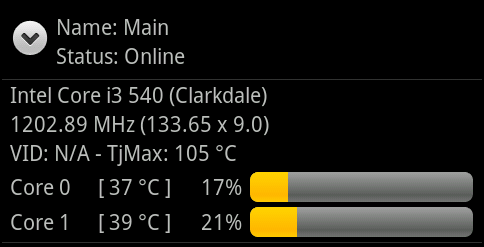
Core Temp Mobile is an app, currenly only available for Android. In conjunction with the Core Temp Remote Server, it allows you to monitor your machines outside of your home or office.
Download and installation instructions
Core Temp Gadget 2.7
This is a sidebar gadget for Windows Vista and 7 for use in conjunction with Core Temp. There is not much to say about it, I think the screenshot speaks for itself.
the gadget requires Core Temp 0.99 or higher to be running for it to work.
Download
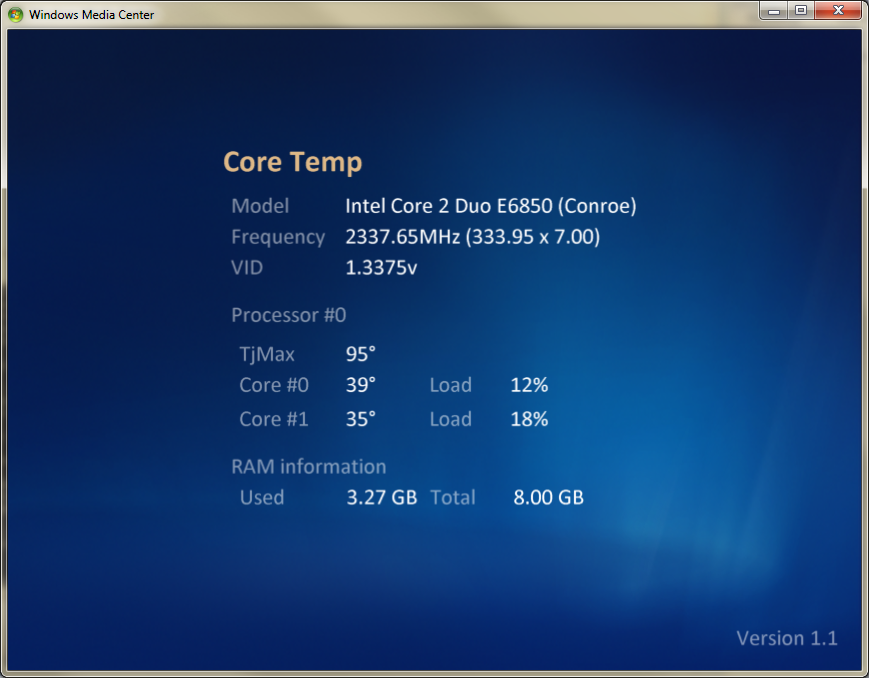
Core Temp MC is a Windows Media Center add on (supported in Vista and Windows 7) which allows the user to view the status of their processor directly from Windows Media Center's UI.
Download
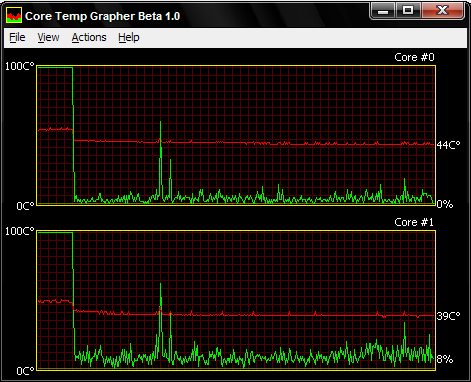
Core Temp Grapher comes as a plug-in (dll) or standalone (exe). It will display a graph per processor core displaying the load percentage and core temperature. For best results with the Grapher, you should use the latest Core Temp version available.
Setup and usage instructions can be found in the "readme.txt" file.
Download plug-in: 32 bit 64 bit
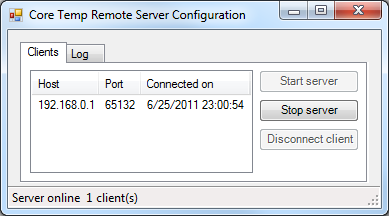
This plug-in allows applications to connect over a network to Core Temp and recieve updates on your processor's status, similar to the sidebar gadget.
It's a required plug-in for Core Temp Mobile
Requirements: Windows XP SP2 or higher + .Net Framework 3.5.
Download
An addon for the "SystemInfo" script. It requires Core Temp 0.99 or higher to be running to work properly.
The installation instructions are inside.
Download
"VCTemp is an open-source tool that interfaces with CoreTemp to allow you to view the temperatures on a remote machine.
This can be useful to keep an eye on processor temperatures of your rig while fullscreen gaming."
DISCLAIMER: VCTemp is a third party tool, and any questions, suggestions, bug reports and complaints should be directed to the developer.

Monday, August 22, 2011

Windows XP topfitting

Saturday, August 7, 2010

ZHPDiag

ZHPDiag est un outil de diagnostic extrait du logiciel Zeb Help Process. Le logiciel permet d'effectuer un diagnostic rapide et complet de son système d'exploitation. Il est basé en partie sur le principe d'HijackThis. Il scrute votre Base de Registre et énumère les zones sensibles qui sont susceptibles d'être piratées.
A noter qu'il n'écrit rien dans votre Base de Registres et ne procède à aucun nettoyage.
Il est totalement compatible avec l'analyse de Zeb Help Process et ne nécessite aucune installation.
Vous trouverez un descriptif complet du programme ici.

Wednesday, October 21, 2009

USB Flash Drive Tester

USB-Stick-Test
Download at C'T Magazin

Test and Detect Fake or Counterfeit USB Flash Drives with H2testw
eBay has lots of cheap stuff that you can buy. The price are normally lower than the retail suggested price to attract buyers but beware! Not all cheap stuff are good and some of them can be counterfeit.
If you’ve ever purchased a second hand USB flash drive from a friend or even a new one from eBay, you should have it checked if it is a fake. Even though Windows might seem to be reporting the correct capacity of the drive, that information might not be sufficiently enough to prove that it is truly a 64GB flash drive. Here is a standard tool called H2testw that a lot of eBayers use to PROVE they have received a fake from a seller. It is extremely easy to use and proves detailed information. Created by Harald Bögeholz, the default language of the interface is in German but can be changed to English.
H2testw was developed to test USB sticks for various kinds of errors. It can also be used for any other storage media like memory cards, internal and external hard drives and even network volumes. To run the test for your drive, just plug in the drive, format it in Windows, run H2testw, select the target, and click Write + Verify button. H2testw writes files of up to 1GB to the chosen destination and names them 1.h2w, 2.h2w, 3.h2w and so on. If the target directory already contains such a set of files H2testw will offer to verify them. After it is done the software leaves its test files on the medium. You can erase them if you like or verify them again.
test fake usb drives
If the drive that you tested passes the test of H2testw without errors, then the advertised capacity is correct (minus a small overhead for operating system file formatting). However, if you are seeing a sample output like below, then it is a counterfeit. This is 4GB USB flash drive not a 64GB USB flash drive. As 4GB drive it should be about 3.9 GB not 3.8 GB formatted. This indicates in low level formatting a lot of bad sectors had to be locked out. Usually flash chips like these are rejected for major brands but somehow is being resold and reprogrammed.

The media is likely to be defective.
3.8 GByte OK (8084847 sectors)
58.6 GByte DATA LOST (122921617 sectors)
Details:710.5 KByte overwritten (1421 sectors)
7.6 MByte slightly changed (<>

Don’t panic if H2testw detects an error on your USB flash drive. It could be other factors, so here’s what you need to do. Don’t use USB extension cords, make sure you insert it directly to the USB port on your computer. Try using a different USB/Firewire port especially the ones at the back of the case. Try a different cable if you are testing external hard drives. If you still get errors after following the guidelines above, then it’s surely something wrong with the drive.
The executable file H2testw.exe needs no installation and can be directly run. It was developed for Windows XP and Vista but I’ve tested it on Windows 7 32-bit which worked without problems.
[ Download H2testw ]

http://www.fz-juelich.de/jsc/sicherheit/download/freeware.1/pc-tools/USB-Stick-Test/readme.txt
H2testw
-- by Harald Bögeholz / c't Magazin für Computertechnik
Data integrity test for USB sticks and other media
Version 1.3, Copyright © 2008 Heise Zeitschriften Verlag GmbH & Co. KG
=====================
H2testw was developed to test USB sticks for various kinds of errors.
It can also be used for any other storage media like memory cards, internal and external hard drives and even network volumes.
The executable file H2testw.exe needs no installation and can be directly run. It was developed for Windows XP and Vista. It might work under other versions of Windows but was only tested on XP and Vista.
The function of H2testw is quite simple: It fills the chosen target directory with test data and then reads it back and verifies it.
H2testw does not overwrite or erase any existing data. It doesn't do any low-level tricks so administrator privileges are not required.
If your hardware is working properly H2testw will not harm any existing data.
BUT: _If_ the hardware is defective then H2testw is designed to find that defect and might as a side effect damage existing files.
Therefore:
IF YOU SUSPECT A USB STICK OR OTHER STORAGE MEDIA TO BE DEFECTIVE, EMPTY IT AND TEST IT COMPLETELY WITH H2TESTW.
Only empty media can be fully tested with H2testw. In order to be able to reproduce the results we recommend to format the media (quick format will do) and then test it.
H2testw writes files of up to 1 GByte to the chosen destination and names them 1.h2w, 2.h2w, 3.h2w and so on. If the target directory alread contains such a set of files H2testw will offer to verify them.
If there are any other files named *.h2w it will refuse to work. In that case please erase all files *.h2w and hit the Refresh button.
After it is done the software leaves its test files on the medium.
You can erase them if you like or verify them again -- if it's a USB stick for instance with another PC.
The check box "endless verify" does just that: It puts the verify routine in an endless loop that stops only if an error is found. This is meant to be used as a long-time test to find sporadic data transfer errors.
A remark on the estimated time remaining: For intact flash memory the estimate should be pretty exact since it has a constant data rate.
With defective media we have seen massive drops in the transfer rate resulting in the estimate increasing instead of decreasing. Hard drives are slower on the inner tracks than on the outer tracks so when testing a hard drive the estimate is never precise.
If you have any questions or suggestions for H2testw please send an email to Harald Bögeholz (in German or English).
What to do in case of errors
If H2benchw finds errors while verifying the data it means that the media has not returned all data exactly as it was written. It is likely that the media is defective, but there are other possible
causes for data corruption. In case of error you should therefore repeat the test and
* Format the media immediately before testing
* Don't use USB extension cords
* If testing USB or FireWire devices, try a different port (sometimes USB ports at the back of the PC are better than those at the front)
* For exteral drives try another cable if possible
Error messages
When the verifying process detects any errors it outputs some statistics differentiating the various error types:
* sectors that have been overwritten by others due to addressing errors (see above)
* sectors that have been altered only slightly (less than 8 differing bits per sector)
* completely corrupted sectors.
In the case of overwritten sectors H2testw tries to find out how much real memory exists in the overwritten area and outputs that amount as "aliased memory" (no guarantee here).
Finally it outputs the offset of the first error with regard to the total amount of test data along with the expected and found value at that offset.
Hint: You can copy&paste the error message, for instance to send it in an email.
Typical errors
The test data of H2testw is made up so as to be able to discern certain typical errors. There are three types:
* Addressing errors: When writing a sector its contents are not written to the correct address but overwrite another sector. We have seen this error on certain manipulated USB sticks. It also happens if you use a hard drive larger than 128 GByte on a machine whose BIOS or OS doesn't know about 48-bit addressing. In this case all addresses are taken modulo 128 GByte. When crossing the 128 GByte boundary you overwrite data at the beginning of the drive.
* Data is not saved at all. We have encountered this with defective USB sticks. Instead of the data written to it a sector returns only ones or zeroes when reading it. This is typical when accessing nonexisting memory.
* Only few bits of data are changed. That might happen if the connection between the PC and the storage media is faulty.
Technical details about the test data
H2testw writes data in chunks of 1 megabyte. So even if you choose to completely fill the media you will end up with up to 1 megabyte of free space. Although technically not correct H2testw uses the Windows convention that 1 MByte equals 1024 KByte or 1,048,576 Byte.
In order to avoid problems with the 4 GByte limitation of the FAT file system, H2testw begins a new data file after each gigabyte (1024 MByte).
Inside a data file each 512-byte sector begins with a 64-bit word (8 byte) containing the offset with regard to the whole data set. It is stored in little-endian format, least significant byte first.
So the file 1.h2w begins with
00 00 00 00 00 00 00 00,
the next sector with
00 02 00 00 00 00 00 00,
the next with
00 04 00 00 00 00 00 00
and so on. The file 2.h2w begins with
00 00 00 40 00 00 00 00
(offset 1 GByte = 0x40000000).
The rest of each sector is filled with a pseudo random number sequence using the offset word as a seed.

Saturday, October 3, 2009

System ANalyser, Diagnostic and Reporting Assistant

SANDRA Lite

NB. If you do not know which version is suitable or want to confirm, the site can attempt to figure it out based on your current browser - assuming you're intending to download for the system you're currently using. Click here. Naturally, this only works if the browser does supply the operating system information in the standard form, some don't!

Wednesday, July 29, 2009

DFT & OGT Diagnostic Tool

Source
Looking for drivers for Hitachi hard disk drives?

Looking for drivers for Microdrive Digital Media?

Install or Optimize Your Drive
Utilities for installing or optimizing Hitachi HDDs

Analyze, Monitor and Restore Your Drive
Utilities for analyzing, monitoring and restoring Hitachi HDDs

Drive Fitness Test
The Drive Fitness Test (DFT) quickly and reliably tests SCSI, IDE and SATA drives. The DFT analyze function performs read tests without overwriting customer data. (Note: other DFT restoration utilities may overwrite data.)
Downloads

Notes

  • Ultrastar 10K300, Ultrastar 15K73 and DK32XX users, do not use DFT — Use the OGT Diagnostic Tool.
  • Does not support Microdrive Digital Media products.
  • Supports all Travelstar HDDs, except 8E, 10E and C4K series.
  • Does not support Endurastar products.
  • Does not support external USB or Firewire attached drives.
  • Compatible only with x86-based processors.
  • Does not support the PC which loads Intel ICH9M chipset. HitachiGST are working to fix this situation.

Supports Leading Drives

  • SCSI.
  • Serial ATA.
  • Parallel ATA.
  • IDE.

Analyzes Drive Fitness

  • Three modes of operation.
    - High confidence level quick test
    - Full media scan
    - Exerciser
  • Performs real-time analysis of your drive to quickly determine if problem exists.
  • Identifies system problems such as cable or temperatures.
  • Automatically logs significant drive parameters to track potential impacts to the drive operations (diskette version only).

Restores Drive Fitness

  • Erase-boot-sector utility (Use option: Erase Boot Sector).
    - Note: this utility overwrites customer data to allow repair of bad sectors.
  • Low-level format utility (Use option: Erase Disk).
    - Note: this utility overwrites customer data to allow repair of bad sectors.

Includes Utilities

  • Drive information.
  • SMART operations for supported hard disk drives.

Resources


OGT Diagnostic Tool

OGT Diagnostic Tool is a failure analysis tool for Ultrastar 10K300, Ultrastar 15K73 and DK32xx disk drives. For these drives, OGT Diagnostic Tool replaces the Drive Fitness Test.

Downloads

Notes

  • Automatically performs necessary diagnostic testing and failure analysis.
  • Windows OS-compatible only.