Bienvenido! - Willkommen! - Welcome!

Bitácora Técnica de Tux&Cía., Santa Cruz de la Sierra, BO
Bitácora Central: Tux&Cía.
Bitácora de Información Avanzada: Tux&Cía.-Información
May the source be with you!
Showing posts with label flash video. Show all posts

Sunday, November 20, 2011

Youtube video related

youtube_video technique
Download YouTube Videos the Easy Way
Set videos playback to the lowest definition
Unless the link explicitly sets the playback quality to something higher, it does play back the lowest quality by default. I suspect, however, that the lowest quality is not a low as it used to be. Certainly older clips still look horrible and have lower resolution, but newer material doesn't seem to be encoded at the the old rates and resolutions because, well, they were crap.
  • Log in to YouTube, go to the playback settings and select that you have a Slow Connection.
  • en.wikipedia.org/wiki/YouTube#Quality_and_codecs
  • By adding the parameter fmt to the URL. See http://en.wikipedia.org/wiki/YouTube.
    Google can help you find GreaseMonkey scripts that do that automatically. 
  • Add &hd=0 to the YouTube URL. That will display the video in 360p.
    Ex. http://www.youtube.com/watch?v=nxdtVWvfFSU&hd=0
    Additionally, you can add $hd=1 to the URL to get 720p (if available).
    Ex. http://www.youtube.com/watch?v=nxdtVWvfFSU&hd=1
  • &fmt=18 is generally lower quality than the default 360p version.
    The lowest quality is &fmt=5 (flv1/mp3, 350 kbps).
    A script for &fmt=18 http://userscripts.org/scripts/show/24980
  • The lowest quality is &fmt=5 Seems to work - didn't know about that trick. I tried it on the video below. File size is about half the 360P version. That measn there are now five versions of some videos?
    If you upload the video in the correct format, you can get five versions of a video
    360P/480P/720P-HD, 1280P-HD, like this video HERE. And apparently a fifth version using the tag above.
    I've always assumed that youtube throttles downloading of all their videos.
    For me, they always start downloading fast, then throttle back after about 25%. 
    They probably keep the &fmt=5 version for users with older versions of adobe flash player that don't support h264/aac.

Wednesday, December 15, 2010

Flash Video Howto

How to download video from any website
Download VideoCacheView. This tool will allow you to see all flv videos in your cache..Remember again – you can browse only flv videos using this tool. 
Look at'C:\Documents and Settings\copzz\Local Settings\Application Data\Mozilla\Firefox\Profiles\xxxxo.default
how-to-copy-youtube-video-or-flv-file-from-google-chrome-cache-folder/
http://sourceforge.net/projects/wangdera/


Retrieve Flash Video From Firefox Cache Folder


Source
  1. Open a new tab / window of Firefox and enter about:cache as an URL
     
  2. Take note of the Firefox cache folder path specified in Cache Directory: and browse to this folder with Windows Explorer

    If the Storage In Use greater than or approaching Maximum Storage Size, the video might not be cached completely or you’ll have to increase Maximum Storage Size and reload the MTV again. 

    To set Firefox cache folder maximum storage size, click Tools | Option… | Network | Cache
  3. Sort the cached files by file size and try to open the biggest file with an related Codec or FlV Player. (The biggest file is likely to be the cached YouTube video)

OK. If you want to know what those files in the Firefox cache folder exactly are, here we go:
  1. While in the about:cache page, click the List Cache Entries link of the Disk cache device section
     
  2. Press CTRL + F to search for Key: (URL) with the get_videokeyword and also with the biggest Data Size: (YouTube doesn’t cache the flash video in FLV extension. For other flash video hosting site, you may save time by trying to search for .FLV extension).
     
  3. Right-click the URL and select the Open Link In New Tab and refer to the File on Disk:

P/S: There are many Firefox plugins available to save flash video. However, if you’re not regularly download flash video, then it’s worth to know how to do it manually

Monday, December 6, 2010

OpenSUSE -Video streams in browsers

Adobe flash player
# zypper install flash-player
================
To get support for various multimedia streams in Firefox and other browsers, install the package xine-browser-plugin ('Packman Repository' required).
Installing multimedia plugin in the terminal:
# zypper install xine-browser-plugin

=================
 Google Voice and Video Chat Google provide voice and video chat with Google services on GNU/Linux with a browser plugin. Download the RPM files for OpenSUSE here:
google.com/chat/video
Dependencias para Google Talk en OpenSUSE Cuando intentamos instalarlo encuentra una dependencia libcrypto.so.10, que se encuentra dentro del paquete openssl.
Si ya está instalado,  proceder con los comandos dados líneas abajo

Tras descargar este último (incluyendo también la versión de 32 bits si nuestro operativo es de 64), en lugar de instalar directamente el complemento de vídeo hay que crear dos enlaces simbólicos, porque a saber qué criterio de nombrado habrán utilizado en Google y por eso no encuentra la biblioteca que procede. Las órdenes son:
sudo ln -s /lib/libcrypto.so.1.0.0 /lib/libcrypto.so.10
sudo ln -s /lib/libssl.so.1.0.0 /lib/libssl.so.10
Ahora sí, podemos proceder a instalar el RPM, ignorando el error de dependencias que se muestre. Tras reiniciar el navegador ya deberíamos poder configurar los parámetros de la cámara :D
Tuve que instalarlo primero en Chrome y después volver a probar desde Firefox. Tras este segundo intento ya funcionó sin problemas en ambos.
Comparar
=================
MPlayer plugin
 packman.links2linux.org/?action=319
or YAST install: rpm w32codec-all
kaffeine

packman.links2linux.org/
YAST install: rpm kaffeine-mozilla
=================
Moonlight (pendant of M$ Silverlight)
Check the list of supported operating systems and architectures

1. Watching the Olympics

If you want to watch the Olympics you will need to use the Moonlight 3 Preview as opposed to Moonlight 2. If you just want Moonlight 2, proceed to the next step. If you want the Olympics, click here.

2. Select the architecture:

3. Download the plugin

Installation
When installing the Novell Moonlight plugin, Firefox may prevent the installation and present you with an information bar:
Information Bar
To continue the installation click Edit Options... on the information bar and add this site to Allowed Sites, then click on the appropriate installer again.
Allowed Sites
=================

MPlayer
mplayerhq.hu/design7/news.html MPlayer 1.0rc3 can be downloaded by HTTP or FTP.
MD5SUM: e1221be5fcad74a2a4185f67ba6c9ae0
SHA1SUM: f533ea1eb2c540402bace0f0fe2317721361510d
  MPlayer is a movie player for Linux (runs on many other Unices, and non-x86 CPUs, see the documentation). MPlayer plays most MPEG, VOB, AVI, Ogg/OGM, VIVO, ASF/WMA/WMV, QT/MOV/MP4, FLI, RM, NuppelVideo, YUV4MPEG, FILM, RoQ, PVA files, supported by many native, XAnim, and Win32 DLL codecs. You can watch VideoCD, SVCD, DVD, 3ivx, DivX 3/4/5 and even WMV movies, too (without the avifile library).
  Another great feature of MPlayer is the wide range of supported output drivers.
It works with X11, Xv, DGA, OpenGL, SVGAlib, fbdev, AAlib, DirectFB, but you can use GGI, SDL (and this way all their drivers), VESA (on every VESA compatible card, even without X11!) and some low level card-specific drivers (for Matrox, 3Dfx and ATI), too!
  Most of them support software or hardware scaling, so you can enjoy movies in fullscreen. MPlayer supports displaying through some hardware MPEG decoder boards, such as the Siemens DVB, DXR2 and DXR3/Hollywood+.
  MPlayer has an onscreen display (OSD) for status information, nice big antialiased shaded subtitles and visual feedback for keyboard controls. European/ISO 8859-1,2 (Hungarian, English, Czech, etc), Cyrillic and Korean fonts are supported along with 12 subtitle formats (MicroDVD, SubRip, OGM, SubViewer, Sami, VPlayer, RT, SSA, AQTitle, JACOsub, PJS and our own: MPsub). DVD subtitles (SPU streams, VOBsub and Closed Captions) are supported as well.
Decoders:
  • support for X8 frames (fixes "J-type picture is not supported" for WMV2)
  • support for DTS WAV/DTS-CD passthrough by ad_hwac3
  • Apple's raw YUV2 in MOV
  • LATM over LOAS AAC decoding via internal libfaad2
  • video game codecs: BFI video, Playstation MDEC video, ADPCM XA audio, EA Maxis XA ADPCM audio, RL2 video, Beam Software SIFF video, V.Flash PTX video
  • AVOption support for libavcodec-based decoders
  • use lavc ADPCM codecs by default
  • support for progressive JPEG in ffmjpeg
  • ACDSystems MJPEG (ACDV) via binary DLL and lavc
  • SIF1 via binary DLL
  • wincam screen capture (WCMV) via binary DLL
  • Creative Labs Video Blaster Webcam mjpeg (CJPG) via binary DLL and ijpg library
  • kensington webcam (AJPG, ABYR) via binary DLL
  • centre for wavelets (wavc) via binary DLL
  • GeoVision Advanced MPEG-4 (GMP4, GM40) via binary DLL
  • Xiricam JPEG from Veo PC Camera (XJPG) via binary DLL
  • WorldConnect Wavelet Video (SMSV) via binary DLL
  • VDOWave 3 advanced (VDO3, VDOM, VDOW) via binary DLL
  • VoxWare MetaVoice (format 0x0074) via binary DLL
  • Ulead DV Audio (0x215, 0x216) via binary DLL
  • GoToMeeting codec (G2M2, G2M3) via binary DLL
  • SP4x codec - used by Aiptek MegaCam (SP4x) via binary DLL
  • Broadway MPEG Capture Codec (BW10) via binary DLL
  • ZDSoft screen recorder (ZDSV) via binary DLL
  • WebTrain Communication lossless screen recorder (WTVC) via binary DLL
  • xfire video (XFR1) via binary DLL
  • VFAPI RGB transcode (vifp) via binary DLL
  • ETI CamCorder EYECON (NUB0, NUB1, NUB2) via binary DLL
  • fox motion (FMVC) via binary DLL
  • Trident video (TY2C, TY2N, TY0N) via binary DLL
  • 10-bit video (v210) via Cinewave binary DLL
  • Brooktree YUV 4:1:1 Raw (Y41P) via binary DLL
  • many rare/obscure fourccs for known formats added
  • lower priority for binary Linux rv3040 codecs due to bugs
  • remove native NuppelVideo decoder, use lavc instead

Demuxers:

  • -lavfdopts cryptokey allows decrypting MXF and ASF files
  • support for wavpack in Matroska
  • AVOption support for lavf demuxing
  • prefer lavf musepack demuxer over libmpdemux
  • prefer lavf MOV demuxer over libmpdemux (use -demuxer mov for old behavior)
  • support program switching in lavf demuxer
  • support -slang in lavf demuxer
  • support nosound switching in lavf demuxer
  • support libass in lavf demuxer
  • support VOBsub in lavf demuxer
  • support MOV subtitle format
  • support for attachments in lavf demuxer
  • support for chapters in lavf demuxer
  • support seeking in multirate RealMedia files
  • FLAC speedup in lavf demuxer
  • MNG demuxer
  • remove native NuppelVideo demuxer, use lavf demuxer instead

Filters:

  • vf_ow new overcomplete wavelet denoiser
  • change vf_screenshot dependency from libpng to lavc
  • add af_scaletempo which maintains audio pitch when changing playback speed
  • fix multi-channel reordering
  • af_stats filter to print information about the audio stream

Streaming:

  • tv:// support for Windows
  • fix teletext on some systems
  • DVD streams can switch angles
  • DVD still menus are now supported via dvdnav://
  • allow specifying the TV standard for each channel
  • switch internal dvdread to libdvdread SVN external

FFmpeg/libavcodec:

  • DNxHD encoder
  • H.264 PAFF decoding
  • Nellymoser ASAO decoder
  • Beam Software SIFF demuxer and decoder
  • libvorbis Vorbis decoding removed in favor of native decoder
  • IntraX8 (J-Frame) subdecoder for WMV2 and VC-1
  • Ogg (Vorbis only) muxer
  • PC Paintbrush PCX decoder
  • Sun Rasterfile decoder
  • TechnoTrend PVA demuxer
  • Linux Media Labs MPEG-4 (LMLM4) demuxer
  • AVM2 (Flash 9) SWF muxer
  • QT variant of IMA ADPCM encoder
  • iPod/iPhone compatible MP4 muxer
  • Mimic decoder
  • MSN TCP Webcam stream demuxer
  • RL2 demuxer / decoder
  • IFF demuxer
  • 8SVX audio decoder
  • BFI demuxer
  • MAXIS EA XA (.xa) demuxer / decoder
  • BFI video decoder
  • OMA demuxer
  • MLP/TrueHD decoder
  • Electronic Arts CMV decoder
  • Motion Pixels Video decoder
  • Motion Pixels MVI demuxer
  • removed animated GIF decoder/demuxer
  • D-Cinema audio muxer
  • Electronic Arts TGV decoder
  • Apple Lossless Audio Codec (ALAC) encoder
  • AAC decoder
  • floating point PCM encoder/decoder
  • MXF muxer
  • E-AC-3 support added to AC-3 decoder
  • Nellymoser ASAO encoder
  • ASS and SSA demuxer and muxer
  • liba52 wrapper removed
  • SVQ3 watermark decoding support
  • Speex decoding via libspeex
  • Electronic Arts TGQ decoder
  • RV30 and RV40 decoder
  • QCELP / PureVoice decoder
  • hybrid WavPack support
  • R3D REDCODE demuxer
  • Electronic Arts TQI decoder
  • OpenJPEG based JPEG 2000 decoder
  • NC (NC4600) cameras file demuxer
  • MXF D-10 muxer
  • Generic metadata API
  • H.264 speedup and PAFF decoding (install Yasm for faster H.264 decoding)
  • correctly decode more of the H.264 conformance testsuite
  • VC-1/WMV3 decoder speedup
  • VP3 decoder speedup
  • VP6 decoder speedup
  • Split-Radix FFT (speedup multiple audio codecs)
  • MMX/SSE/ARM and other misc speedups

libmpeg2:

  • enable Alpha/ARM optimizations in libmpeg2
  • SSE2-optimized IDCT routines from upstream libmpeg2
  • libmpeg2 updated to version 0.5.1

Drivers:

  • replace PolypAudio by PulseAudio (-ao pulse)
  • add force-pbo suboption for faster output in vo_gl
  • add Nintendo Wii/GameCube video driver (-vo wii)
  • VIDIX driver for SuperH Mobile VEU hardware block
  • support -border on vo_gl/gl2 in x11
  • Direct3D Windows video output driver added
  • factorize code in vo_wii
  • removed unnecessary code from vo x11, xv, xvmc
  • add OS/2 DART audio driver (-ao dart)
  • add VDPAU video output
  • add OS/2 KVA video driver (-vo kva)

MEncoder:

  • check for system-wide configuration file in MEncoder
  • AVOption support for lavc encoders
  • AVOption support for lavf muxers

Others:

  • many compiler warning fixes
  • basic support for Closed Captioning roll-up mode
  • reworked screensaver disabling support, most users will need to use -heartbeat-cmd due to screensaver authors failing to design a common API
  • grayscale decoding/encoding with FFmpeg disabled where it slowed down the color case
  • Linux AppleIR remote support
  • add options to disable some or all configuration files
  • support for DOS-style file:///x:/path paths
  • some new slave commands (check DOCS/tech/slave.txt)
  • libdvdcss updated to 1.2.10, now same as upstream version
  • fix -endchapter support again for -dump* options
  • add startup audio volume option
  • add option to disable default key binds
  • change default OSD and subtitle font size to a smaller default

Thursday, October 28, 2010

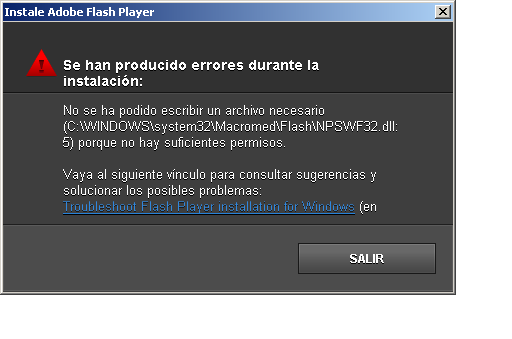
Update Flash Player on Windows Vista and Windows 7

Source

On some Windows Vista and Windows 7 systems, Flash Player is installed, but does not display Flash content.

If the installed Flash Player is between version 9.0.28.0 to 10.0.45.0, use a special installation utility that uninstalls Flash Player and then installs the latest Flash Player. This utility is for Flash Player for Internet Explorer. Follow these steps:
  1. Open Windows Explorer and navigate to one of the following folders (only one exists depending on your operating system): 
    • C:\Windows\System32\Macromed\Flash\
    •  C:\Windows\SysWOW64\Macromed\Flash\
  2. Locate the installation utility. It is a file with a name like FlashUtil10d.exe. The number and the letter, such as 10d in this example, depend on the installed Flash Player version.
  3. Close all applications except for Windows Explorer.
  4. Right-click the installation utility  (FlashUtil10d.exe in this example).
  5. Select Run as administrator to execute the installer with administrator permissions.


  6. Select Yes in the User Account Control display, if it pops up.
  7. Select Install Now to install the update to Adobe Flash Player.


  8. Check the license agreement and select Install in the Install Adobe Flash Player display. 


  9. When the install completes, select Done.
  10. Restart your computer.
Note: As of Flash Player 10.1, the utility in the Macromed\Flash folder only uninstalls the Flash Player, but does not start the automatic installation process as it did in Flash Player versions 9.0.28.0 to 10.0.45.0. If you use this utility for Flash Player 10.1, download the latest Flash Player and install manually. See Download Flash Player with the manual installer.
The Flash Player 10.1 uninstall utility in the Macromed\Flash folder has the following names:
  • FlashUtil10*_ActiveX.exe
  • FlashUtil10*_Plugin.exe
The * in the name is a letter that depends on the Flash Player 10.1 version. For example, FlashUtil10h_ActiveX.exe is the name for Flash Player 10.1.53.64.
Both of these utilities uninstall Flash Player for Internet Explorer and Flash Player for other browsers such as Firefox. If you want to uninstall Flash Player for Internet Explorer only, use the Windows Control Panel to remove the program Adobe Flash Player 10 ActiveX. To uninstall Flash Player only for other browsers, remove the program Adobe Flash Player 10 Plugin.
For more information about the utilities in the Macromed\Flash folder, see  Installation issues when switching between release and debugger versions during development and testing (TechNote 4da116d3).

Friday, February 12, 2010

Firefox Cache video size limit::25548 KB

If you can stream it, you can download it!

Source

There are some tools for storing streaming video from youtube or other site like keepvid.com or flv plugins for firefox. But usually just use the manual way. I go to the firefox cache directory, see the latest and usually the largest file size. Copy it to other directory and give it an .flv extension.
When I watch a rather long videos, usually the file in the cache would only store 25,584 KB of the file. This numbers is the same no matter what long video I cache. And what rather interest me is, when i see the video in my browser. It still replay able to its full length.
First you can type about:cache in your firefox address bar. There you can see the Disk Cache Device information. It can show you how many entries in your cache, Maximum Storage Size, Storage in use, and a link to the cache directory.
Well one thing that i realize is, the size of 25,548. Is the size of half of the default Maximum Storage Size in firefox, which is 50 MB. So i tried to increase the Maximum Storage Size to 200 MB and refresh the video I'm watching, and finally able to get the full size video, which in my experiment is 29,418 KB.
I think firefox is limiting the size of a cache file into half of the maximum Disk Space. This because its almost imposible for a cache directory to only contains a single file. Almost all the time the directory will contains more than one file.
But that doesn't answer why i could re-play the full file in my browser ?
My guess is, it is stored in the memory. To prove it i try watch the firefox memory usage in windows task manager. And close the tab and reopen it again. The memory usage drop significantly, but not quite the same as the full size of the file. But i'm guessing that my hunch is correct. 

Johnfull I have found a 'Temp' folder for the system addition to the Cache of the Mozilla profile.
The Temp will not allow copying of contents, however. I don't intend to do more than view the youtube video on a machine without internet connection, so I don't think it's infringement on copyright. I would gladly take the lower quality video instead, but it seems to be disabled on the youtube site. They are switching more and more to the high bit videos, which will make piracy a tempting prospect for some. That might be reason enough to limit the Cache size in the browser -- it uses the data from the Temp file for playback anyway. But they should retain the low-resolution copies for folks to use remotely for their own use. Or Seamonkey could simply expand the capacity of the Cache to accommodate the new realities -- and trust users not to use it for piracy...
http://keepvid.com/ -just insert the link to the video and it provides a link to download the video file. 

Type in the address bar of the Mozilla browser:
about:cache where you can examine the cache contents for both disk and memory caches.And change it to more than 50 MB 
You could toggle browser.cache.memory.enable to "false", maybe it's ending up in the memory cache and you don't find it in the disk cache then.