Bienvenido! - Willkommen! - Welcome!

Bitácora Técnica de Tux&Cía., Santa Cruz de la Sierra, BO
Bitácora Central: Tux&Cía.
Bitácora de Información Avanzada: Tux&Cía.-Información
May the source be with you!

Thursday, March 29, 2018

Zotac 7200GS windows 10

https://www.tenforums.com/graphic-cards/9449-nvidia-geforce-7200-gs-problems.html
http://www.dell.com/support/article/bo/en/bobsdt1/sln298917/how-to-upgrade-to-windows-10-using-the-microsoft-windows-10-media-creation-tool?lang=en
https://www.techadvisor.co.uk/download/operating-systems-distros/windows-10-media-creation-tool-1001629915-3330946/
https://www.geforce.com/drivers/results/82701
éste funcionó:
http://www.driverscape.com/download/nvidia-geforce-7300-se-7200-gs-(microsoft-corporation---wddm-v1.2)

Saturday, May 13, 2017

debricking a Router

http://foro.seguridadwireless.net/openwrt/procedimientos-para-leer-y-programar-memorias-serie-spi-flash-25xxx/

the Kill Switch

https://blog.elcomsoft.com/2016/05/understanding-and-bypassing-reset-protection/

Friday, May 12, 2017

root password of CA SecureSpan appliance

https://communities.ca.com/thread/241749010#comment-241863618

Novatech NVTEF10MIX


Intel powered classmate PC
The Intel Classmate PC for students and pupils have been around for several versions to buy and it has now introduced two new models, once., In the form of a new Windows 8.1 notebooks and an Android tablet PCs
The latest generation of the Intel Classmate PCs in the notebook version will go as a 10-inch model at the start and the extra cost of a few Euros you can get this model as a touch screen variant. In the area of ​​performance you have time an Intel Celeron processor N2806 installed which technology is based on the Silver Mont / Bay Trail, as well as the latest Intel Atom processors.
The Celeron N2806 dual core offers a clock speed of 1.6GHz and the power consumption is 4.5 watts (TDP) indicated. In addition, also comes an Intel HD graphics chipset with 756MHz clock frequency and operating system Windows 8.1 are used. Other variants with Windows 7 and Linux operating systems to follow suit later this year.
The second model is also a new Android tablet PC has been introduced, which will advance as a 10.1-inch device. Here you will find an Intel Atom Z2520 dual-core processor with 1.2GHz clock frequency before, either 1GB or 2GB of memory and the internal memory can hold up to 32GB. On the front and back can be found in front of cameras and the built-in battery is designed to support a term of up to 12 hours. The operating system Android 4.2 "Jelly Bean" will be used.
The technical data / specifications / data sheet of the Intel Classmate PC notebook:
· 10-inch display (Optional Touch Screen)
· Intel Mont Silver / Bay Trail Technology
· N2806 Intel Celeron dual-core processor with 1.6GHz clock speed, 4.5 Watt TDP
· 756MHz Intel HD graphics chipset
· Windows 8.1 operating system
· Linux / Windows 7 versions in planning
-----------------------
 Intel Celeron N2806 @ 1.60 GHz 
Phoenix Technologies Ltd. MPBYT10A.88C.0029.2014.0530.1440
Problema: No da imagen luego de modificar la BIOS
Se logra desbloquearla cambiando el chip TPM y los 2 chips de la BIOS
https://en.wikipedia.org/wiki/Trusted_Platform_Module
https://en.wikipedia.org/wiki/Trusted_Execution_Technology
Sacar la parte superior de la carcasa:
Sacar el teclado, que tiene cuatro trabas las cuales las haces hacia atrás y vas levantando el teclado pero con delicadeza no vayas a sacar las teclas y debajo tienes el flex el cual debes levantar la pestaña que hace presión, también hay una chapa algunas se corren hacia la izquierda y salen otras tiene un tornillo a cada extremo los retiras y levantas la chapa después tienes varios tornillos (6-8)
Sacar la placa: fíjate que tenes de la parte de atrás por debajo dos gomas que cubren los tornillos sacas estos con cuidado y con la ayuda de una punta plana vas sacando la base de la pantalla y bueno observa bien, espero te sirva. Claro esta es para las que tiene dos Gb. de ram. La otra de 1 Gb. es mas simple sacar la placa saca tonillos de la parte de abajo y los que están debajo del teclado y ya puedes sacar la carcasa y quitar los tornillos que sujetan la placa y todos los flex que están conectados como también el wifi.
http://drivers.for.intel-corporation.intel-powered-classmate-pc.driveragent.com/24968264430377/Microsoft-Windows-8-1-x64-Pro 
https://downloadcenter.intel.com/es/search?keyword=INTEL+CLASSMATE+PC
https://downloadcenter.intel.com/download/26538/Intel-Education-Theft-Deterrent-root-CA-Server
https://en.wikipedia.org/wiki/Classmate_PC
http://compgene.blogspot.com/2009/10/classmate-pc.html
Note: The term device is used to refer to Intel® Education Tablet and Intel® classmate PC.
----------------------
Terms Definition
  • Hardware ID A 12-character string that is unique for each device.
  • Boot Tick A hexadecimal number that increases by 1 after the Theft Deterrent client applies a package from the server successfully.
  • Provision Number (S/N) A 20-digit hexadecimal number generated from the Public Key of the Theft Deterrent server. 
http://www.taringa.net/comunidades/desbloqueonetbook/9003240/Aporte-Act-15-11-Intel-Theft-Deterrent-Server-2-X-3-X-4.html
Bootear un linux ubunto x64 en un pendrive. Meter el pendrive > conectar el netbook > apretar repetidamente SUPR y F9 > tocar las teclas de direccion un poco y aprete enter varias veces, espere un poco y aparecio el logo del sistema operativo para comenzar la instalacion.
Como ven lo importante es que anda
--------
la solucion, tienen que tener en cuenta que cada Bios tiene su propio software, por lo menos la que posteo, es para las canaimas con el bios "EF10MI2"
http://www.taringa.net/comunidades/venezolanos/9517475/Ayuda-Problema-de-Arranque-de-Canaima-ef10mi2.html
Buenas, logre instalar Windows 8.1
Primero instalen la BIOS de intel https://downloadcenter.intel.com/es/download/23839/ cambian el nombre del archivo MP0021.CAP a BIOS.CAP, la meten en la raiz de un pendrive y estando totalmente apagada presionan "Fn+R", sin dejar de presionarlo conectan el cargador hasta que comience a parpadear el led de encendido y luego la prenden, esperan un momento dependiendo de la velocidad del pendrive y los deberia mandar a la EFI Shell, si no les funciona el teclado (Como a mi me pasaba) Conectenle uno por usb, sirve bien, yo utilice incluso uno inalambrico porque era el que tenia, escriben "exit" en la consola y hay dos posibilidades, que les salga un menu de booteo
o que simplemente se quede en negro y haga boot, en el caso de quedarse negro en el mismo pendrive donde metieron el BOOT.CAP tenganlo preparado con windows 8.1 grabado con Rufus en GPT (O cualquier sistema que les sirva, pero esa version de windows principalmente porque permite desactivar el Secure Boot que tanto problema da) y les iniciara la instalacion, de ahi buscan como desactivar el secure boot y el uefi
PD: Dentro de la instalacion tampoco sirve el touch asi que se las arreglan con teclado o le instalan un mouse usb tambien https://youtu.be/KQPsLc6BDl0
---------------------
la posible solución es hacer lo mismo que muestra el vídeo, sólo que usando la bios "Phoenix MPBYT10A.88C.0029.2014.0530.1440"
https://mega.nz/#!q8ph0ATa!dOGrENawrywbBrL6AJ8xRK1VWLcaYcD5sOXtkQyxGEE
------------------
Con un programador basado en CH340, Si manejas arduino, puedes hacerlo tambien, aunque un poco mas lento, lo compras en ML y te regalan los binarios para unlock 
---------------
tiene 1 sola solucion:
 sacar el chip del BIOS. cambiarlo o en su defecto si tienen liberador flasharlo.
lo que hice fue comprar un chip de la BIOS nuevo, desoldar el que tenian y soldar uno nuevo!! problema solucionado esas netbook tienen un sistema de proteccion que no deja hacer ninguna modificacion en el setup.(conclusion no hay que entrar al setup)
http://listado.mercadolibre.com.ar/grabador-de-memorias-spi

Tuesday, May 9, 2017

Windows Update Installation Failure 80240020

https://answers.microsoft.com/en-us/windows/forum/windows_10-windows_install/windows-update-installation-failure-80240020/d695e827-9774-4e10-8972-df8d51a7bb51?auth=1
This is an expected message indicating that when installation begins it may require user interaction.  This is the largest software upgrade event ever and we’re managing it so everyone has a great experience. We recommend waiting until your PC receives a notification to upgrade, and then following the instructions provided. 

Please note that there is no problem with your reservation or upgrade download. The upgrade download is not corrupt as some have stated, and you will be notified in the coming days or weeks when your device is ready to upgrade.

If you are very eager to upgrade, tech savvy users with the above message can modify the following registry key to install immediately. 

Warning:  Serious problems might occur if you modify the registry incorrectly. Before you modify it, back up the registry for restoration in case problems occur. 
  1. Locate the registry key: [HKEY_LOCAL_MACHINE\SOFTWARE\Microsoft\Windows\CurrentVersion\WindowsUpdate\OSUpgrade]
  2. It should exist, but if not, create it.
  3. Create a new DWORD (32-bit) Value with Name = "AllowOSUpgrade” (without the quotes), and set the Value = 0x00000001.
 Once the registry key is modified, close and reopen the desktop Control Panel, go to Windows Update and check for updates.  You should now be able to click the Get Started button to upgrade to Windows 10.  Note: Windows 8.1 users must go to the desktop Control Panel, and not the modern Windows Update UI.”

Tuesday, March 7, 2017

VIA HD AUDIO WINDOWS10

https://www.driverscloud.com/en/services/GetInformationDriver/57959-317792/via-via-hd-aud-v11-1100e-01282016zip
https://www.youtube.com/watch?v=Zw6fWveM22Y
http://download.viatech.com/en/support/driversSelect.jsp
https://answers.microsoft.com/en-us/windows/forum/windows_10-hardware/via-hd-vdeck-doesnt-work-on-windows-10-anniversary/d80cb779-f790-4056-bc84-fba0c95e41fe
https://answers.microsoft.com/fr-fr/windows/forum/windows_10-update/hd-vdeck-ne-va-plus-avec-windows-10-r%C3%A9solu/111b9d4c-6db0-4fb2-baf9-036e4c0b9955
https://www.youtube.com/watch?v=UZziynSSe-o
https://www.reddit.com/r/windows/comments/3ftdkj/windows_10_via_hd_audio_driver_fix/
https://support.microsoft.com/en-us/help/3073930/how-to-temporarily-prevent-a-driver-update-from-reinstalling-in-windows-10
https://www.reddit.com/r/windows/comments/3ftdkj/windows_10_via_hd_audio_driver_fix/
I'm using an ASROCK H61M-HVS with VIA HD onboard audio. Noticed that the default drivers windows installs for it are completely fucked. Enhancements don't work at all, and it keeps defaulting to headphones (front jack) even when you only have speakers plugged in.
To fix;
  1. Right click your start button, click system, and then go to advanced system settings
  2. Go to hardware tab and go to device installation settings
  3. Click no, then click Never install device software, then click okay.
  4. Open Device Manager
  5. Go under the sound field, select VIA HD Audio, and uninstall the driver, then restart your computer.
  6. Go to https://support.microsoft.com/en-us/kb/3073930 - download the .diagcab file. (Windows 10 has removed the ability to blacklist updates without using this file)
  7. Go through the steps and choose to ignore the VIA HD Audio update that is queued up.
Congratulations, your sound drivers now work properly.

Update for Windows 10 Threshold - 15NOV15
  1. Open device manager
  2. Go under Sound, Video, and Game Controllers
  3. Open VIA HD Audio, click uninstall
  4. Click action, scan for new hardware changes
  5. Wait for VIA HD audio to show up again
  6. Open VIA HD Audio, go to second tab
  7. Rollback drivers
  8. Open wushowhide
  9. Blacklist VIA HD Audio update

Friday, March 3, 2017

side by side error windows 10

https://answers.microsoft.com/en-us/windows/forum/windows_10-other_settings/error-error-997-while-installing-microsoft-visual/60a4f08e-a740-475d-8858-3435b2784b01?auth=1
https://www.microsoft.com/en-us/download/details.aspx?id=54251
https://download.microsoft.com/download/F/B/A/FBAB6866-71F8-4A3F-89A4-5BC6AB035C62/vstor_redist.exe
http://www.microsoft.com/en-eg/download/details.aspx?id=49981
https://www.microsoft.com/en-eg/download/details.aspx?id=30679
https://download.microsoft.com/download/3/5/9/35980F81-60F4-4DE3-88FC-8F962B97253B/NDP461-KB3102438-Web.exe

Saturday, February 18, 2017

/var/lib/dpkg/lock

https://lignux.com/tutorial-para-solucionar-no-se-pudo-bloquear-varlibdpkglock-open-11-recurso-no-disponible-temporalmente/
“No se pudo bloquear /var/lib/dpkg/lock – open (11: Recurso no disponible temporalmente)”
lsof /var/lib/dpkg/lock 
sudo rm -f /var/lib/dpkg/lock
sudo dpkg --configure -a
sudo apt-get autoremove

Monday, January 16, 2017

Samsung mobile MTP device can not start (code 10)

https://forum.xda-developers.com/showthread.php?t=1797344
Go to the Registry Editor (Start -- Run -- "regedit" --  [ENTER]) Search the following key: HKEY_LOCAL_MACHINE\SYSTEM\CurrentControlSet\Control\Class\
If you click one of the few subkeys in class (e.g. {4D36E965-E325-11CE-BFC1-08002BE10318}) you'll find the string value (Standard) on the right side with a value (e.g. DVD/CD-ROM-Drives) You have to find the value "Portable Devices" on the string value (Standard) (In my case {EEC5AD98-8080-425f-922A-DABF3DE3F69A}, but I don't know if they are called always the same. Once found, you see a string value called UpperFilters --DELETE IT! Finished! Now your Samsung Mobile MTP Device should be recognized and even installed correctly right away. (The name of the device changed to GT-I9100 (Devicemanager) in my case...) Here an explanation about UpperFilters and LowerFilters if you want to know more:
http://djlizard.net/2007/04/30/230/

Windows update error code 450


https://support.microsoft.com/es-ar/help/15090/windows-7-install-service-pack-1-sp1
https://support.microsoft.com/en-us/help/2509997/you-can-t-install-updates-in-windows-vista,-windows-7,-windows-server-2008,-or-windows-server-2008-r2
https://www.sevenforums.com/windows-updates-activation/281710-windows-update-error-code-490-80070490-a-3.html
https://support.microsoft.com/es-ar/help/10164/fix-windows-update-errors
Modify Registry Permissions
  1. Click on the Start button and in the search box, type regedit
  2. When you see regedit on the list, right-click on it and select Run as administrator.
  3. In the left hand panel of regedit, you will see a list of registry keys. Navigate to the following key, right-click on it and select Permissions...:
    HKEY_LOCAL_MACHINE\SOFTWARE\Microsoft\Windows\CurrentVersion\Component Based Servicing
  4. Click Advanced.
  5. Under the Owner tab, click Edit.
  6. Click "Other Users and Groups".
  7. Click Advanced.
  8. Click "Find Now".
  9. Scroll down and double click on Everyone.
  10. Click OK.
  11. Put the check in "Replace owner on subcontainers and objects", click Apply then change to the Permissions tab.
  12. Under type Deny, single click on any entries and click Remove. (N.B.: There may not be any Deny entries, in which case just ignore this step. Just remove any that do exist)
  13. Click Edit (now on the standard file Property window under the Security tab).
  14. Click Add.
  15. Click Advanced.
  16. Click "Find Now".
  17. Scroll down and double click on Everyone.
  18. Click OK.
  19. Single click on Everyone and then tick the "Full Control" box under Allow.
  20. Click OK TWO times.
    Navigate to the following key: HKEY_LOCAL_MACHINE\SOFTWARE\Microsoft\Windows\CurrentVersion\Component Based Servicing\Packages
    And, still in the left hand panel here, find this sub key Microsoft-Windows-IE-Troublesðooters-Package~31bf3856ad364e35ÿamd64~en-US~6.1.7600.16385
    Rename it to: Microsoft-Windows-IE-Troubleshooters-Package~31bf3856ad364e35~amd64~en-US~6.1.7600.16385
https://www.sysnative.com/forums/windows-update/13761-windows-update-error-code-490-cant-install-service-pack-1-windows-7-64-bit.html
http://www.sysnative.com/niemiro/apps/SFCFix.exe
Regback
http://www.acelogix.com/download.html

Tuesday, June 14, 2016

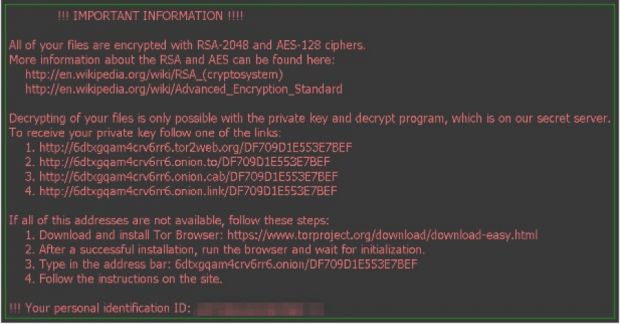
Ramsonware Locky

Fuente: http://news.softpedia.com/news/distributors-of-dridex-banking-trojan-take-a-break-deliver-ransomware-instead-500513.shtml

How to stay safe
  • As always, don’t open suspicious attachments (e.g. .doc, .xls, and .zip files)
  • Disable Microsoft Office macros by default and never enable macros in strange/unknown attachments that you receive via email
  • Keep recent backup copies of important data in a secure place either online or offline
  • Ensure that your system and applications are fully updated and patched

http://www.heise.de/security/meldung/Erpressungs-Trojaner-Locky-schlaegt-offenbar-koordiniert-zu-3104069.html

RSA und AES

Die Opfer der Ransomware sollen im Tor-Netz die "special software" Locky Decryptor kaufen, um ihre Daten zu entschlüsseln.
Die Opfer der Ransomware sollen im Tor-Netz die "special software" Locky Decryptor kaufen, um ihre Daten zu entschlüsseln. Vergrößern
Der Inhalt der Datei macht den Betroffenen wenig Hoffnung: Laut den Tätern verschlüsselt Locky mit RSA mit 2048 Bit Schlüssellänge und AES mit 128 Bit. Wenn das stimmt und die Entwickler bei der Krypto-Implementierung nicht gepatzt haben, besteht keine Hoffnung, die verschlüsselten Dateien zu retten. Eine unabhängige Analyse der von Locky eingesetzten Verschlüsselung steht derzeit noch aus. Aktuell ist kein Weg bekannt, die von Locky verschlüsselten Dateien ohne Zahlung des Lösegelds zu retten.
http://www.heise.de/ct/ausgabe/2016-6-News-Sicherheit-3122075.html
https://decrypter.emsisoft.com/
https://esupport.trendmicro.com/en-us/home/pages/technical-support/1105975.aspx
https://support.kaspersky.com/viruses/disinfection/8547?
http://malwarefixes.com/remove-locky-ransomware-and-decrypt-files/
Was not able to do System Restore, nor Previous Versions (none found).
Took the hard drive out and attached it to another Windows 7 -64bit computer as a 2nd hard drive.
Ran antivirus scan against the encrypted drive. (clean).
Ran CHKDSK /R against the encrypted drive. (some tweaks, no bad sectors)
Put the hard drive back in original PC.
Was able to do System Restore.
Was able to turn on Service Volume Shadow Copy.
Was able to use Previous Versions!
pandaunransom.exe
32-bit Version – http://download.eset.com/special/ERARemover_x86.exe
64-bit Version – http://download.eset.com/special/ERARemover_x64.exe
---
 Download ShadowExplorer
http://www.shadowexplorer.com/downloads.html
=====
http://www.heise.de/security/meldung/Erpressungs-Trojaner-CryptXXX-kostenlos-entschluesseln-3189766.html
http://www.techworld.com/security/7-best-ransomware-removal-tools-how-clean-up-cryptolocker-cryptowall-extortion-malware-3626974/
https://labs.bitdefender.com/2016/03/combination-crypto-ransomware-vaccine-released/

Tuesday, April 26, 2016

Independencia del ciberespacio

wired.com/2016/02/its-been-20-years-since-this-man-declared-cyberspace-independence/
http://www.wired.com/tag/declaration-of-independence-of-cyberspace/
www.eff.org/cyberspace-independence
es.m.wikipedia.org/wiki/Declaraci%C3%B3n_de_independencia_del_ciberespacio
es.m.wikisource.org/wiki/Declaraci%C3%B3n_de_independencia_del_ciberespacio
A Declaration of the Independence of Cyberspace
by John Perry Barlow
Governments of the Industrial World, you weary giants of flesh and steel, I come from Cyberspace, the new home of Mind. On behalf of the future, I ask you of the past to leave us alone. You are not welcome among us. You have no sovereignty where we gather.
We have no elected government, nor are we likely to have one, so I address you with no greater authority than that with which liberty itself always speaks. I declare the global social space we are building to be naturally independent of the tyrannies you seek to impose on us. You have no moral right to rule us nor do you possess any methods of enforcement we have true reason to fear.
Governments derive their just powers from the consent of the governed. You have neither solicited nor received ours. We did not invite you. You do not know us, nor do you know our world. Cyberspace does not lie within your borders. Do not think that you can build it, as though it were a public construction project. You cannot. It is an act of nature and it grows itself through our collective actions.
You have not engaged in our great and gathering conversation, nor did you create the wealth of our marketplaces. You do not know our culture, our ethics, or the unwritten codes that already provide our society more order than could be obtained by any of your impositions.
You claim there are problems among us that you need to solve. You use this claim as an excuse to invade our precincts. Many of these problems don't exist. Where there are real conflicts, where there are wrongs, we will identify them and address them by our means. We are forming our own Social Contract. This governance will arise according to the conditions of our world, not yours. Our world is different.
Cyberspace consists of transactions, relationships, and thought itself, arrayed like a standing wave in the web of our communications. Ours is a world that is both everywhere and nowhere, but it is not where bodies live.
We are creating a world that all may enter without privilege or prejudice accorded by race, economic power, military force, or station of birth.
We are creating a world where anyone, anywhere may express his or her beliefs, no matter how singular, without fear of being coerced into silence or conformity.
Your legal concepts of property, expression, identity, movement, and context do not apply to us. They are all based on matter, and there is no matter here.
Our identities have no bodies, so, unlike you, we cannot obtain order by physical coercion. We believe that from ethics, enlightened self-interest, and the commonweal, our governance will emerge. Our identities may be distributed across many of your jurisdictions. The only law that all our constituent cultures would generally recognize is the Golden Rule. We hope we will be able to build our particular solutions on that basis. But we cannot accept the solutions you are attempting to impose.
In the United States, you have today created a law, the Telecommunications Reform Act, which repudiates your own Constitution and insults the dreams of Jefferson, Washington, Mill, Madison, DeToqueville, and Brandeis. These dreams must now be born anew in us.
You are terrified of your own children, since they are natives in a world where you will always be immigrants. Because you fear them, you entrust your bureaucracies with the parental responsibilities you are too cowardly to confront yourselves. In our world, all the sentiments and expressions of humanity, from the debasing to the angelic, are parts of a seamless whole, the global conversation of bits. We cannot separate the air that chokes from the air upon which wings beat.
In China, Germany, France, Russia, Singapore, Italy and the United States, you are trying to ward off the virus of liberty by erecting guard posts at the frontiers of Cyberspace. These may keep out the contagion for a small time, but they will not work in a world that will soon be bl

Wednesday, January 13, 2016

AVI and DivX tools

Source
1. SubtitlesSynch
SubtitlesSynch is a small and easy to use tool that enables the user to synchronize the time of a subtitle (.sub/.srt) file by entering the time difference between the video and the subtitle file giving you a new subtitle file synchronized with your video.
It automatically open with the previous selected subtitle file and has an option to synchronize only for a specific time slice (good for commercial breaks). The program interface itself is pretty much self explanatory. Load the subtitle file, if the subtitle is slower than the movie character is speaking, then you need to select “Add time” and set the time offset in seconds and milliseconds, minutes and hours probably won’t be required. If the subtitle is too fast, then select “Reduce time” to slow down the subtitle.
Download SubtitlesSynch 
2. Easy Subtitles Synchronizer
This is a much more advanced utility and as well as containing several options to repair, synchronize and adjust your subtitle files, Easy Subtitles Synchronizer can also allow inserting and editing of individual lines of subtitle text. This can be achieved with the option to load the video file the subtitle is for so the lines can be checked against the video without leaving the program.
Go to File -> Open Subtitle File to load an SRT or SUB file for editing and if the video file has a matching name excluding extension, it can be loaded as well. It can also be loaded manually. Then you have the ability to adjust several timing options from the tabs, including; the time of the first and last subtitles, manual synchronization of specific subtitles, move or change the starting point, extend the full duration and manually or automatically set the frames-per-second for the file. There’s also around 10 fixes that can be applied for common issues.
Download Easy Subtitles Synchronizer 
3. Subtitle Workshop
What will make Subtitle Workshop a valuable tool for many users is the sheer amount of subtitle file types it supports, around 30 different formats can be loaded in, edited and saved out again. In addition to editing, there are other powerful options such as spell checking and translating the text between different languages, and a search option which opens a page at opensubtitles.org with the query results.
The options to adjust and synchronize the subtitles are found in the the Edit -> Timings menu and there are several to choose from. The simple menu option to shift the subtitles forwards or backwards in time by 100 milliseconds might be all that’s required for some users, although you can also manually or automatically set duration limits, expand or reduce on screen display times, more precise control over inserting positive or negative delay times and adjust the time between the first and last spoken lines. All of those options can be applied to all or just selected subtitles. The video file itself can be opened in the window for a more visual inspection of the accuracy of your adjustments.
Download Subtitle Workshop 
4. SubMagic
SubMagic is quite a powerful subtitle analyzing, editing and synchronizing tool, but is also quite easy to understand and use. The program is also able to show the video file while manually adding, deleting or editing each subtitle if necessary. The Analyze tab can check and give information about potential errors, and the Fix Errors tab can apply around 25 different fixes to make the subtitle file more compliant.
SubMagic supports SRT, SSA, SUB, SMI and TXT files and there are a couple of tabs to to change sync settings; Framerate will allow you to switch from NTSC2PAL or PAL2NTSC quickly and easily to match the output video, and the Synchronize tab has options to move a selection or all subtitles backwards or forwards in time, and stretch or shrink the timing of the whole file or a selection. Simply enter the seconds and milliseconds and press the button, then you can go to the Movie tab and check to see it’s correct when overlaid onto the video.
Download SubMagic 
5. Subtitle Framerate Changer
Subtitle Framerate Changer is a plain a simple tool that allows you to change the timing of SRT subtitle files using either a positive or negative time adjustment, or altering the the framerate of the subtitles. A different framerate on the video and SRT file could account for synchronization problems.
The program also allows the batch changing of the framerate for multiple files at once if you have many subtitles with the same problem. To adjust a single file simply browse for it and select the output folder, then either choose the Change framerate option and set the desired frames-per-second for the saved SRT file, or the Set delay will allow the positive or negative delay in milliseconds for all the subtitles in the file. The program is only 215K and a portable executable.
Download Subtitle Framerate Changer 
6. Jubler Subtitle Editor
A requirement for Jubler to function is the Java Runtime Environment as it’s a Java based program, which will require downloading during the setup if you don’t already have it. The program can display a video preview of the subtitles overlaid onto it, but you need to have the open source MPlayer on your system to do so. Jubler also has a spell checker and translate option.
There are several options in the Tools menu to adjust the timings of the subtitles with Synchronize able to change the index offset, Shift time will move the selection forwards or backwards in time, Recode time allows the changing of the default subtitle framerate, and Time fix can adjust the on screen time of each piece of subtitle text. Each option can be applied by time range, user selection or by marked colors.
Download Jubler Subtitle Editor

Tuesday, September 1, 2015

There is allways a price for it!


"Software is like sex: it's better when it's free!"
Versión subtitulada:
https://www.youtube.com/watch?v=ppM9tU7-b6A

Friday, July 24, 2015

Front Side Bus & PCIExpress guide

http://www.directron.com/fsbguide.html
There are three main buses in most computers:

1) PCI Bus- The PCI bus connects your expansion cards and drives to your processor and other sub systems. On most systems the bus speed of the PCI bus is 33MHz. If you go higher than that, then cards, drives, and other devices can have problems. The exception to this is found in servers. In some servers you have a special 64-bit (extra wide) 66MHz PCI slots that can accept special high-speed cards. Think of this as a double sized passing lane on a major road that allows higher cars to go through. For information about PCI Express please see the PCI Express Guide.

2) AGP Bus- The AGP bus connects your video card directly to your memory and processor. It is very high speed compared to standard PCI and has a standard speed of 66MHz. Only one device can be hooked to the AGP bus as it only supports one video card so the speed is better compared to the PCI bus, which has many devices on it at once.

3) Front Side Bus (FSB) - The Front Side Bus is the most important bus to consider when you are talking about the performance of a computer. The FSB connects the processor (CPU) in your computer to the system memory. The faster the FSB is, the faster you can get data to your processor. The faster you get data to the processor, the faster your processor can do work on it. The speed of the front side bus depends on the processor and motherboard chipset you are using as well as the system clock. Read on for more information about the Front Side Bus later in this article.

http://www.directron.com/expressguide.html
Bandwidth PCI Express: 1x, 2x, 4x, 8x, 16x and 32x all have much greater bandwidth than basic PCI.
Common Buses and their Max Bandwidth
PCI132 MB/s
AGP 8X2,100 MB/s
PCI Express 1x250 [500]* MB/s
PCI Express 2x500 [1000]* MB/s
PCI Express 4x1000 [2000]* MB/s
PCI Express 8x2000 [4000]* MB/s
PCI Express 16x4000 [8000]* MB/s
PCI Express 32x8000 [16000]* MB/s
USB 2.0 (Max Possible)60 MB/s
IDE (ATA100)100 MB/s
IDE (ATA133)133 MB/s
SATA150 MB/s
SATA II300 MB/s
SATA III [SATA 3]600 MB/s
Gigabit Ethernet125 MB/s
IEEE1394B [Firewire 800]~100 MB/s*

* Note 1 - Since PCI Express is a serial based technology, data can be sent over the bus in two directions at once. Normal PCI is Parallel, and as such all data goes in one direction around the loop. Each 1x lane in PCI Express can transmit in both directions at once. In the table the first number is the bandwidth in one direction and the second number is the combined bandwidth in both directions. Also please note that in PCI Express bandwidth is not shared the same way as in PCI, so there is less congestion on the bus.

Update: Table above contains speeds for PCI Express 1.0 bus. 

For PCIe version 2.0, multiply all bandwidths by 2. 
For example a PCI Express 2.0 16x slot has a max bandwidth of 8000 MB/s one way or 16000 MB/s both ways.
* Note 2 - Firewire 800 has a bandwidth of 786.432 Mbit/s this converts over to between 98 and 99 MB/s.
PCI Express 2.0 runs twice as fast as PCI Express 1.0 or 1.1. However, there is currently no advantage to using a motherboard with PCI-E 2.0 slots, as no card out yet can take full advantage of a PCI-E 1.1 or 1.0 slot. (To my knowledge, there isn't any major difference between PCI-E 1.0 and 1.1. The PCI-E slots on most motherboards unless they're new chipsets like X38/X48/780 are 1.1.) And no, PCI-E 2.0 slots are not called PCI Express X32. They're still PCI Express X16 slots.
Increased bandwidth can be equated into increased system performance. We've long known that to get the most out of your processor you need to get as much information into it as possible, as quickly as possible. Chipset designers have consistently addressed this by increasing Front Side Bus speeds. The problem with this is that front side bus speed increases the speed of transfer between the memory and CPU but often you've got data that's coming from other sources that needs to get to the memory or CPU like drives, network traffic, video, etc. PCI Express addresses this problem head on by making it much faster and easier for data to get around the system.

Q-A Common Questions about PCI Express

Q:Is PCI Express Faster Than PCI?
A:PCI Express is much faster than PCI. For 1x Cards it at least 118% faster. When you compare PCI Express video to PCI Video the difference is enormous: PCI Express 16x video is over 29x faster than PCI Video.

Q:Is PCI Express Video Faster than AGP Video?
A:Yes and No. A 16x PCI Express connection is at least 190% Faster than AGP 8x but this is the connection between the system and the video card. You use the connection the most when your video card is low on memory or when the game you are using uses a Direct X or Open GL feature that isn't supported in hardware.

So, what this means is that in terms of real world performance there may not be a huge difference between AGP and PCI Express if you are talking about identical chipsets. Unfortunately this is very hard to prove because graphics chipsets are designed either for PCI Express or AGP. If you have a card that is available in both forms then you have a graphics chipset that was designed for PCI Express and has a special bridge chip installed to let it communicate with the AGP bus. The short of this is: if two cards of the same chipset are available in AGP and PCI-E then the PCI-E one will always be faster. On PCI-E you don't have the overhead of the bridge chip so it's faster, and you have the better bandwidth so in intense situations such as high resolution gaming you'll come out on top every time.

The main point here is: If you have a system with AGP on it, it doesn't make sense to upgrade just to get PCI-E video right now. The fastest AGP card to ever come out is likely to be the nVidia 6800GT. If you are at a point where that is too slow then by all means it makes sense to make a complete switch. If your happy with your AGP graphics options, wait until you are ready to upgrade the processor or other components before making the PCI-E switch. For more information on AGP and PCI please see the general FSB guide.

Q:What is SLI?
A:SLI or Scalable Link Interface is a technology that lets you take two identical nVidia based graphics cards *that support SLI* and a motherboard *that supports SLI* to achieve a very high level of video performance. SLI works by splitting the rendering of the screen between the two cards- one card renders half, the other card renders the other half. This technique is extremely effective. For instance two 6600GT cards in SLI can do vastly better than a 6800GT or X800 card even though the price is lower for two 6600GT Cards. The downside to this is that SLI is still new and is limited to systems based on AMD 64 / AMD FX Socket 939 processors.

Q:Do I need a special power supply for PCI-E [PCI Express].
A:Yes and no. Although the PCI-E spec calls for a PCI Express power connector, most PCI-E cards don't currently use it. This means that you should only probably worry about this if you are buying bleeding edge PCI Express parts. Card based on the ATI X600, ATI X700, ATI X300, ATI X1300, Nvidia 6600, Nvidia 7600 or Nvidia 7300 series graphic chipsets rarely use the connector. If you are in a situation where you need a PCI Express power connector but the power supply doesn't have one you can always just use a PCI Express Power Adapter that converts a 4-pin molex connector to PCI-E Power.

Conclusion  PCI Express is an exciting advance in the area of computers. Although AGP is now starting to die rapidly, standard PCI is taking/will take longer to die off. Expect to see at least 1 or 2 standard PCI slots along side PCI-E in all motherboards for at least the next 2 years. By that time there will be PCI-E replacements for all common devices such as modems, network cards, raid cards, i/o and more.
=================
DDR2 Short and Sweet There are a few major things you need to know about DDR2 when building a system:
Basic Functionality: DDR2 memory has a different approach to design at the chip level then DDR. The simplest way to understand how it works would be to think that at the low level it had two chips of half the stated memory speed working in tandem together to achieve the full speed stated. So for DDR2 400 it would be something like 2 chips of DDR200 working together to achieve the full 400 speed. Notice that I say "chips" not sticks of memory. All this happens on 1 stick of memory.

The overall effect of this trickery is that manufacturers can scale up the speed of the memory beyond the limits of DDR, with only taking a small hit to the timing of the memory ( how long it takes for the memory to respond back to a request ).

This means that it's possible, and expected to see memory speeds of 533MHz or higher for DDR2. In fact, the current concensus is that if you want to build a system, and have a choice between a motherboard with DDR1 and DDR2 then to see a benefit to DDR2 you need to at least get one speed grade higher than that of the max normal speed of DDR1. ( 400MHz ). This is because the timings ( latency ) of DDR2 are worse than DDR. Essentially in most situation DDR400 ( especially low latency DDR400) is faster than DDR2 400. However, when you get to DDR2 533 the speed boost makes up for the slower timings.

As far as matching FSB to DDR2 speed my recommendations are to skip DDR2 400 and opt for going with the following:

800MHz FSB = DDR2 533MHz ( Ideal ) or DDR2 400MHz ( Matched but Slow. ) 1066MHz FSB = DDR2 667 ( Good ) or DDR2 533MHz ( Matched )

Generally you want to keep the system clock of your memory matching with the root clock of your memory or one step above. So the system clock on a 800MHz FSB P4 is 200 (quad pumped) so that matches DDR2 400 (essentially 200 unimproved) or is good with 1 step up DDR2 533MHz (essentially 266 unimproved). Note however that if you only had a 800MHz FSB processor then DDR2 667 really probably isn't going to help much. Once you pass the 1 step above mark on the memory you have diminishing returns unless you can get to double (DDR2 800MHz).

Compatability: Generally a motherboard is only going to accept DDR1 or DDR2 not both. The slots are physically different and have a different number of pins, however people have been known to force memory into the wrong slots ( And that ends in horrible results! ). Be careful when installing it and make sure the motherboard takes that kind of memory before attempting.

At the time of this writing only motherboards for Pentium4 or Xeon accepted DDR2. AMD Socket 754 and Socket 939 motherboards can't accept DDR2 due to the integrated memory controller in the CPU. AMD is making a line of CPUs that can work with DDR2. They will use new motherboards and have a new socket called M2.

Additional Notes on DDR2: 1) DDR2 is not QDR like I mentioned earlier, the technology is different. 2) DDR2 does give you definate benefits and it is recommended. 3) At the time of this writing ALL motherboards that used DDR2 were Dual Channel Ready. 4) It is not uncommon to hear of problems from people trying to use 3 sticks of DDR2. This stems somewhat from what I mentioned in #3. I recommend either using 1,2 or 4 sticks of DDR2. ( more is ok if you are doing a server but add them in pairs, don't use a odd number of sticks if you can avoid it ).


Saturday, January 24, 2015

error 0x80041003

"SELECT * FROM __InstanceModificationEvent WITHIN 60 WHERE TargetInstance ISA "Win32_Processor" AND TargetInstance.LoadPercentage >99
https://social.msdn.microsoft.com/Forums/windowsserver/en-US/6fcc4447-4d68-4ab8-8ca2-2c0a8bddb584/event-id-10-event-filter-with-query-select-from-instancemodificationevent-within-60-where?forum=winserver2008appcompatabilityandcertification
The actual vbscript for test.vbs can be found in:
http://support.microsoft.com/kb/950375
http://www.msfn.org/board/topic/114389-heres-how-to-fix-wmi-event-id-10-instancemodificationeven/

http://support.microsoft.com/kb/2545227
Click the start orb, enter CMD.EXE, hold CTRL+SHIFT, and press enter.  This will launch an elevated command prompt.  Then, type the following command at the prompt and press enter.  Substitute the actual path to test.vbs in the command.
  cscript.exe "c:\path\to\test.vbs"

Wednesday, January 21, 2015

STOP ERROR 0x0000007A

windbg: http://msdn.microsoft.com/en-us/windows/hardware/gg463009.aspx
===============
http://www.tomshardware.com/answers/id-2223087/kernel-data-inpage-error.html
the KERNEL_DATA_INPAGE_ERROR occurs when memory in the kernel's paged pool is swapped to the hard disk and cannot be read when needed at a later time.

Windows broadly divides memory into three pools:

The kernel non-paged pool

The kernel paged pool

The user paged pool
  The kernel non-paged pool contains memory that must be in memory at all times. This includes all of the memory used to handle interrupts, track thread and process states, and handle deferred procedure calls. Memory allocated to the kernel or drivers from this pool will always remain resident in memory at all times, it will never be swapped out to the hard disk drive and referencing memory in the non-paged pool will never generate a page fault (in fact, PAGE_FAULT_IN_NONPAGED_AREA is another famous BSoD).
  The kernel paged-pool contains kernel memory that can be swapped to a page file or swap file located on a secondary storage medium such as a hard disk drive. If memory is infrequently used, it may be swapped out. If the kernel references memory located in the kernel paged-pool it will generate a page-fault interrupt which will bring it back into the physical memory (note that as I mentioned above, the page-fault interrupt handler operates only on non-paged memory).
  The user paged-pool contains memory that can be allocated to user processes.

To best address your question, imagine a scenario when an application causes a page fault by referencing memory that has been swapped out to a page file that is located on a secondary storage device that has been removed or is inaccessible. That memory can no longer be found, so the application must be terminated as it can no longer proceed.

The same is true when the kernel causes a page fault by referencing memory that has been swapped out to a page file that is located on a secondary storage device that has been removed or is inaccessible. The kernel cannot proceed to a consistent state, so it must terminate and halt the machine.

If you have any removable storage devices, make sure that they are configured as such. If they contain page files (pagefile.sys, swapfile.sys, hiberfile.sys) they may unwittingly be used to store memory and that memory will go with them when they are removed. Your machine will run uninhibited until something references the memory that has now disappeared at which point the referencing task will fail.

Your hard disk drive and SSD may also be failing.  
CHKDSK /R will scan for bad sectors but it won't catch non-deterministic read errors and long-latency events. Check the health of the drive using a vendor supplied S.M.A.R.T monitoring tool.
------------------------------
**if you get a inpage error and do not get a memory dump: Look for a drive disconnection issue**
a common cause of a kernel inpage error would be a disconnection of a drive.
This can be caused by some simple issues, Thermal expansion/contraction of the sata cable can make and break a connection several times a second. You might consider checking the cable connections for your drive with on the sata port.
-There can be bugs in the chipset drivers for the sata port ( update chipset drivers, or change the cable to connect to another Sata chipset if you have 2.
-there can be bugs in the BIOS setup for the electronics on your board (update the BIOS)
- special issues involving solid state drives. where the SSD gets behind on it cleanup routines and takes too long to respond causing windows to reset the port. and the drive does not reconnect.
- sometimes you can enable hotswap in BIOS on the sata port of the drive and it will reconnect (hides the disconnect issue but you don't bugcheck)
- sometimes you have to update the firmware of the SSD because of bugs that cause the drive not to respond correctly (often caused by using image software to install the OS)
- sometimes you can boot your machine into BIOS and leave the SSD drive powered, after 5 mins the cleanup routines in the drive will start and it can fix the errors. (just leave it powered and not in use for a few hours)
[most of the time you will see a event viewer error from the disk subsystem that indicates that the sata port was reset]

You can also get inpage error with some physical problems with the memory sticks (basically, thermal breaks on certain pads where the memory chips connects to the circuit board. The defect is hard to detect because and most people will think it is related to when they first turn on the machine but it occurs due to the heat cycle of the memory stick. (when the board is cool, the circuit contracts and opens a address line (line disconnected therfore wired to 0 logic) drivers are loaded into the memory then the memory chip heats up in 5 to 7 seconds circuit and the connection is made and the address line gets set correctly. This can cause a whole block of memory to move after a device driver was loaded into it.
 Results is memory corruption that only occurs when the memory is cool. And the memtest86 would not find this type of failure.
==========
http://answers.microsoft.com/en-us/windows/forum/windows_7-system/kerneldatainpageerror-every-few-days/650474dd-46e2-42c1-b74b-21413fbaad55
The error code KERNEL_DATA_INPAGE_ERROR STOP: 0x0000007A states that the requested page of kernel data from the paging file could not be read into memory. It appears that there are some issues with the hard disk.
Method 1: I would suggest you to try the steps provided below and check if it helps.
a)       Click on Start, type Command Prompt, right click on it and select to run as administrator.
b)       In command prompt, type chkdsk volume: /f /r and hit enter to check and repair any volume disk errors or bad sectors present on the drive which would be causing this problem.
 ==========
try ssd life  : http://ssd-life.com/

download UBCD, and run memtest86+ for ram (couple of passes)
 http://ubcd.mirror.fusa.be/ubcd511.iso                 
For an SSD - check the manufacturers site for a diagnostic tool, or post the model here
eg, for an intel SSD:
Intel® Solid-State Drive Toolbox
Intel® Solid-State Drive Firmware Update Tool
http://windows.microsoft.com/en-US/windows7/Check-a-drive-for-errors

