Bienvenido! - Willkommen! - Welcome!

Bitácora Técnica de Tux&Cía., Santa Cruz de la Sierra, BO
Bitácora Central: Tux&Cía.
Bitácora de Información Avanzada: Tux&Cía.-Información
May the source be with you!
Showing posts with label errors. Show all posts

Saturday, September 24, 2011

Windows 7 Error Code 39 Solution

Source
A Windows 7 error code 39 is another one of those annoying errors that seem hard to fix, but generally isn’t all that difficult once you know what you are looking for.
If your CD-ROM is not visible in My Computer, you might see that error code displayed in the Device Manager.
To check, open the Device Manager by right clicking on the “My Computer” icon on the desktop. Then on the Hardware tab, select the Device Manager button. In the Device Manger window, look at the CD or DVD drive with a yellow exclamation mark. Right-click on it and select update driver. Follow the instructions and reboot the computer.
If that doesn’t do the trick, you will need to correcting the problem via the registry error. You can manually go into the registry and attempt to fix the problem. An error code 39 in Windows 7 doesn’t include many keys fortunately.
On Start
Run
regedit [press the Enter key]
Next, navigate to the following registry key:
HKEY_LOCAL_MACHINE\SYSTEM\Current\ControlSet\ ControlClass {4D36E965-E325-11CE-BFC1-08002BE10318}
Delete any of the following registry entries if they exist under this key:
  • LowerFilters
  • LowerFilters.bak
  • UpperFilters
  • UpperFilters.bak
Once you have removed those files, restart your computer and check to see if the CD-ROM is visible. Also, go back into the device manager and confirm that the error code is indeed gone.
You will need to reinstall any applications that use the DVD or CD-ROM drive. For example Nero or other burning applications use these registry keys, so reinstalling the applications will re-add those keys and they should then be the correct versions of them.
Going into the registry is something that you should be comfortable with and be careful with however. Only edit keys you specifically know what they are. Incorrectly editing keys can lead to worse issues than the original problem. An easier potential solution is to download and use a registry cleaner program. These applications search for invalid or inaccurate registry keys and correct or remove them.
This should fix your Windows 7 error code 39.
You can find the best registry cleaners reviews in my website Improve PC Tools. You will also find there many great tools and utilities that will help you solve the Windows 7 error code 39.

Tuesday, July 12, 2011

Device-Harddisk2-DR2 error

Source
Imminent failure on 'Harddisk2\DR2'
I have seen these paths end with three things after Harddisk#\, DR#, Partition# and FT#.
DR is simply an abbreviation for Drive and should match the Harddisk# entry in the path before it.
Partition# indicates the partion on that drive
and FT#, where FT is an abbreviation for Fault Tolerance set, indicates the Fault Talerance set the drive belongs to.
Since your is simply "\Device\Harddisk1\DR1" and "\Device\Harddisk2\DR2" both the Harddisk# and DR# represent the same as the Disk # you see in Disk Management.

Friday, October 15, 2010

Unmountable_Boot_Volume

El problema que tuve con una hp pavillon en 2002
When you use volumes that use the NTFS file system on integrated device electronics (IDE) drives with caching enabled, you may receive the following error message during startup:
Stop 0x000000ED
Unmountable_Boot_Volume
The normal recovery process in such a case is to run the chkdsk /r command from Recovery Console, and then continue. On OEM versions of Windows XP, the Recovery Console may not be accessible. If this fix has not been included in the OEM build of Windows XP, you may not be able to enter Recovery Console and run the chkdsk /r command for recovery. For additional information, click the article number below to view the article in the Microsoft Knowledge Base:
308402  Cannot Log On to Recovery Console After Running Sysprep in Windows XP
Because of the write-pattern optimization in IDE disk drives, the caching routines sometimes write data out of order to keep drive write speeds at the fastest possible level depending on where data is located on the disk. This opens a timing window where the NTFS disk system could have critical tables damaged if a write is not finished. Microsoft has recommended in the past that caching on IDE drives be turned off on programs with somewhat critical data that is stored on the disk or for situations that allow the slight drop in overall speed. Programs with critical data may need to use SCSI drives, which have better control of data transactions.
To resolve this problem, obtain the latest service pack for Windows XP. For additional information, click the following article number to view the article in the Microsoft Knowledge Base:
322389  How to Obtain the Latest Windows XP Service Pack
To resolve this problem, obtain the following update from the Microsoft Windows Update Web site:Release Date: February 10, 2002

Microsoft has confirmed that this is a problem in the Microsoft products that are listed below. This problem was first corrected in Windows XP Service Pack 1.

  • Microsoft Windows XP Home Edition
  • Microsoft Windows XP Professional

Saturday, August 7, 2010

No se detectan los dispositivos USB

Fuente


Descargar y/o actualizar las siguientes herramientas; pero no ejecutarlas todavía:
Ccleaner.
UsbFix By Chiquitine29.
Malwarebytes' Anti-Malware.
Reiniciar en Modo Seguro (a prueba de fallos). 
Ejecutar de a una a la vez:
1 Malwarebytes' Anti-Malware y elimina las infecciones que este detecte.
El reporte queda guardado en la pestaña "Logs" o "Registros" en español, abrir el reporte y copiar el contenido para pegarlo en este tema.
2 Ccleaner.Usar primero su opción de "Limpiador" para borrar cookies, temporales de Internet y todos los archivos que éste muestre como obsoletos.
Después usar opción de "Registro" para limpiar todo el registro de Windows (haciendo copia de seguridad).
3 USBFix; Conectar todos los dispositivos extraibles, Pendrive\Micro SD, etc.
Doble Click sobre USBFix  Elegir idioma, opción 2 - Eliminar \ Deleting
El proceso de desinfección se iniciará, el ordenador se reiniciará.
Una vez Windows inicie, USBFix arrancará automáticamente para complementar el proceso de desinfección y vacunación.
USBFix genera un reporte, el cual se encuentra generalmente en C:\USBFix.txt 
Reiniciar en modo normal y realizar un análisis completo con Panda ActiveScan 2.0.

Saturday, June 19, 2010

STPD.sys error

SCSI Pass Through Direct Layer (duplex secure) - uninstall!
It's from Daemon tools and alchohol 120%. This little bugger is a time bomb. It should work fine with those programs but for some such as myself it will malfunction and crash windows. Expect a BSOD from then on whenever loading normally. On top of that it can cause safe mode to freeze up. Expect a lot of trouble when this software goes bad and make sure to delete it if you don't need it.
------------------------------------
caused a BSOD: 0x0000007e error
Couldn't get into safe mode without pressing esc to cancel it loading
Source
Blue screen with the 0x000000D3 stop error code and sptd.sys
Solution?
Ultimate Boot CD utility Avira NTFS4DOS Personal was able to go into the hard drive and delete the sptd.sys in the windows/system32/drivers directory and thus fix the issue.
Posible Solution 
Safe Mode: http://support.microsoft.com/kb/315222
Once there, look for sptd.sys and delete it.
Also, click start, run, type msconfig and press enter - look under startup or services for Daemon Tools - uncheck it (sptd IS part of that process and obviously something has gone awry) and this will stop Daemon Tools from starting.
Reboot.
SPTD.sys will not, afaik, delete when you remove Daemon Tools - it HAS to be done manually.
There is another file named sptdXXX.XX (some random number I believe) but I can't remember the extension at the moment.
SolutionIsn't that the daemon tools driver? Are you able to boot into safe mode at all? (Press F8 at boot time - I don't recall which option lets you see which drivers get loaded - I think it's boot logging enabled - it may ask you if you want to load sptd.sys then just say no) and if you manage to get into safe mode uninstall daemon tools and see if that works.
Another thing you can do is boot into your Windows XP CD, and pick repair and choose the recovery console
Then type listsvc to see the list of services and drivers.
sptd.sys may be listed in there. 
Then type disable (name of driver - may be sptd.sys may be something else) to disable it the next time you boot.
Then type exit to reboot

Friday, September 25, 2009

cannot remove WAN Miniport

De dodas maneras, ahora, si en una ventana de comandos (cmd.exe) ejecutas:
set devmgr_show_nonpresent_devices=1
devmgmt.msc
y le das , en el menu "ver", el ver dispositivos ocultos, verás que la antigua tarjeta te aparecerá (difuminada... con menos brillo que los dispositivos que estan montados en el sistema). Allí puede marvarla y darla de baja. Se daran tambien de baja solitos los dispositivos heredados como ese minipuerto WAN.
Source
Network Card not working....cannot remove WAN Miniport
This is the info i have been given:
The users network card does not work, the network card is a realtek 8139 family or 3189 (he's not sure which)....and I dont have access to this machine
The user and someone else have tried without luck to get it working.....they told me "we want to remove WAN Miniport....how do we do it"
The machine is an XP Home PC.
The WAN Miniport does not HAVE to be removed...it can be disabled, long as the card works.
I have Googled around, and he best solutions seems to be:
--------------------
The reason that uninstalling the device fails is that the device is marked in the registry as not being user removable. You can find the relevant registry key by searching the registry for the string "Packet Scheduler Miniport".
The key should be under HKLM\SYSTEM\CurrentControlSet. The "not user removable" attribute is stored in the Characteristics bitfield of the device's registry key.
The "not user removable" bit is 0x20 and clearing that bit allows the device to be
removed through Device Manager, e.g. If the characteristics value was 0x00000029 change it to 0x00000009.
---------------
Now, if the above is done will the card work ???
And what implications does it have by removing/disabling the WAN Miniport
-----------
RealTek Mini port
LAN cards are built on the Motherboard itself, therefore non removable but can be disabled in BIOS. You will need to get a PCI LAN card to take it's place if you want to continue using the LAN (Network).

Such as:
http://www.compusa.com/products/product_info.asp?pfp=BROWSE&N=200688&product_code=284928&Pn=Instant_Gigabit_EG1032_PCI_Ethernet_Adapter or:
http://www.compusa.com/products/product_info.asp?pfp=BROWSE&N=200688&product_code=316834&Pn=Gigabit_10_100_1000_Network_PCI_card

Go into BIOS and disable the on-board LAN Card, then insert a card like above into a PCI (short white slot on the motherboard), then restart the PC and load the software that comes with the new card.
-------
Right, we've been told we have to get THAT card working, so disabling it in the BIOS is not an option.
I take it disabling "WAN Miniport" in device manger would stop the card working aswell, right? (i.e. have ame effect as disabling it in the BIOS)
-------
True, from the Device Manager, click the + sign next to Network Adapters, right click on the Miniport adapter and choose disable. But if you do so, the Network will not work off the MiniPort LAN connection. And it is possible you may get a "New Hardware Found" message unless it is disabled in BIOS.
Are you using a PCI Network card now?
If the Miniport card is ON in BIOS it should over-ride any other card you may be using.
------
The real question here is, why is the card not working? So lets examine the possibilities.
1. Software corruption. This is simple to resolve and disabling the WAN Miniport is part of what you will want to do. Easiest is to remove the hardware using Add Remove Hardware and then reinstall. If the problem presists remove the networking support from windows then reinstall. This will usually solve the problem.

2. Hardware problem.
Network cards (even built in) do fail from time to time. This card is likely built in so disabling it in BIOS then installing a replacement would be the only solution.
---------
If the card is not working, and is still good, uninstall it from the Device Manager by right click, open and choose uninstall.

When you re-boot your PC, XP should recognize the Miniport card and install the drivers for it again, as I have done with my own PC until I went with a T-1 Connection.
--------
go to device manager, view hidden devices, disable wan miniport. uninstallation not necesssary
-----------------------------------------------
Source
I just ran into this myself on a Windows XP system and managed to find a solution. Please note that the extraneous WAN Miniport devices shown in Device Manager didn't seem to be doing any harm on my system, but Device Manager did display them with a yellow exclamation point and the property page for the devices indicated that their registry entries were corrupt.

The reason that uninstalling the device fails is that the device is marked in the registry as not being user removable. You can find the relevent registry key by searching the registry for the string "Packet Scheduler Miniport". The key should be under HKLM\SYSTEM\CurrentControlSet. The "not user removable" attribute is stored in the Characteristics bitfield of the device's registry key. The "not user removable" bit is 0x20 and clearing that bit allows the device to be removed through Device Manager. In my case, the Characteristics value was 0x00000029 and I changed it to 0x00000009.

The complete list of values for the Characteristics value can be found athttp://www.osr.com/ddk/network/501install_4q5j.htm .

I just ran into this myself on a Windows XP system and managed to find a solution. Please note that the extraneous WAN Miniport devices shown in Device Manager didn't seem to be doing any harm on my system, but Device Manager did display them with a yellow exclamation point and the property page for the devices indicated that their registry entries were corrupt.

The reason that uninstalling the device fails is that the device is marked in the registry as not being user removable. You can find the relevent registry key by searching the registry for the string "Packet Scheduler Miniport". The key should be under HKLM\SYSTEM\CurrentControlSet. The "not user removable" attribute is stored in the Characteristics bitfield of the device's registry key. The "not user removable" bit is 0x20 and clearing that bit allows the device to be removed through Device Manager. In my case, the Characteristics value was 0x00000029 and I changed it to 0x00000009.

The complete list of values for the Characteristics value can be found athttp://www.osr.com/ddk/network/501install_4q5j.htm .

seems you all suffer from WAN Miniport (IP) #2? huh?
well,
I already overcame on it,
I think you can do too,
just needs some registry edition:

go to this key:HKEY_LOCAL_MACHINE\SYSTEM\ControlSet002\Control\Network\{4D36E972-E325-11CE-BFC1-08002BE10318}\Descriptions

for WAN minport there you'll see values of "1 2" the junk inside of it should be edited to look like this:
0000 31 00 00 00 00 00 1.....

but beside the things above you'll see 0008, so only remove extra dots from the end, untill you get at the above config.
now the value is just 1,

another this is a KEY that must be deleted,HKEY_LOCAL_MACHINE\SYSTEM\CurrentControlSet\Control\Class\{4D36E972-E325-11CE-BFC1-08002BE10318}\0006
you primary WAN IP is 0005 and this one is extra, delete it,
and reboot your box

now easily you can remove the confilct in device manager,
but I recommend before that uninstall all TCP/IP protocols, File and print sharing and ...
and then reinstall them!

-----------------------------
Fixed my problem.

1. Edited registry to allow uninstall of "Wan Miniport (IP)" device (this was the most difficult part...i'll post a link to where I found the info for this step when I find it again)
2. Took the file called "c:\windows\inf\netrasa.inf" from another working XP installation and copied it to a flash drive
3. Reinstalled Wan Miniport through add new hardware > add a new hardware device > network adapters > microsoft > wan miniport (IP) .. select "have disk" and find the file called "netrasa.inf" saved on the flash drive
4. Reinstall wifi drivers if not already installed
5. reboot and test connection.. if it's still not working then...
6. go to run > services.msc and make sure any services that reference networking in any way is not disabled and set to automatic. this was my problem.
7. reboot and test for connectivity.

hope this helps someone else with this problem..
-----------
Source

Hi everybody,
seems you all suffer from WAN Miniport (IP) #2? huh?
well,
I already overcame on it,
I think you can do too,
just needs some registry edition:

go to this key:HKEY_LOCAL_MACHINE\SYSTEM\ControlSet002\Control\Network\{4D36E972-E325-11CE-BFC1-08002BE10318}\Descriptions

for WAN minport there you'll see values of "1 2" the junk inside of it should be edited to look like this:
0000 31 00 00 00 00 00 1.....

but beside the things above you'll see 0008, so only remove extra dots from the end, untill you get at the above config.
now the value is just 1,

another this is a KEY that must be deleted,HKEY_LOCAL_MACHINE\SYSTEM\CurrentControlSet\Control\Class\{4D36E972-E325-11CE-BFC1-08002BE10318}\0006
you primary WAN IP is 0005 and this one is extra, delete it,
and reboot your box

now easily you can remove the confilct in device manager,
but I recommend before that uninstall all TCP/IP protocols, File and print sharing and ...
and then reinstall them!


Cómo usar la utilidad LSPFix

File Description:
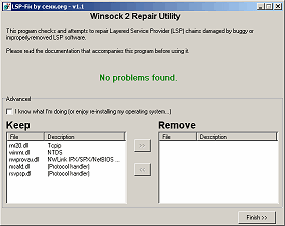
LSP-Fix attempts to correct Internet connection problems resulting from buggy or improperly-removed Layered Service Provider (LSP) software. When you start LSP-Fix, it will read the list of LSP modules from the Windows registry and verify that each module is present. If a module is missing, it is placed on the "Remove" list for removal. Advanced users can override suggested removals in the "Advanced" area. When "Finish" is pressed, the undesired entries are removed, and the remaining entries in the registry are renumbered to make them consecutive. The total module counts are then updated. Finally, the program will display a summary of the changes that were made.
Usage Instructions:
This program should only be used under the supervision of an advanced computer user.
For a tutorial on how to use this tool see the link below:
Using LSP-Fix to remove Spyware & Hijackers

Source
LSP-Fix
Repairs Winsock 2 settings, caused by buggy or improperly-removed Internet software, that result in loss of Internet access

LSP-Fix is a free Windows utility to repair a loss of Internet access associated with certain types of software. This type of software, known as a Layered Service Provider or LSP, typically handles low-level Internet-related tasks, and data is passed through a chain of these programs on its way to and from the Internet. However, due to bugs in the LSP software or deletion of the software, this chain can get broken, causing the Internet connection to become inaccessible.
Unfortunately, problematic LSP software, including malware/spyware, is sometimes quietly installed by unrelated products such as file-sharing programs, sneaking onto a system unannounced. In fact, in many cases, the user does not know of its existence until something goes wrong, and he/she can no longer access Web sites. Historically, New.net* (NEWDOTNET) and WebHancer* (often bundled with file-sharing utilities, DVD player software, and other free downloads) have been the worst offenders, but the problem can be caused by any improperly-written Layered Service Provider software, or the deletion of any LSP program's files. LSP-Fix repairs the LSP chain by removing the entries left behind when LSP software is removed by hand (or when errors in the software itself break the LSP chain), and removing any gaps in the chain.

LSP-Fix is not a malware removal utility and does not target specific products. LSP-Fix does not delete any files.

Downloads: (All downloads will fit easily on a floppy disk.)

  • LSP-Fix (.zip) v1.1 - includes the program, documentation and source code.

f you are using the program on a machine that cannot open .zip files, or are downloading for a friend whom you're not sure can read .zip files, download the uncompressed files below instead. It will take a bit longer, but this way the program can be used as-is (e.g. from a floppy disk).

LSPFix.exe
lspfix.txt

New in this version:

  • LSP chains entirely verified on program start, and status (errors / no errors) now displayed on the program main window.
  • If Winsock2 registry keys are inaccessible, LSP-Fix now warns the user to log in as Administrator and retry, rather than reporting the key as missing.
  • Released under the GNU General Public License.
Please refer to the Readme for a complete list of changes.
Screen Shot

Third Party Winsock Repair Tools

Following is a list of additional LSP/Winsock repair utilities written by others. These are provided for convenience, and are not written or tech-supported by cexx.org. Please direct support inquiries at the original authors! Thanks.

http://www.bu.edu/pcsc/internetaccess/winsock2fix.html - Winsock repair utility designed for Windows 98, 98SE, and ME.
http://www.iup.edu/house/resnet/WinsockXPFix.exe - Winsock repair utility designed for Windows XP.

http://digital-solutions.co.uk/lavasoft/whndnfix.zip - Winsock repair utility for Windows 95/98/98SE/ME.

Wednesday, August 26, 2009

Ping request fails

XP SP2 Windows Firewall enabled on the host PC?
If the firewall is enabled and you don't have File & Print Sharing enabled in the firewall settings ping requests will be dropped.

Show firewall configuration:
Start--Run...-->cmd
C:\Documents and Settings\Admin>netsh
help (optional...)
firewall
show config
The VPN entry at the end of your firewall configuration dump.
If you are running any type of VPN client, ie. like from Cisco, openvpn, etc... sometimes those include a built-in firewall function that can cause issues like blocking incomng Remote Desktop requests for example.

Subnetmask doens't care in this situation. Also subnetmask is not a problem.
You can use 194.x.y.z as B Class with 255.255.0.0.The problem is TCP\IP. If you can't ping localhost, TCP\IP isn't working properly so never can ping ther machines.
reset your TCP/IP configuration. It is not working properly.
To reset TCP\IP in Windows XP

Disable Norton Internet Security firewall

READ

Monday, August 24, 2009

Google Chrome: Error 102

Source
Installation issues: Error 102

A missing Windows component called 'expand.exe' is preventing Google Chrome from installing properly.
Solution

  1. Go to the Start menu > Search.
  2. Search your computer for the following file: expand.exe
  3. If you're able to locate the file on your computer, move it to the following directory: C:\Windows\system32. You can also copy the file from Windows installation CDs/DVDs, if you're unable to find it on your computer.

Once you've copied the file to the directory, try installing Google Chrome again.

Send us more information

If Google Chrome still won't install, we'd greatly appreciate it if you could send us additional information about your system. The following steps are a little complex, but would go a long way in helping us investigate the issue:

  1. Download Microsoft Process Monitor from http://technet.microsoft.com/en-us/sysinternals/bb896645.aspx
  2. Open Process Monitor and press Ctrl+L.
  3. Create the following filters in the window that opens:
    1. To create the first filter, select 'ProcessName' in the first box, 'ends with' in the second box, and type 'installer.exe' in the third box. Click Add.
    2. To create the second filter, select 'ProcessName' in the first box, 'is' in the second box, and type 'GoogleUpdate.exe' in the third box. Click Add.
  4. Click OK.
  5. From 'Filter' menu select 'Drop Filtered Events.'
  6. Download an alternate version of the Google Chrome installer file at http://www.google.com/chrome/eula.html?installdataindex=verboselogging. Save this file as 'ChromeSetup.exe' in C:\test.
  7. Go back to the Start menu > Run.
  8. Enter the following in the text field: cmd.exe
  9. Click OK.
  10. In the command prompt window that opens, type the following: cd C:\test
  11. Try installing the browser again by typing the following in the command prompt window: start ChromeSetup.exe
  12. The installation process most likely won't complete successfully. Once the installation process has gone as far as it can go, some events should be reported in Process Monitor. Go back to the Process Monitor window and press Ctrl+S. Save these events in a PML file.
  13. Send the saved .PML file to us

Saturday, June 20, 2009

Grub error on SCSI and SATA disks


Source
Grub Error 2 means "Selected disk doesn't exist"
Errors description

Errors Reported by the Stage 1

The general way that the Stage 1 handles errors is to print an error string and then halt. Pressing Ctrl-Alt-Del will reboot.

The following is a comprehensive list of error messages for the Stage 1:

  • "Hard Disk Error"

    This error message will occur if the Stage 2 or Stage 1.5 is being read from a hard disk, and the attempt to determine the size and geometry of the hard disk fails.

  • "Floppy Error"

    This error message will occur if the Stage 2 or Stage 1.5 is being read from a floppy disk, and the attempt to determine the size and geometry of the floppy disk fails. It's listed as a different error since the probe sequence is different than for hard disks.

  • "Read Error"

    This error message will occur if a disk read error happens while trying to read the Stage 2 or Stage 1.5.

  • "Geom Error"

    This error message will occur if the location of the Stage 2 or Stage 1.5 is not in the area supported by reading the disk with the BIOS directly. This could occur because the BIOS translated geometry has been changed by the user or the disk is moved to another machine or controller after installation, or GRUB was not installed using itself (if it was, the Stage 2 version of this error would have been seen during that process and it would not have completed the install).


Errors Reported by the Stage 1.5

The general way that the Stage 1.5 handles errors is to print an error number in the form "Error: " and then halt. Pressing Ctrl-Alt-Del will reboot.

The error numbers correspond to the Errors Reported by the Stage 2 in the listed sequence.


Errors Reported by the Stage 2

The general way that the Stage 2 handles errors is to abort the operation in question, print an error string, then (if possible) either continue based on the fact that an error occurred or wait for the user to deal with the error.

The following is a comprehensive list of error messages for the Stage 2 (error numbers for the Stage 1.5 are listed before the colon in each description):

  • 1 : "Selected item won't fit into memory"

    This error is returned if a kernel, module, or raw file load command is either trying to load it's data such that it won't fit into memory or it is simply too big.

  • 2 : "Selected disk doesn't exist"

    This error is returned if the device part of a device- or full filename refers to a disk or BIOS device that is not present or not recognized by the BIOS in the system.

  • 3 : "Disk read error"

    This error is returned if there is a disk read error when trying to probe or read data from a particular disk.

  • 4 : "Disk write error"

    This error is returned if there is a disk write error when trying to write to a particular disk. This would generally only occur during an install of set active partition command.

  • 5 : "Disk geometry error"

    This error is returned when a read is attempted at a linear block address beyond the end of the BIOS translated area. This generally happens if your disk is larger than the BIOS can handle (512MB for (E)IDE disks on older machines or larger than 8GB in general).

  • 6 : "Attempt to access block outside partition"

    This error is returned if a linear block address is outside of the disk partition. This generally happens because of a corrupt filesystem on the disk or a bug in the code handling it in GRUB (it's a great debugging tool).

  • 7 : "Partition table invalid or corrupt"

    This error is returned if the sanity checks on the integrity of the partition table fail. This is a bad sign.

  • 8 : "No such partition"

    This error is returned if a partition is requested in the device part of a device- or full filename which isn't on the selected disk.

  • 9 : "Bad filename (must be absolute pathname or blocklist)"

    This error is returned if a filename is requested which doesn't fit the syntax/rules listed in the Filesystem Description.

  • 10 : "Bad file or directory type"

    This error is returned if a file requested is not a regular file, but something like a symbolic link, directory, or FIFO.

  • 11 : "File not found"

    This error is returned if the specified filename cannot be found, but everything else (like the disk/partition info) is OK.

  • 12 : "Cannot mount selected partition"

    This error is returned if the partition requested exists, but the filesystem type cannot be recognized by GRUB.

  • 13 : "Inconsistent filesystem structure"

    This error is returned by the filesystem code to denote an internal error caused by the sanity checks of the filesystem structure on disk not matching what it expects. This is usually caused by a corrupt filesystem or bugs in the code handling it in GRUB.

  • 14 : "Filesystem compatibility error, can\'t read whole file"

    Some of the filesystem reading code in GRUB has limits on the length of the files it can read. This error is returned when the user runs into such a limit.

  • 15 : "Error while parsing number"

    This error is returned if GRUB was expecting to read a numbur and encountered bad data.

  • 16 : "Device string unrecognizable"

    This error is returned if a device string was expected, and the string encountered didn't fit the syntax/rules listed in the Filesystem Description.

  • 17 : "Invalid device requested"

    This error is returned if a device string is recognizable but does not fall under the other device errors.

  • 18 : "Invalid or unsupported executable format"

    This error is returned if the kernel image boing loaded is not recognized as Multiboot or one of the supported native formats (Linux zImage or bzImage, FreeBSD, or NetBSD).

  • 19 : "Loading below 1MB is not supported"

    This error is returned if the lowest address in a kernel is below the 1MB boundary. The Linux zImage format is a special case and can be handled since it has a fixed loading address and maximum size.

  • 20 : "Unsupported Multiboot features requested"

    This error is returned when the Multiboot features word in the Multiboot header requires a feature that is not recognized. The point of this is that the kernel requires special handling which GRUB is likely unable to provide.

  • 21 : "Unknown boot failure"

    This error is returned if the boot attempt did not succeed for reasons which are unknown.

  • 22 : "Must load Multiboot kernel before modules"

    This error is returned if the module load command is used before loading a Multiboot kernel. It only makes sense in this case anyway, as GRUB has no idea how to communicate the presence of location of such modules to a non-Multiboot-aware kernel.

  • 23 : "Must load Linux kernel before initrd"

    This error is returned if the initrd command is used before loading a Linux kernel. Similar to the above error, it only makes sense in that case anyway.

  • 24 : "Cannot boot without kernel loaded"

    This error is returned if GRUB is told to execute the boot sequence without having a kernel to start.

  • 25 : "Unrecognized command"

    This error is returned if an unrecognized command is entered into the command-line or in a boot sequence section of a config file and that entry is selected.

  • 26 : "Bad or incompatible header on compressed file"

    This error is returned if the file header for a supposedly compressed file is bad.

  • 27 : "Bad or corrupt data while decompressing file"

    This error is returned the run-length decompression code gets an internal error. This is usually from a corrupt file.

  • 28 : "Bad or corrupt version of stage1/stage2"

    This error is returned if the install command is pointed to incompatible or corrupt versions of the stage1 or stage2. It can't detect corruption in general, but this is a sanity check on the version numbers, which should be correct.

NTFS-3g error: Hal.Storage.mount-fixed

org.freedesktop.Hal.Device.PermissionDeniedByPolicy:
org.freedesktop.Hal.Storage.mount-fixed
auth_admin_keep_always <-- (action, result).
Source
Hal is the hardware abstraction layer, which to my knowledge knows no policy by itself. That is usually the domain of "udev". Have a look at
http://www.reactivated.net/writing_udev_rules.html
http://gentoo-wiki.com/HOWTO_Customizing_UDEV
http://linuxcommand.org/man_pages/udev8.html
http://ftp.kernel.org/pub/linux/util...tplug/udev-FAQ
http://www.linuxfromscratch.org/lfs/...er07/udev.html
But maybe, just maybe, it is faster to have a look at your file ".hal-mtab-lock". What does it contain? "cat /etc/mtab" lists the mounted devices as you probably know. Why not renaming that ".hal-mtab-lock" for a test and try to access your DVD-drive...
-------------------------------
Windows-Partitionen einbinden
Bugs in Hal?
mein Fall:/dev/disk/by-id/ata-ST3250310AS_6RYFZQM8-part2 / ext3 acl,user_xattr 1 1
/dev/disk/by-id/ata-ST3250310AS_6RYFZQM8-part8 /DATEN ntfs-3g users,gid=users,fmask=133,dmask=022,locale=de_DE.UTF-8 0 0
/dev/disk/by-id/ata-ST3250310AS_6RYFZQM8-part11 /IMAGES ntfs-3g users,gid=users,fmask=133,dmask=022,locale=de_DE.UTF-8 0 0
/dev/disk/by-id/ata-ST3250310AS_6RYFZQM8-part9 /MMEDIA ntfs-3g users,gid=users,fmask=133,dmask=022,locale=de_DE.UTF-8 0 0
/dev/disk/by-id/ata-ST3250310AS_6RYFZQM8-part10 /VMs ntfs-3g users,gid=users,fmask=133,dmask=022,locale=de_DE.UTF-8 0 0
/dev/disk/by-id/ata-ST3250310AS_6RYFZQM8-part1 /Win2k3 ntfs-3g defaults,users,locale=POSIX 0 0
/dev/disk/by-id/ata-ST3250310AS_6RYFZQM8-part3 /WinXP ntfs-3g defaults,locale=POSIX 0 0
/dev/disk/by-id/ata-ST3250310AS_6RYFZQM8-part7 /home ext3 acl,user_xattr 1 2
/dev/sdb9 /media/data1 ntfs-3g defaults,locale=POSIX 0 0
/dev/disk/by-id/ata-ST3250310AS_6RYFZQM8-part6 swap swap defaults 0 0

/dev/sdb9 wird gemounted ohne Probleme!

Monday, June 15, 2009

Web Services management

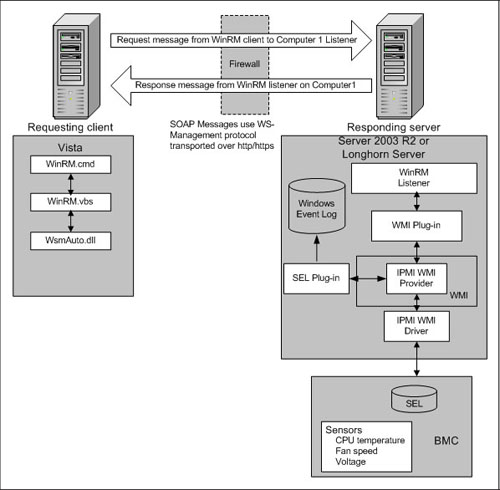
Windows Remote Management (WS-Management)

Windows Remote Management (WinRM) service implements the WS-Management protocol for remote management. WS-Management is a standard web services protocol used for remote software and hardware management. The WinRM service listens on the network for WS-Management requests and processes them. The WinRM Service needs to be configured with a listener using winrm.cmd command line tool or through Group Policy in order for it to listen over the network. The WinRM service provides access to WMI data and enables event collection. Event collection and subscription to events require that the service is running. WinRM messages use HTTP and HTTPS as transports. The WinRM service does not depend on IIS but is preconfigured to share a port with IIS on the same machine. The WinRM service reserves the /wsman URL prefix. To prevent conflicts with IIS, administrators should ensure that any websites hosted on IIS do not use the /wsman URL prefix.
...

Source Thanks, Mathevs!!
I dived into WS-Management support in Vista / Longhorn Server Windows Server 2008 this weekend. There are a couple of caveats if you want to enable remote WS-Management based access to these machines. Support for remote management is also built into Windows Server 2003 R2.
WS-Management specification allows remote access to any resource that implements the specification. Everything accessed in a WS-Management world is a resource, which is identifiable by a URI. The spec uses WS-Eventing, WS-Enumeration, WS-Transfer and SOAP 1.2 via HTTP.
Since remote management implementation in Windows acknowledges all the work done in the WMI space, you can simply issue commands in terms of URIs that incorporate WMI namespaces.

For example, the WMI class or action (method) is identified by a URI, just as any other WS-Management based resource. You can construct access to any WMI class / action using the following semantics:

  • http://schemas.microsoft.com/wbem/wsman/1/wmi denotes a default WMI namespace accessible via WS-Management
  • http://schemas.microsoft.com/wbem/wsman/1/wmi/root/default denotes access to root/default namespace

Since the majority of WMI classes are in root/cimv2 namespace, you should use the following URI to access those:

http://schemas.microsoft.com/wbem/wsman/1/wmi/root/cimv2

Thursday, April 23, 2009

Nvidia "infinite loop" error

Source
Audio&Video

Symptoms of this error
* Spontaneous reboot, hardware lockup or insufficient virtual memory error from WinXP
* Hardware lockup, BSOD with a message about an infinite loop error with a Nvidia driver
* BSOD error message - this varies but refers to a problem with "nv4_disp.dll"

Friday, December 12, 2008

DCOM error -event 10016

Source
The machine-default permission settings do not grant Local Activation permission for the COM Server application with CLSID
{BC866CF2-5486-41F7-B46B-9AA49CF3EBB1}
to the user NT AUTHORITY\NETWORK SERVICE SID (S-1-5-20).
This security permission can be modified using the Component Services administrative tool.
I googled that GUID (BC866CF2-5486-41F7-B46B-9AA49CF3EBB1) and it seems to be an nVidia firewall.
Do you have that installed on your server?
Is there a link in the bottom of the DCOM error, and if you click it does it lead you to instructions to fix that? If so, you could follow those instructions. However, if the offending application really is nVidia firewall, I'd probably want to disable or remove that rather than configure DCOM security to let it work. AFAIK that's a "personal firewall" and isn't a server-level application.
If there's not a link in the error, you can go to HKEY_CLASSES_ROOT\CLSID.
Scroll down until you find BC866CF2-5486-41F7-B46B-9AA49CF3EBB1 and look through the entries to find what it is. You can go into DCOM and set the permissions indicated in the error message, but ONLY IF you want to give Network Service rights to the application represented by that GUID.
After you have removed or disabled the firewall or whatever other app that may be, or otherwise straightened out the DCOM error, you can move on to troubleshooting the other issues, assuming they're not cleared up by fixing the other issue.
"Terje"

Source
With Microsoft on the phone, completely removed it and started over. I've since found, after reinstalling the nVidia drivers, that it is a permissions problem coming from Windows Server 2003 R2.
I got an nVidia error #1 after reinstall and trying to use Network Access Manager
The Forceware Web Interface service terminated with service-specific error 1 (0x1).
and thousands of DCOM errors that say some SID does not have permission to :
The machine-default permission settings do not grant Local Activation permission for the COM Server application with CLSID
Something basic is disallowing the redirection of the frontend of nVidia which uses it's own Apache instance as an interface to configure the firewall settings.
It may not matter much, since on Monday we're stripping the servers of this version of Windows Server and installing a new one.
I believe Windows is disallowing execution of the basic cgi scripts, but can't find out how it's doing that. What paranoiaware! I can handle security and I really don't need all this extra junk which stops things by default. I wish they'd let administrator think for themselves, instead of giving into the general public's fears about stopping everything from executing.

GinEric: It's not nVidia, it's Windows, of that I'm sure because I have a production server Apache running side by side with it, but I have to define the ScriptsAlias and add other executeable directories to that Apache. It too has cgi-bin problems owing to Windows permissions paranoia, considering the Data Execution Prevention [DEP], a builit in Windows Firewall that is junk, an attempt at a built in Windows antivirus that is junk, a DNS that is non RFC compliant, a web browser that is non html compliant, and a lot more non compliant Windows software.
And we're Microsoft Developers and Partners!
We're constantly on the phone with them, at Microsoft Headquarters. It took us a month to get a version of Windows Server 2003 because the distributors and resellers couldn't find a copy! This from the pressing plant, which we believe must be in Puerto Rico [that's what the box says!], and a complete breakdown in the distribution chain.
It was hard enough acquiring XP Pro 64-bit, which also took over week. Next week we'll be full 64-bit, ready for Vista and perhaps a Vista Server, if they get that far this year. But it looks like there are going to be real fun problems when that comes out!
It will sell, no doubt, and there will be about a million experts telling people how to fix problems, but, like our block of IP questions, I think the answers will be just too simple for some to figure out.
I'm going to get some manuals and the debugger for this system and see if I can't pinpoint what is causing this permissions problem with Windows.

What I'm down to: Installing the role of Domain Controller subtracts the automatic "localhost" pseudo domainname privileges therefrom.
nVidia chipset manufacturers install their configuration utilities using Apache2. Because Windows Server 2003 (R2) has more than strict default security settings the nVidia chipset drivers which rely on Apache2 for viewing and configuration of their onboard [as well as Asus' onboard nVidia chipset] Ethernet.
http://www.musics.com/manhtml/nVidia/nForce4.Marvell.onboard/Report.htm
http://www.musics.com/manhtml/nVidia/Devices/Devices.Report.html
While this Network Access Manager will run on kiddie computers [and other non Fully Qualified Doman Name systems named "localhost"], it will not run on real servers under Windows Server 2003 (R2) because that Operating System is POSIX compliant with respect to Apache not running as localhost.
That means that while nVidia made a wise choice in using the httpd server for the http [the World Wide Web, of which Internet Explorer is a client and Internet Information Server is an emulating server] because this is where all forms of word processing and information exchange are headed, they did not know how to install their frontend properly. They did not take the time to run their daemon in a chrooted jail, which means they did not take the time to run the service as a user, rather than the local system account. The local system account is localhost and no service should be run as such, which is to say as "localhost."
So now we come across how to fix it. The service must be started with a command of this type:
"D:\nVidia\NETWOR~1\Apache
Group\Apache2\bin\apache.exe" -n "NetworkAccessManager.exe" -k runservice
if the service name is NetworkAccessManager.exe and has been installed with that name, or, by changing the name Apache.exe to NetworkAccessManager.exe to distinguish it from any other Apache or web server service.
Done per http://httpd.apache.org/docs/2.2/platform/windows.html on this particular machine.
Because nVidia made no provisions to do the proper install for Windows, per the above, which should have been:
apache -k uninstall -n "NetworkAccessManager.exe"
one has to do a "workaround" to get it to work. This involves creating a user for the service, and giving it the proper permissions to Grant Local Activation and to then fix this error:
"The machine-default permission settings do not grant Local Activation permission for the COM Server application with CLSID
{BC866CF2-5486-41F7-B46B-9AA49CF3EBB1}
to the user Enterprise\username SID (S-1-5-21-837930903-1476599053-4099141860-1125). This security permission can be modified using the Component Services administrative tool."
which leads to this Microsoft Advistory:
10016 DCOM EVENT_COM_ACCESS_DENIED_IN_SERVER_ACTIVATION_OR_LAUNCH_PERMISSION
A simple "Access Denied" for the service to start. Finding this permission, however, is more of a task. Per the article :
http://support.microsoft.com/kb/913119/en-us
2.e. is changed to selecting a username, instead of the IUSR_ServerName [apparently this still doesn't work with a real PDC hostname, so you can use the chrooted user instead]. Thereafter following the advisroy and setting the Launch Activation Allow checkbox for that user.
When a service is run as a user with the ability to restrict permissions, this is called a Chrooted Jail. CH is from chmod, the permission command in Linux ported to Windows by C and Linux programmers, root is the root user meaning that root or the built in Administrator or System Authority account is overseeing this process, and Jail means that that service [daemon] is within the jail set by the permissions and the administrative account, that is, it cannot access objects outside of its confines.
This error began showing up with nearly all new chipsets, since about 2004, regarding Via and nVidia, particularly on their drivers for the onboard chipset, when using a layer controlled under the Data Execution Prevention [DEP] strategic hardware design of the 64-bit systems architecture. This architecture is a necessary prerequisite for DEP because it includes a Special Operator in the Microprocessor to control the lowest level of access, which should always be "supervised" by the Operating System. Set the Special Ops bit, and call an Operating System routine to handle any program as a subtask, such as controlling the fan speeds, checking temperatures, and all functions within the Control Mode Set [Supervisory and Privileged Mode of Intel, AMD, and Citrix microprocessors, as well as Motorola microprocessors (which had this feature 25 years ago)].
Take a good look here: http://en.wikipedia.org/wiki/AMD64
Under "No Execute Bit" ; that is "Our Design!" from over 30 years ago, just now being implemented in microprocessors. Without "Our Bit," you don't have Data Execution Prevention, however, this is at a cost in that you must now allow for application and user permissions to launch and execute outside of the system areas, and, this must be done under System Authority.
So, I knew this problem was a DEP problem as soon as it failed to launch or execute, and/or load a web page that needed to launch and execute, as do the cgi and other executeable scripts found on many web pages, including .asp and .cgi
I simply did not know where Microsoft had implemented it in their billions of bytes of Operating System software. I still do not know all of the locations of its implementation in the DEP architecture as assigned by the mostly Redmund programmers, and others around the world, the developers and partners, like us.
Mostly, the problem is borne out of lowe level training that is completely unaware of how this architecture has been implemented. Since Unisys, it's owners, stockholders, and employees, retired or not, own the copyrights and patents to these innovations, Microsoft, AMD, Intel, perhaps Citrix and others who use the 64-bit design, must have a standing agreement with these copyright and patent owners through Unisys [whose foundation is aboriginally Univac and Burroughs, the two J. Presper Eckert and John Mauchly companies] in order to use these copyrighted and patented creations and discoveries, hence, the announcements of the partnering of all of these with Unisys.
Many trainees and even degreed IT and computer professionals are completely unaware of this architecture and these legal requirements, and the 64-bit systems are, at best, vagueries to them. Not realising that there are actual designers of these systems sitting right here discussing problems with the 64-bit emulated copies of these mainframe architectures [AMD, Intel, Citrix, et ux en toto], a lack of understanding may exist at some levels.
But since this is a relevant problem that encompasses nearly all aspects of the new Windows 64-bit Operating Systems, this platform, this Experts Exchange, has been lucky enough to have such experts here fully detailing the operation for those who need to know them in order to understand how their network and system architecture actually works, and thereby to quickly spot and resolve problems.
The question was to see if anyone had had this problem before. If they had lost the ability to execute programs at some point under Windows Server 2003 (R2).
I did not expect anyone to explain it as I have. I'll award the points to anyone who participates and formulates the points I've made above if they agree and it solves any of their execution permissions problems. After all, I can't award them to myself, and the fact is that DEP is going to play an extremely important role in Vista, when it arrives. Those who don't understand this basic design concept will have a hard time in troubleshooting and fixing problems related to execute and access permissions on Windows Server 2003 (R2) 64-bit and the upcoming Vista Server versions.
I often find the depth of information I provide is very comprehensive, simply because I'm involved in the design and don't want to trivialize or skip over what I consider to be critically important, as this area involving the Execute Bit is, but this is written mostly as my "draft" copy of what will appear on my site; if Experts Exchange wishes to use it, I grant the right to re-publish, but require that the author be fully credited.
Which is fairly generous, since it's the most accurate information there is, from one of the designers himself. I could have just put it all in a book, which would have cost dearly, but I felt that sharing the information was a kind gesture and the right thing to do for those who have an exceptional interest in Systems Architecture and Operating Systems Design.


What I did to make nVidia Firewall work:
01.) copy D:\nVidia\NetworkAccessManager\Apache Group\Apache2\bin\Apache.exe to same directory, Windows named it "copy of Apache.exe"
02.) Renamed D:\nVidia\NetworkAccessManager\Apache Group\Apache2\bin\Apache.exe to ..\NetworkAccessManager.exe
03.) Created user nobody [the normal Apache chrooted jail]
04.) Granted "Launch Applications" to nobody
05.) borrowed the startup command "D:\Program Files\Apache Software Foundation\Apache2.2\bin\httpd.exe"
06.) used it this way
"D:\nVidia\NETWOR~1\Apache Group\Apache2\bin\NetworkAccessManager.exe"
and that from a command prompt. It runs now and I can once again configure my firewall using the nVidia tray icon.
nVidia is just so much more configurable than Microsoft Firewall and it was worth all of the effort. It's also a lot easier to find than the Windows Security popup and the Windows Firewall administration popup. In searching the internet for the error and solution, to :
"The Forceware Web Interface service terminated with service-specific error 1 (0x1)."
I found no definitive answers since the nVidia creation, about 2004. Googling will show this non-result. The answer, as I suspected it would be, was to solve it myself, hopefully with expert help. Even if someone would only listen, that is enough to solve a problem very often. Up to this point Jay_Jay70, no other expert did listen. For that I thank you. You will make one of the best experts there is here, because you listen.
As for others who often criticized the aboriginal question, which was deleted here, this answer stands as a monument that will come to haunt many henceforth.
"The customer is always right." J.C. Penny
to paraphrase:
"The questioner is always right." GinEric
Don't you just love it when your'e right? This question and answer is classic. And my bet is that it will be the #1 solution for this problem, from experts exchange and from Musics.com
http://www.experts-exchange.com/Operating_Systems/Windows_Server_2003/Q_21870899.html#16829874
http://www.musics.com/manhtml/nVidia/A_21870899.Q_21870899.html#16829874
The last word.

Fixing a DCOM error on Windows Server 2003

Source

... A quick list of the sequence of events:
  • Get the error Info from "Event Viewer"
  • Trace the error info in the registry.
  • Resolve the security error using "COM Manager"
Event Viewer:

The first step would be to open up "Event Viewer" that can be found under administration tools on server 2003.

List Errors

Navigate to the errors that are marked with the red icon and double-click on one to get all the error information.

Error Details

This is the point where most people get frustrated due to the fact that the error information does not include the name of the application or component that is causing the error. Let us analyse what we do have:

  • We know the error has to do with security due to the reference of the word "Permission" in the text.
  • We know what permission is missing - "Local Activation"
  • We know what account requires permission - "Network Service" in this case.
  • We have the Class ID for the assembly causing the problem.

All we need to do now is convert the CLSID into a logical application name. To do this we need to access the registry by executing the command "regedit" from the command line.

RegEdit

Copy the CLSID from the error and do a find using the "Registry Editing" tool. Once you find a match to the CLSID, you will be given a PROGID (Program Identifier). This is the name of the application causing the error, in this case "IIS WAMREG admin Service".

The next step is to find this application using "COM Manager" that can be found under administrative tools in "Control Panel".

Component Services

Collapse out the tree in component manager until you get to the "DCOM Config" section. Under this section you will find the application in question listed. Edit the properties of this application to fix the problem.

Security Tab

The error specified that the problem was related to "Security" and "Local Activation". Therefore we navigate to the "Security" tab and select the edit button under the "Launch and Activation" section.

Add Account

Select the "Add User" button and add the "Network Service" to this ACL (Access Control List).

Problem Solved.

Friday, December 5, 2008

No se encuentra el archivo C:\Documents

forospyware.com


FS-Admin


Mensaje "No se encuentra el archivo C:/...//privacy_danger/index.htm"

Infeccion con el PSGuard virus
- Descarga la herramienta DelPSGuard.zip y ejecútala en Modo a Seguro

- Descarga el Super Antispyware instálalo y actualízalo... luego realiza un escaneo en Modo Seguro

- Pasa el Ccleaner y siguiendo los pasos de su manual utiliza las opciones Limpiador y Registro.

Tuesday, November 18, 2008

La memoria no se puede "written"/"read"

Source
Uno de los problemas que más recibo y que pienso que más despista a la gente es un error del tipo "La instrucción en "0xnúmero_hexadecimal" hace referencia a la memoria en "0xnúmero_hexadecimal". La memoria no se puede "written"/"read". Observe la siguiente imagen que ilustra el error:

Mensaje de error de aplicación

Mucha gente asocia este mensaje de error con un problema con la memoria RAM, pensando que pudiera estar dañada o que quede poca disponible. Probablemente el problema no se deba a un módulo defectuoso de RAM.

Ese mensaje de error es la manera "fea" que tiene Windows XP de decir que ha ocurrido una excepción en modo usuario porque alguna aplicación o componente ha intentado acceder a una posición de memoria que no debería (por ejemplo, mediante un puntero erróneo). Esto se denomina infracción de acceso y se identifica mediante el código de error c0000005.

Veamos un poco qué ocurre por dentro de Windows cuando sucede un error de este tipo

Windows debe tener un mecanismo interno que le permita actuar de algún modo cuando ocurra una excepción no controlada en modo usuario. Para simplificar las cosas, supongamos que se trata de un bloque try convencional que puede lanzar la excepción mediante la función UnhandledExceptionFilter. En este momento, Windows examina el Registro para saber qué hacer una vez ha ocurrido un error de aplicación. La clave HKLM\SOFTWARE\Microsoft\Windows NT\CurrentVersion\AeDebug contiene un valor Auto que le indica al sistema si debe iniciar automáticamente el depurador por defecto del sistema, definido éste en el valor Debugger. El depurador por defecto de Windows XP es Dr Watson.

Nota: Si instala alguna aplicación relacionada con el desarrollo, es probable que ésta instale su propio depurador. Quizá también lo establezca automáticamente como depurador por defecto del sistema.


En este momento se carga la dll Faultrep.dll que examina el Registro para saber cómo desea el usuario que se le informe de los errores de aplicación. La clave de Registro HKLM\SOFTWARE\Microsoft\PCHealth\ErrorReporting contiene la información accesible desde la interfaz gráfica de Windows en el panel Informe de errores, situado en la pestaña Opciones avanzadas de Propiedades de sistema. Observe la siguiente imagen:

Panel Informe de errores de Windows XP

Si se desea que se muestre una intuitiva interfaz gráfica (valor ShowUI distinto de cero), Windows cargará el proceso \WINDOWS\system32\Dwwin.exe en memoria, que es el que muestra la típica pantalla de error de aplicación de Windows XP, mostrada en la siguiente imagen:

Típica ventana de error de aplicación de Windows XP

Si el valor ShowUI es igual a cero, siempre obtendrá la pantalla mostrada al principio del artículo, que no ofrece la posibilidad de ver el módulo afectado por el error ni de enviar la información a Microsoft. Dependiendo de la aplicación que haya generado el error, es posible que se le muestre esta pantalla pese a que utilice la configuración por defecto. No debe preocuparse, se trata del mismo problema: una excepción no controlada en modo usuario.

¿Cómo solucionar el problema?

En primer lugar debe asegurarse de que el sistema esté libre de virus y ficheros espía. Un sistema infectado puede producir excepciones de este tipo. En segundo lugar, revise la esquina superior izquierda del título de la ventana de error, es posible que se haga referencia a un fichero de terceros conocido, en cuyo caso habría que contactar con el fabricante para informarse de si es un problema conocido o de si existe alguna solución al respecto.

Si el proceso referenciado fuese demasiado inespecífico (como por ejemplo Explorer.exe), no queda más remedio que hacer pruebas iniciando el sistema en Modo seguro o realizar sucesivos inicios limpios hasta dar con el posible culpable.

También es posible examinar la información registrada por el depurador de programa.

Nota: Si el proceso referenciado fuese Iexplore.exe, es posible que algún añadido (plug-in) sea el que ha generado la excepción. Si usa Internet Explorer 7, ejecute el navegador sin complementos y observe si se reproduce el problema. Para ejecutar el navegador sin complementos abra Inicio, Ejecutar, escriba "%ProgramFiles%\Internet Explorer\iexplore.exe" -extoff y pulse Aceptar.


En este caso deberá pulsar sobre Cancelar en la ventana de error para depurarlo. Abra Inicio, Ejecutar, escriba "%AllUsers%\Datos de programa\Microsoft\Dr Watson" (con comillas) y pulse Aceptar. Observará dos ficheros: Drwtsn32.log contiene un reporte con todos los errores de aplicación que han sido administrados por Dr Watson. Los últimos errores recibidos se sitúan al final de la lista. User.dmp suele ser un pequeño volcado de la memoria en el momento del error. Este fichero se sobreescribe cada vez que ocurre un error de aplicación. Puede cargar este fichero en cualquier depurador como Windbg (http://www.microsoft.com/whdc/devtools/debugging/default.mspx) para examinarlo.

Espero que este artículo haya aclarado algunas dudas acerca de esa "extraña" ventana que nos indica que la memoria no se puede "read" (o "written") y que nos podemos encontrar cuando nos topamos con software mal diseñado en nuestro sistema.

Wednesday, October 1, 2008

Error al instalar archivos de catálogo Win XP SP3

“Failed to install catalog files”
En internet existen para descargar Windows XP SP3 que en realidad son SP3RC2 y lo hacen pasar como SP3.
Leer esto
Un enlace fiable aquí
No todas las instalaciones de Windows XP SP2, aceptan el SP3, entre ellos las versiones desatendidas (unatended). Al parecer hay copias o versiones piratas de Windows XP SP2 con demasiadas modificaciones estructurales  o con código malicioso incrustrado en el sistema (o encriptado)
Se debe instalar previamente Internet Explorer 7 y Windows Media Player 11 (en caso de querer usarlos), porque después de realizar la actualización no se podrá instalar estos programas.

Strange behavior in the Back Button

Source

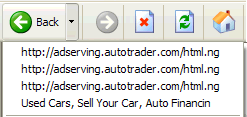
Sometimes when you click the Back button in IE6 to return to the previous page it appears that nothing happens. What usually occurs is that the HOSTS file has blocked one or more (<IFrame>) ad pages that are embedded into the web page you are viewing.
To verify this click the small drop-down arrow on the Back button, do you see just an ad server listed? ... well now you know ..... As you can see the first three links are blocked ad servers, simply skip to the valid link. However there are a few exceptions. In some cases the web page can contain a script to prevent the user from returning to a previous page.


Martin Hawes sends along this tip: (IE6)
If you add the "ad servers" you see listed in the Back Button drop-down, to the Restricted Zone this will eliminate the Back button issue.
Editors Note: however if you are using Windows XP SP2, you will be prompted by the "Security Center" about a 3rd party connection. Just click No and continue.


Vista/IE7 users should not see any ad servers listed in the drop-down list of the Back Button if your HOSTS file is working properly.

Tuesday, September 30, 2008

Winsock -Layered Service Provider (LSP)

Fuente

Hay Anti-spyware que rompe, borra o modifica el Winsock por Layered Service Provider (LSP), lo que origina que no se pueda conectar a Internet, el programa en si no tiene muchas opciones pero vamos a detallar un poco como funciona.
LSP-fix leerá la lista de módulos LSP desde el registro de Windows y verificará que cada módulo esté presente. Si falta  o no encuentra un módulo, es colocado en la lista "Remove" para removerlo del registro de windows.
Los usuarios que no tengan experiencia deberian dejar todo como esta, pero los usuarios con conocimientos podran modificar que modulos remover y cuales no activado la casilla de "I know what I'm doing". REPITO ESTA OPCION ES PARA USUARIOS AVANZADOS, si no sabes lo que haces no lo actives, puedes inutilizar más aún el sistema.

A continuacion pulsa en el boton "Finish",conseguiendo que las entradas no deseadas sean eliminadas, y las entradas restantes serán reenumeradas para hacerlas consecutivas.
El total de módulos contados es actualizado.
Al final el LSP-Fix nos mostrada un detalle de los cambios que hemos realizado.
Para que los cambios surgan efecto debera reiniciar la maquina.

IMPORTANTE
Antes de utilizar el programa es recomendable que haga una copia de seguridad del registro.
1. Haga clic en Inicio y, a continuación, en Ejecutar.
2. En el cuadro Abrir, escriba regedit y, después, haga clic en Aceptar.
3. Localice y, después, haga clic en la subclave que contiene los valores que desea modificar.
4. En el menú Archivo, haga clic en Exportar.
5. En el cuadro Guardar en, seleccione una ubicación donde desea guardar el archivo Entradas de registro (.reg), escriba un nombre de archivo en el cuadro Nombre de archivo y, a continuación, haga clic en Guardar. 

Descargar LSP-Fix

Monday, September 29, 2008

Mensaje de servidor ocupado

"No se puede completar esta acción porque el otro programa está ocupado. Elija cambiar a... para activar el programa ocupado y corregir el problema"
Fuente
Causa:
Este problema ocurre si el programa se conecta a una dirección de bucle  127.0.0.1. Service Pack 2 de Windows XP (SP2) impide conexiones a todas las direcciones IP que están en el intervalo de direcciones de bucle de retroceso excepto 127.0.0.1.  
Para más data: 
http://www.wilkinsonpc.com.co/free/KB884020.html
http://www.configurarequipos.com/tema28518-8-0.html

Nada de virus ni similares, sólo es M$Windows!
No hay que olvidar que W XP es un W2K con  bonita superficie ...y W2K es un sistema operativo semi-optimizado para la red.
Ya se ha comentado que el emule, en especial las ultimas versiones consumen gran cantidad de recursos y de memoria. A veces parece colgado el emule cuando en realidad está ocupado, windows trata de acceder y avisa que el programa ha dejado de responder...., sin que en realidad esté colgado y transcurrido un tiempo funciona normalmente (esto sucede en especial cuando nos acercamos al límite del ancho de banda y hay muchas URLs que gestionar. El problema mencionado es similar, tratas de abrir un  programa, con el emule funcionando, y el sistema no tiene sufientes recursos, windows se vuelve loco y se cree que, dado que corres W XP, es un servidor o que trata de acceder a un servidor, y te sale el mensaje de marras.
La solucion es "cambiar a" o "reintentar", hasta que el programa arranque.
Error con el ACDsee cuando corre el emule:
http://forum.emule-project.net/lofiversion/index.php/t40602.html
Ésta y otras explicaciones son referentes al uso del e-mule, por supuesto no está configurado para iniciar con windows
Por cierto: http://www.wilkinsonpc.com.co/free/KB884020.html no soluciona el problema
También puede ser infección del "Backdoor.IRCBot"

Solución
Realizar los siguientes pasos en este orden:
1º » Actualizar el sistema  opèrativo Aqui
2º » Borrar todas las cookies y limpiar el registro con CCleaner
3º »Inicio- Panel de Control--> Java y eliminar todos los archivos temporales. (si usas Java)
4º » Usar AVG Antispyware. ( Actualizar, explorar por malware , elegir la opcion eliminar, leer el reporte)
5º » Usar también el ElistarA (No necesita instalación, optar por SI a todo) Los resultados aparecen en el archivo C:\Infosat.txt