Bienvenido! - Willkommen! - Welcome!

Bitácora Técnica de Tux&Cía., Santa Cruz de la Sierra, BO
Bitácora Central: Tux&Cía.
Bitácora de Información Avanzada: Tux&Cía.-Información
May the source be with you!
Showing posts with label AMD. Show all posts

Saturday, November 12, 2011

AMD RaidXpert

Download the AMD RAIDXpert™ Driver
Last Updated: 2/16/2008
Article Number: CS1 
Name: RAIDXpert2.4.1540.4_X2.exe
File size: 70.7 MB   Release Date: 10/30/2007

Click here to download the AMD RAIDXpert™ Driver for the 7-Series Chipset
--------------------
File size 59.77 MB
Updated January 29, 2009 ????
download.amd.com/Desktop/RAIDXpert2.4.1540.11.exe
---------------------------------
from AMD fori
RAIDXPert is OEMed from Promise Technology and it's fairly poorly documented.
I have found an updated manual on the ASRock web site, if you actually want to USE the program. An nanohead pointed out, this program is poorly supported:
username: admin
password: admin
Welcome to Web based AMD Array Management Software (RAIDXpert)
RAIDXpert is an easy-to-use software designed to simplify RAID storage management. RAIDXpert is specifically designed for AMD HBA. RAIDXpert can configure, manage or monitor AMD RAID products remotely from a web browser from anywhere in the world.
---------------------------------------
When I try to install it on sb8xx system 
'Raid Driver for Windows 7'
It only has sb7xx driver in it.
check C:\ATI\Support\10-9_win7_32-64_raid\Packages\Drivers\SBDrv
motherboard_driver_amd_chipset_8-series_win7.exe
when extracted it produces a file folder called
win7_chipset
---------------------------------------
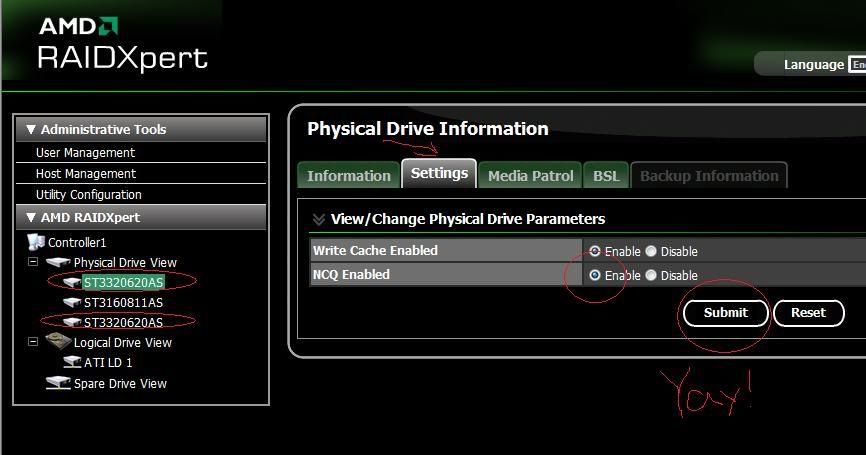
magical button NCQ enable!
 
For sure, benchmark with HD Tune!
---------------------------
http://forums.amd.com/forum/me...=100045&enterthread=y
Before
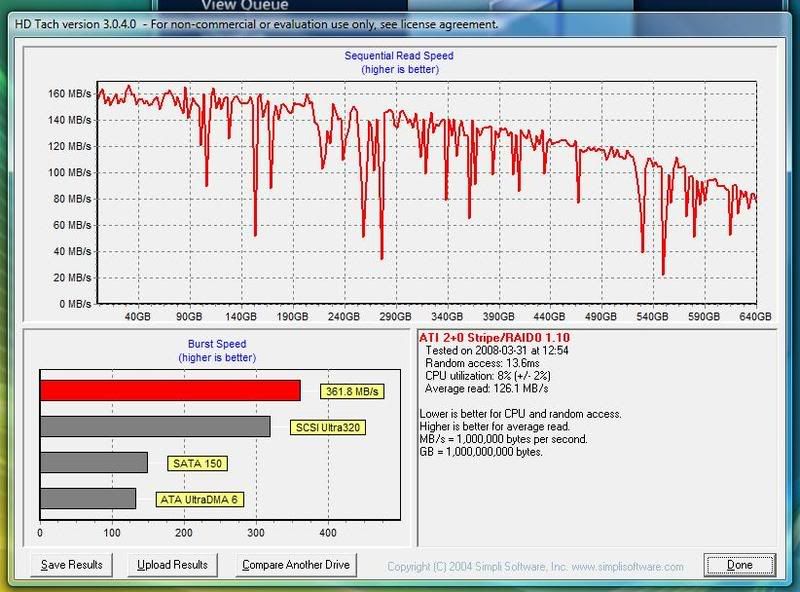
After
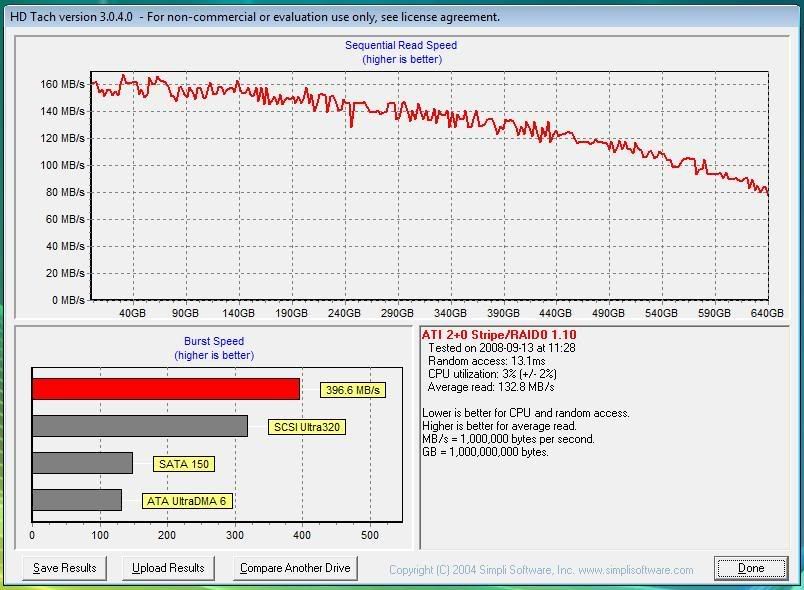
------------------
You see, your comparison is low end, low power WD vs. top of the line Seagate.
So quit seagating me.
Currently, WD has 3 Godlike sets of drives: black edition, RE2 and RE3 that are overall undefeatable by any other company's SATA HDDs.
Getting back to you futile comparison, either you compare RE3 or black with .11 (high end comparison) either .7 with the WD GP models (old tech/low end). In any case, the equivalent WD wins.
And here's your .11 getting owned with even 40% by the respectable HDDs (Spinpoint F1, deskstat 7k1000 and RE2, and above) : http://techreport.com/articles.x/15363/6
--------------------------- 
All those hard drives are much more expensive than the one I quoted for $68.99. I did metion they both have identical prices. Unfortunately for WD I would have to nearly double the price to get a better hard drive from them, and to start getting into RE2 and all those ones, more than double in some case. Some of those hard drives are $204!!!

But I can see you are on the kool-aid and WD seems to win in every aspect. Cool. So why do we have other manufacturers making hard drives if WD is the shiznit? I mean, I did see the Samsung F1 above WD in those tests. We're obviously not including the Raptor or VelociRaptor since those are outrageously expensive hard drives for their performance.
--------------------------
 Another bug I experienced is this -- RAIDXpert or your hard drive may not work if you have a certain combination of SATA/IDE or SATA ports enabled on the SB600, SB700 and SB750 motherboards. For me, it is SATA Port#1 when using Port#2 which causes this (huge performance loss). If I change ports to using #3, #4, #5 then all starts working fine. I don't know why this occurs, it is a platform wide bug.
---------------------------
7-Series Discrete Chipset 

The AMD 790FX and AMD 790GX chipset-based motherboards form the backbone of the "Dragon" platform. Get ultimate performance and platform level efficiencies for an immersive gaming experience with speed, control and total exhiliration.
The AMD 7-Series Chipsets are designed for AMD Phenom™ true quad-core processors and next-generation graphics.  Performance, scalability, and personalization are coupled with an innovative and efficient design incorporating new technologies.

Features and Benefits

  • Phenomenal Performance
  • Enables Next-Generation Graphics
  • Superior Scalability
  • Ultimate Control
  • Exceptional Power Efficiency

AMD 700 chipsets

The AMD 700 chipset series (also called as AMD 7-Series Chipsets) is a set of chipsets designed by ATI for AMD Phenom processors to be sold under the AMD brand. Several members were launched in the end of 2007 and the first half of 2008, others launched throughout the rest of 2008.

Advanced Clock Calibration

Advanced clock calibration (ACC) is a feature originally available for Phenom families of processors, particularly for Black Edition ones, to increase the overclocking potential of the CPU. ACC is supported by the SB710 and the SB750 southbridges, and available through BIOS settings on some motherboards and AMD OverDrive utility.[43]
It was later discovered that this functionality has the possibility of unlocking the supposedly disabled cores of some Phenom II X2/X3 processors. In normal cases, it is not possible to use or unlock any of those hidden cores because originally those cores were disabled: a technique called "chip harvesting" or "feature binning" used by AMD to sell parts with one or two defective cores which will cause system instability if not disabled.
The following are available through the Advanced Clock Calibration feature:
  1. Auto or manual settings
  2. Allow separate settings for each of the CPU cores
  3. Allowed range: -12% to +12%
  4. Possibility of unlocking AMD Phenom II X2/X3, AMD Athlon II X2/X3 and AMD Sempron locked cores / cache. (with BIOS support)
The principle of ACC is not publicly discussed by AMD but some third-party vendors, including ASUS (Core Unlocker)[44] and Biostar (BIO-unlocKING)[45] have had it for some time. Gigabyte has added this feature, called CPU Core Control, to many NB785/SB710 boards via BIOS update[46], and will be including this feature (now called Auto Unlock) in all of their 800 Series boards with the SB850 chip[47]. On many of the boards, the feature is dependent on BIOS version. 
While NVIDIA also has a similar technology for its nForce 780a motherboards, called NVCC (NVIDIA Clock Calibration) with very similar functionality.
-------------------------------------
Northbridge issues(760G, M770, 780x, M780x, 790GX)
  • All platforms:
    • Low speed instability with HyperTransport version 3 capable processors. HT3 speeds 1.2 GHz up to 1.6 GHz should not be used, only 1.8 up to 2.2 GHz speeds are safe to be used. HT3 processors operating at 1.6 GHz(Phenom X3 8250e, Phenom X4 9100e and Phenom X4 9150e) will suffer from high retry count on the HyperTransport link which may result in hangs on revision A12 northbridges.
  • Windows platform:
    • Microsoft KB959345[60]
Southbridge issues(SB7x0) Most OSes require patches in order to work reliably.
  • Windows platform:
    • Microsoft KB982091[61]
    • Microsoft KB956871[62]
    • Microsoft KB953689[63]
  • Linux platform:
    • HPET operation with MSI causes LPC DMA corruption on devices using LPC DMA (floppy, parallel port, serial port in FIR mode) because MSI requests are misinterpreted as DMA cycles by the broken LPC controller[64]
    • USB freeze when multiple devices are connected through hub (related to AMD Product Advisory PA_SB700AK1)[65]
    • Erratic behaviour of the HPET when Spread Spectrum is enabled (related to AMD Product Advisory PA_SB700AG2)[66]
    • Disabling legacy interrupts for SATA disables MSI too[67]
    • SATA soft reset fails when PMP is enabled and attached devices will not be detected
    • SATA internal errors are ignored because the controller will set Serial ATA port Error when it should not
See also

Saturday, October 15, 2011

AMD support


AMD Processor prices
AMD drivers and downloads
Title
Version
Release Date
AmdvOpt 1.0.1.00286/30/2011
AMD Cool'n'Quiet Software for Windows ME and Windows 2000, Version 1.0.8.1 7/31/2005
AMD LCD Keyboard Applet Version 1.0.0.0026 5/21/2006
AMD Turion™ 64 Mobile Technology PowerNow! Driver Version 1.50.03 Linux 7/20/2005
AMD Dual-Core Optimizer Version 1.1.4 7/31/2008
AMD Processor Driver Version 1.3.2.0053 for Windows XP and Windows Server 2003 (x86 and x64) 8/31/2007
Cpufreq Driver for Linux 2.10.00 9/8/2007
AMD PowerNow! Software for Windows 98SE, Windows ME, Windows NT 4.0 & Windows 2000 Version (exe) 3.0.5 9/30/2005
AMD Athlon™ 64 Cool'n'Quiet Driver Version 1.50.03 Linux 7/20/2005
AMD Virtualization™ Technology and Microsoft® Hyper-V™ System Compatibility Check Utility V310/9/2011
Microsoft Windows® 2000 Patch for AGP Applications on AMD Athlon™, AMD Athlon XP, AMD Athlon MP, mobile AMD Athlon 4 and AMD Duron™ Processors 8/19/2008
AMD Turion™ 64 Mobile Technology, AMD Opteron™ Processors, and AMD Athlon™ 64 Processors Driver Version 1.60.01 for Linux 2.6. 5/18/2006
AMD VOPT 2/13/2011
AMD System Monitor 1.0.0.87/5/2011

AMD processors FAQs

AMD Processor Warranty Coverage and Eligibility - Frequently Asked Questions (FAQs)
This article provides a list of frequently asked questions and answers regarding the eligibility of warranty for AMD processors. It provides information AMD’s warranty policy, what is covered by the warranty and how to submit a warranty request to AMD.

AMD Catalyst™ 11.6b Hotfix: Resolves blue screen, screen flicker at idle and corrupt mouse pointer issues. Also, provides AMD Catalyst driver support for A8 – AMD Radeon™ HD 6550D and A6 – AMD Radeon HD 6530D series of products
This article provides a download link to AMD Catalyst™ 11.6b Hotfix, which provides AMD Catalyst driver support for A8 - AMD Radeon HD 6550D and A6 - AMD Radeon HD 6530 series of products and resolves blue screen, screen flicker at idle and corrupt mouse pointer issues.

AMD Catalyst™ 11.6a Hotfix: AMD Catalyst driver support for A8 – AMD Radeon™ HD 6550D and A6 – AMD Radeon HD 6530D series of products
This article provides a download link to AMD Catalyst™ 11.6a Hotfix, which provides AMD Catalyst driver support for A8 - AMD Radeon HD 6550D and A6 - AMD Radeon HD 6530 series of products.

Troubleshooting tips that can help resolve system / game software reboot, freeze, crash issues that occur when playing game software
This article provides a series of troubleshooting tips that can help to resolve issues that may occur when playing game software on a system with an AMD processor and / or graphics card installed

How to uninstall and install an AMD processor and a heatsink / fan in a system
This article provides step-by-step instructions on the best method to uninstall and install an AMD processor and heatsink / fan (HSF) to ensure proper function and prevent subsequent damage to the processor and HSF.

How to determine the authenticity of an AMD boxed processor
This article provides information on how to confirm the authenticity of an AMD boxed processor.

AMD Partners: Add-in-Board, Original Equipment & System Builder Configurations
This article provides a list of companies that utilize AMD products. Links to their respective websites are provided to help obtain the necessary warranty, technical support and regional contact information. AMD Radeon™ graphics and AMD Wonder products are commonly licensed by Original Equipment Manufacturers (OEMs) and utilize AMD’s brand to market the product. Although often similar to a retail packaged version of an AMD product, they can be custom-built to unique specifications, and as such these products are supported and / or warranted by the System Builder only.

Low I / O performance and / or increased CPU utilization in a virtualized Windows® XP 32-Bit System
This article provides a hotfix download which resolves low performance on multi-core clients running virtualized Windows XP 32-bit systems with AMD processors, which include symptoms such as degraded I/O performance and increased CPU utilization in the Windows XP guest.

Cooling solutions for AMD Opteron™ processors in a server environment

How to determine if my system’s instability is related to the power supply
One of the key components that is overlooked when troubleshooting system issues is the power supply. This article provides information on possible issues caused by a defective or inadequate power supply and troubleshooting tips to help rule it out as a source.

Which AMD NPT Family 0Fh Processor supports Secure Virtual Machine mode (also called AMD Virtualization™ technology, AMD-V™ technology, and SVM)
The following processors include support for Secure Virtual Machine (SVM) mode, also called AMD Virtualization™ technology: - AMD Opteron™ processors* - AMD Athlon™ processors* - AMD Turion™ 64 X2 mobile technology*

CPU-8: After upgrading to a new processor, the system will no longer pass a Power On Self Test (POST) and/or load the operating system
The system will not pass a Power On Self Test (POST) and/or load the operating system. The only system change was a processor upgrade. The case lights (Power, Hard Drive or Disc Drive LED) light up and the internal fans spin, confirming that the system is receiving power.

AMD Processors with Rapid Virtualization Indexing Required to Run Hyper-V in Windows® 8
This article provides a list of AMD processors that support AMD Virtualization™ (AMD-V™) Technology with Rapid Virtualization Indexing (RVI), also known as nested page tables or Second Level Address Translation (SLAT) necessary to support Hyper-V virtualization technology in Microsoft® Windows® 8.

How do I request reliability and quality data reports for AMD processors and chipsets?
The following customer inquiries are to be processed via the Customer Inquiry Form: - Product Content, including RoHS, WEEE, MDDS - Packing Material

The correct number of Processor cores is not recognized correctly in a Microsoft Windows based system after a processor upgrade
The processer was recently upgraded to one with more cores, but the original Microsoft Windows installation was kept. In the Microsoft Window’s Device Manager / Task Manager, the correct number of processor cores is not shown.

Security Features Available on an AMD Processor-in-a-box (PIB)
This article provides information on the security features available on an AMD PIB

CPU-10: The system is functioning as expected with no signs of instability, but the software / utility used to monitor the processor’s temperature shows the processor to be running above its maximum operating temperature
Through the use of the motherboard’s BIOS utility or through third party monitoring software, the processor’s temperature reading is above its maximum operating temperature. However, the system is functioning as expected with no signs of instability, such as slow performance, blue screen, system hang or reboot.

AMD Catalyst 11.10 Preview driver


Should I restart my computer system after I load a program or application?
Although it may not be necessary, it is recommended to always restart your computer after installing a program, application, patch or driver.

How can I tell how many processor cores are being identified by my Linux OS?
Look at /proc/cpuinfo for full details about each logical processor core detected.
Do all power supplies fit into a computer case the same way?
Power supplies can vary greatly. Make sure that the model has the following characteristics: It follows the power supply recommendations provided by AMD; It will fit properly into the computer case.

I don’t want to upgrade to a newer version of Linux quite yet.  Can I still take advantage of dual-core processing?
Any Linux distribution that supports Hyperthreading should recognize additional cores on each AMD64 dual-core processor, though due to differences not all cores on all processors may be recognized.

How can I identify my AMD® processor?
 identify the processor and its specifications.

What is DDR2 memory and what is the benefit to customers? What speeds of DDR2 will AMD support?

Can I install my original, preconfigured hard drive from my old computer into an AMD® processor-based system, since it has all my programs and data on it?
It is not recommended to use a preconfigured hard drive in a new system build. Doing so can cause system instability or loss of performance.

What do I need to know when installing Win64?
All device drivers must be 64-bit.  32-bit device drivers don't work.  Make sure you have 64-bit drivers for all the devices in your system.  This includes the chipset on your motherboard.

What companies are AMD® Authorized Distributors?
Refer to the AMD Distributor Search for a list of available AMD Authorized Distributors.

What are the key features of AMD® 64-bit technology processors?
AMD64 processors have the following features: 32-bit and 64-bit software compatibility, Integrated DDR Memory Controller, A system bus that uses HyperTransport™ Technology for communication…

What do HE and EE stand for?
HE stands for “Highly Efficient” processing for servers and workstations. EE stands for “Energy Efficient” processing.

What is the difference between AMD Opteron™ PIB and AMD Opteron PIB without Fan?
The only difference between the two products is the heatsink/fan is not included in the AMD Opteron™ PIB without Fan.

737-0061: Does the AMD multi-core processor design have more than one AMD processor on a single die?
The AMD Athlon 64 FX-60 dual-core processor design is true dual core - with two cores on one die. Unlike other designs, it is not two separate processors in one package.

Are there any BIOS / CMOS settings in my motherboard that I should be aware of?


What type of warranty does AMD® provide for its processors?
AMD provides two types of processor packages: Processor-in-a-box (PIB) Warranty and OEM / Trade Product Warranty

How do I clean used thermal solution material off of my AMD® 64-Bit processor and heatsink/fan?
Once a heatsink is uninstalled, the original thermal solution material that was applied should never be re-used to mount a heatsink on an AMD64 processor.

When installing an application, I sometimes see an option that says the file being written is older than the one presently on my system. What should I do?
When installing an application, it is common to receive a message indicating that a file being replaced is newer than the file replacing it. In such cases, it is usually best to keep the newer file.

How do I determine the operating specifications (temperature, voltage, frequencies, etc.) of my AMD64 technology processor?
The operation specifications of all retail boxed AMD64 processors can be found by visiting AMD’s product comparison page.

Has the model number scheme changed for the Multi-Core AMD Opteron processors?
The model number scheme differs amongst the different types of AMD Opteron Processor sockets.

Instructions on how to remove the heatsink/fan provided with a PIB processor
This article provides step by step instructions on the installation, removal and / or re-installation of the supplied PIB heatsink / fan unit. Included is a list of recommended thermal materials required for re-installation.

CPU-5: The processor seems to be overheating causing the system to become instable
The motherboard BIOS or system monitoring software reports extremely high CPU temperatures and the system is experiencing random crashes, shut downs, blue screen errors or other system instability

Socket AM2+ Phenom II processors are not compatible with AM3 motherboards. Forced installation can cause damage not covered by AMD warranty
CPU-4: At idle or under a light applications load, the processor utilization jumps between 50% to 100% causing the system to experience extreme lag and or performance decrease
When the computer is idling and/or while light load applications (such as web browsing, office applications, media players, etc.) are being utilized, the processor utilization jumps up to 50% - 100% usage continuously.

CPU-3: System experiences a blue screen and displays an "A clock interrupt was not received on a secondary processor within an allocated time" error
Customers have received the error message in a variety of system configurations. The common system denominators identified are Windows Vista (32 or 64 bit) and an overclocked processor.

AMD System Monitor
AMD System Monitor is a Processor (CPU), Graphic card (GPU) & Memory utilization tool that illustrates the different workloads of the CPU and GPU.

How to find the serial number on an AMD processor
This article provides information on how to find the serial number on an AMD processor. 

 AMD tecnical documentes
44455 Socket FS1 Design Specification
3.008/24/2011
48063 Revision Guide for AMD Family 15h Models 00h-0Fh Processors
3.0010/11/2011
42301 BIOS and Kernel Developer’s Guide (BKDG) for AMD Family 15h Models 00h-0Fh Processors
3.0010/11/2011
49686 Family 15h Models 00h-0Fh AMD FX-Series Processor Product Data Sheet
3.0010/11/2011
40523 Socket AM3 Design Specification
1.064/26/2010
49895 Family 12h AMD E2-Series Processor Product Data Sheet
3.007/20/2011
49894 Family 12h AMD A-Series Processor Product Data Sheet
3.007/20/2011
47610 Socket FM1 Design Specification
3.008/30/2011
41131 BIOS and Kernel Developer’s Guide (BKDG) For AMD Family 12h Processors
3.0210/9/2011
44739 Revision Guide for AMD Family 12h Processors
3.049/8/2011
40555 Performance Guidelines for AMD Athlon™ and AMD Opteron™ ccNUMA Multiprocessor Systems
3.006/25/2006
31839 Low-Profile Socket S1 Design Specification
3.014/10/2007
21928 3DNow!™Technology Manual
G-02/29/2000
43724 Lightweight Profiling Specification
3.088/23/2010
34434 AMD I/O Virtualization Technology (IOMMU) Specification
1.262/9/2009
46878 Family 10h AMD Phenom™ II Processor Product Data Sheet
3.054/26/2010
20734 AMD Processor Recognition Application Note
3.1312/14/2005
32035 Compiler Usage Guidelines for AMD64 Platforms Application Note
3.2210/31/2007
40036 Family 10h AMD Opteron Processor Product Data Sheet
3.046/21/2010
24707 Clock Generator Specification for AMD Athlon™ and AMD Opteron™ Processors
3.089/15/2003
 

Monday, September 26, 2011

The AMD FX Bulldozer overclocking

8,42 GHz with Nitrogen cooling
AMD recently broke the overclocking Guinness World Record at 8.429 GHz with the new 8 core AMD FX-8150 processor.

Wednesday, August 12, 2009

AMD AM3 sockel

Source
Die Sockel-AM3-CPUs des Phenom II sind den bisherigen AM2/AM2+ Modellen sehr ähnlich. Jeder Kern besitzt je einen 64 KB großen L1 Data Cache und 64 KB Instruction Cache, was bei einem Vierkern-Prozessor zusammengerechnet 512 KB ergibt. Darüber hinaus verfügt jeder Kern ebenfalls über 512 KB L2 Cache. Beim X4 sind es also insgesamt 2 MB, beim X3 1,5 MB. Schließlich kann jede CPU, je nach Modell, auf entweder 4 oder 6 MB shared L3 Cache zugreifen.

Der Sockel AM2+, hier auf dem Asus M3A79-T

Der eigentliche Unterschied zwischen den heute vorgestellten Phenom-II-Prozessoren und denen, die im Januar präsentiert wurden, liegt im Speichercontroller. Es bleibt zwar beim 128-Bit Controller, der auf zwei 64 Bit breite Speicherkanäle zugreifen kann. Doch im Gegensatz zum bisherigen Phenom II, dessen Speichercontroller bei 1,8 GHz läuft, taktet er in den AM3-Modellen mit bis zu 2 GHz. Außerdem kann das neue Modell neben DDR2-1066 auch DDR3-1333 Module ansteuern. Rüstet man sein System mit DDR3-1333 aus, darf man aber auch nur ein einziges Modul pro Kanal einstecken. Man sollte bei der Speichermenge also ruhig ein wenig in die Zukunft blicken.
Neben dem Speichercontroller wird auch das HyperTransport Interface beschleunigt, und zwar ebenfalls von 1,8 auf 2,0 GHz. Damit steigt die theoretische Bandbreite von 31,5 auf 33,1 GB/s.
Dass der 45 nm Phenom II für den Sockel AM3 mit etwa 758 Millionen Transistoren und einer Die-Fläche von 258 mm² dieselben Eckpunkte aufweist wie der Phenom II X4 940/920, legt die Vermutung nahe, dass beide den gleichen Die nutzen. Damit bleibt als großer (äußerlicher) Unterschied nur der Sockel selbst. Da man auch beim besten Willen keinen 940-Pin AM2(+) Prozessor in einen AM3-Sockel mit 938 Löchern bekommt, muss man wohl oder übel auf AMDs Zusage vertrauen, dass schon bald schnellere CPUs für den neuen Sockel folgen werden. Geduld ist aber nicht unbedingt die Stärke eines Hardware-Testers - er zeichnet sich eher durch Experimentierfreude aus. Also wollten wir versuchen, unseren AM2+ Phenom II schon heute auf dem neuen Sockel zum Laufen zu bringen. Doch dazu mehr auf der nächsten Seite.

Sockel AM3auf dem Asus M4A79T Deluxe

Leistungsaufnahme
Mit dem Phenom II steht AMD beim Stromverbrauch gegenüber Intel wieder ein gutes Stück besser da. Die wichtigste Veränderung ist die Einführung von vier P-States, gegenüber den zweien der ersten Variante. So können die Prozessoren sich im Leerlauf auf bis zu 800 MHz heruntertakten. Damit verringert sich auch die Leistungsaufnahme, was den Phenom II sehr viel effizienter macht als seinen Vorgänger.
Gleichzeitig hat AMD auch andere Änderungen vorgenommen. So können die einzelnen Kerne nun nicht mehr unabhängig von einander ihre P-States ändern. Wurde eine Thread auf einem Kern gestartet, der nur mit halbem Takt lief, schlug sich das entsprechend in der Performance nieder. Beim Phenom II laufen immer alle vier bzw. drei Kerne mit demselben Takt. Durch die feiner abgestuften P-States erreicht man aber eine viel bessere Balance zwischen Stromverbrauch und Geschwindigkeit.
Der Phenom X4 9950 Black Edition mit 2,6 GHz war der letzte der ursprünglichen Phenom CPUs. Dieser Prozessor hat ein TDP von 140 Watt, was in einigen Fällen zu Problemen führte: Einige der preiswerteren Mainboards waren nicht für solche Lasten ausgelegt und gaben schnell den Geist auf. Der Umstieg auf den 45 nm Immersion Lithography Herstellungsprozess hat es AMD erlaubt, den Stromhunger des Phenom II zu zügeln. So schmückte sich der X4 940 bei 3 GHz schon mit einer TDP von 125 Watt. Alle heute vorgestellten AM3-Chips sind sogar noch ein wenig sparsamer und haben ein TDP von 95 Watt.

Sockel AM3: AMD Phenom II X4 & DDR3-Speicher

Source

Ewig der Zweite zu sein ist eine gute Motivation, die Dinge ein wenig anders - und besser - als die Konkurrenz anzugehen. Für AMD hat das bedeutet, sich den Ruf zu erarbeiten, besonders langlebige Plattformen anzubieten - und Übergänge zu neuen Plattformen möglichst reibungslos für die Kunden und Nutzer zu gestalten.
Als Intel den Core i7 vorstellte, war von vornherein klar, dass man ein X58-Mainboard brauchen würde, welches das LGA1366 Interface des neuen Prozessors nutzt. Davor leistete LGA775 der Core Mikroarchitektur gute Dienste, war aber seinerseits eine Abkehr vom Sockel 478 - auch hier wurde also ein neues Mainboard fällig. Mit jeder Neuvorstellung hat Intel das Herstellungsverfahren seiner CPUs weiter verbessert und dabei die thermischen und mechanischen Eigenschaften angepasst. Jeder neue Sockel hat diesen Anpassungen in der einen oder anderen Weise Rechnung getragen.
Reibungslos von Sockel zu Sockel?
AMDs Prozessoren sind unbestritten ein gutes Stück langsamer als die schnellsten Core i7 Modelle von Intel. Andererseits ist es AMD gelungen, neue Funktionen und die dafür benötigten neuen Sockel reibungsloser einzuführen, als es beim Konkurrenten der Fall war - zumindest oberflächlich betrachtet. In der unten stehenden Tabellen fehlen sowohl der Sockel AM2+ als auch Sockel 940. Letzterer war nur für die High-End Enthusiasten relevant, die sich für einen Athlon 64 FX entschieden hatten. Der Sockel AM2+ ist hingegen das beste Beispiel dafür, wie es AMD geschafft hat, einen "neuen" Sockel einzuführen, ohne die bestehende Käuferbasis mit AM2-Systemen auszuschließen oder vor den Kopf zu stoßen. Man konnte einfach problemlos seine "alte" AM2 CPU in den neuen Sockel AM2+ einsetzen, musste im Gegenzug dafür nur auf die Split Power Planes und HyperTransport 3.0 verzichten.

Sockel AM2+: 940 PinsSockel AM3: 938 Pins

Die Tabelle zeigt allerdings nicht, dass es trotz mechanischer und elektrischer Kompatibilität zu Problemen kommen konnte - etwa wenn man eine CPU mit einer TDP von 140 Watt in ein Mainboard steckt, das damit überfordert ist (wie es bei den frühen AMD 780G Boards der Fall war). Umgekehrt wurden auch neue Mikroarchitekturen auf eine er bestehenden Plattform eingeführt, benötigten aufgrund einer veränderten Spannungsversorgung aber dennoch neue Mainboards (wie bei Intels Conroe-Einführung).

Plattformen mit neuem Sockel
Jahr
AMD
Intel
2001

Sockel 478
2002


2003
Sockel 754

2004
Sockel 939
LGA 775
2005


2006
Sockel AM2

(Intel führt den Core 2 Duo ein; viele Mainboards müssen ersetzt werden)

2007


2008

LGA 1366
2009
(Sockel AM3: neue Prozessoren laufen in alten Mainboards, aber nicht umgekehrt)

Mit der Einführung des Sockel AM3 setzt AMD diesen Kurs beim PGA-ZIF Interface zur Hälfte fort. In AM3-Prozessoren steckt nämlich ein Speichercontroller, der sowohl mit DDR2- als auch mit DDR3-Speicher umgehen kann, sodass man sie sowohl in AM2/AM2+ Boards (mit DDR2) als auch in AM3 Boards (mit DDR3) nutzen kann. AM2/AM2+ Prozessoren fehlt jedoch die Unterstützung für den neuen Speicher, womit sie zu AM3-Boards inkompatibel sind.
AMDs Kalkül dabei ist Folgendes: Es ist wahrscheinlicher, dass sich Enthusiasten für eine der neuen 45-nm-CPUs interessieren und ihre Plattform beibehalten, als dass sie sich ein neues Board kaufen und versuchen, es mit ihrem alten Prozessor zu bestücken. Das ist in unseren Augen ein akzeptabler Kompromiss. Bei der Zahl der Pins unterscheiden sich die Generationen übrigens auch: Während es AM2/AM2+ CPUs auf 940 Pins bringen, sind AM3-Prozessoren mit nur 938 Stiftchen ausgestattet.
READ more...

Tuesday, June 16, 2009

AMD Phenom-ene: X3 vs. X4

Quelle


Vergleich von 3 AMD Prozessoren
Phenom X3 8450 vs. Athlon X2 6400+