Bienvenido! - Willkommen! - Welcome!

Bitácora Técnica de Tux&Cía., Santa Cruz de la Sierra, BO
Bitácora Central: Tux&Cía.
Bitácora de Información Avanzada: Tux&Cía.-Información
May the source be with you!
Showing posts with label malware. Show all posts

Monday, November 25, 2013

PAC: Proxy Auto-Config

PAC: el problema de los scripts proxy maliciosos

1 – PAC: Proxy Auto-Config

Un archivo PAC o Proxy Auto-Config es un recurso reciente que se encuentra en todos los navegadores modernos. Define la forma en que los navegadores web y otros user agent eligen de manera automática el servidor proxy más apropiado (método de acceso) para buscar una determinada URL.
El formato original del archivo PAC fue diseñado originalmente por Netscape en 1996 para Netscape Navigator 2.0. Un navegador compatible con PAC permite el acceso a una lista de funciones definidas en la especificación original de Netscape. Cada navegador ejecuta el PAC en unasandbox y permite el acceso sólo a las funciones JavaScript necesarias para su funcionamiento. Por ejemplo, no es posible acceder al user agent del navegador en un archivo PAC, aunque esté disponible en una página web normal.
PAC es un archivo de texto que define al menos una función de JavaScript, FindProxyForURL(url, host), con dos argumentos: “URL” es la URL del objeto y “host” es el host-name derivado de la URL. Esta función devuelve una dirección de un servidor proxy que se usa para buscar una determinada URL, o un hilo “DIRECT”, si no se requiere un proxy. Por convención, el archivo PAC se llama proxy.pac.
Su aplicación en redes corporativas es en extremo útil para los administradores de redes porque les permite redirigir el tráfico interno. La localización de un archivo PAC está especificada, por ejemplo podría conducir a una URL en la que se encuentra el script; esta URL debe estar definida en la configuración del navegador:


2 – PAC: el “Problem Auto-Config”

3 – PAC: Pequeño-Archivo-Criminal

A medida que algunas compañías antivirus comenzaron a trabajar en la detección de firmas de scripts PAC maliciosos, la respuesta llegó en forma de una mayor ofuscación del código en un intento de burlar la detección.
Y esto tuvo éxito: incluso hoy en día, la mayoría de las compañías antivirus poseen un bajo índice de detección de estos PACs maliciosos. Se trata de una función legítima de los navegadores y puesto que existen PACs legítimos, una variedad de productos de seguridad son extremadamente cuidadosos en sus detecciones para evitar falsos positivos.
Algunos de ellos no pueden ofrecer ninguna solución a este problema.
Los ciberdelincuentes brasileños comenzaron a usar todo tipo de ofuscación JavaScript en estos archivos PAC maliciosos a fin de burlar la detección de firmas. Algunos llegaron más lejos, con la creación de herramientas para automatizar esta ofuscación y su comercialización entre sus pares del ciberhampa a un precio de unos 2500 dólares americanos.

Conclusión

Estos scripts maliciosos quedan fuera del alcance del radar de la mayoría de las compañías antivirus; algunas han fracasado rotundamente en detectar y bloquear estos ataques. Nuestro objetivo es alentar a todas las compañías antivirus para que consideren este vector de ataque y trabajen de forma conjunta para ofrecer una mejor protección y contramedidas eficaces. Hoy en día, los ciberdelincuentes están muy concentrados en burlar las medidas de seguridad y están invirtiendo recursos en herramientas capaces de ofuscar los códigos para que puedan seguir robando furtivamente el dinero de las cuentas de sus víctimas.

Fuente:
Kaspersky Lab


Monday, February 25, 2013

Malware & Co.

How Malware hides and is installed as a Service
A common misconception when working on removing malware from a computer is that the only place an infection will start from is in one of the entries enumerated by HijackThis. For the most part these entries are the most common, but it is not always the case. Lately there are more infections installing a part of themselves as a service. Some examples are Ssearch.biz and Home Search Assistant.
Windows Forensics: Have I been Hacked?
One of the top questions I see on forums is "How do I know if I have been hacked?". When something strange occurs on a computer such as programs shutting down on their own, your mouse moving by itself, or your CD constantly opening and closing on its own, the first thing that people think is that they have been hacked. In the vast majority of cases there is a non-malicious explanation ...
How to delete or rename files and folders that are in use or locked in Windows
One of the more frustrating experiences when using a computer is when you want to delete or rename a file or folder in Windows, but get an error stating that it is open, shared, in use, or locked by a program currently using it.
HijackThis Tutorial - How to use HijackThis to remove Browser Hijackers & Spyware
HijackThis is a utility that produces a listing of certain settings found in your computer. HijackThis will scan your registry and various other files for entries that are similar to what a Spyware or Hijacker program would leave behind. Interpreting these results can be tricky as there are many legitimate programs that are installed in your operating system in a similar manner that Hijackers get ...
How to remove a Trojan, Virus, Worm, or other Malware
If you use a computer, read the newspaper, or watch the news, you will know about computer viruses or other malware. These are those malicious programs that once they infect your machine will start causing havoc on your computer. What many people do not know is that there are many different types of infections that are categorized in the general category of Malware.

Saturday, October 8, 2011

Der Staatstrojaner

Dieser Code fiel bei der Obduktion des Staatstrojaners besonders auf. Es handelt sich wohl um jenen getarnten Teil der Spionagesoftware, der das illegale Nachladen von Programmen ermöglicht. Einmal in Betrieb, kann er sogar digital nie gespeicherte Gedanken lesen. Für Informatiker ist der Code trivial. Für die Bürger, also auch für Richter, Journalisten, Politiker, ist es ein unverständliches Idiom. Aber diese Sprache regelt unser Leben. Wir glauben, eine freie Wahl zu haben, aber längst, so schrieb Lawrence Lessig schon vor Jahren, reguliert uns der unbekannte Code in der digitalen Welt: „Der Code implementiert Werte oder zerstört sie. Er ermöglicht Freiheit, oder er vernichtet sie.“ Wir drucken ihn, um den neuen Analphabetismus der Freiheit anschaulich zu machen. Die Codierer, so Lessig, regulieren die Werte. Die Frage ist, ob die Gesellschaft sie ihnen überlassen will.
Der Code wird morgen in ausführlicher und kommentierter Form im Feuilleton der „Frankfurter Allgemeinen Sonntagszeitung“ abgedruckt.

Tuesday, August 2, 2011

Sentinel Protection Installer

About Sentinel Protection Installer 7.2.2.exe 
Sentinel Software Monetization Solutions
Sentinel software licensing and management solutions help software and technology vendors to implement flexible licensing and distribution models, simplify licensing life cycle processes, protect their software and intellectual property, and license SaaS applications.
List of Products 
Sentinel HASP 5.0 - Learn about Sentinel HASP
Download the Sentinel HASP SDK

Wednesday, June 8, 2011

fwupdate.exe

File Database Index
Name:LGODDFU
Filename:fwupdate.exe
Fix fwupdate.exe errors:Try a Registry Scan
Command:"C:\Program Files\lg_fwupdate\fwupdate.exe" blrun
Description:Software that automatically updates the firmware on LG optical drives when they are released.
File Location:C:\Program Files\lg_fwupdate\fwupdate.exe
Startup Type:This startup entry is started automatically from an entry in your Startup folder in the Start Menu.
HijackThis Category:O4 Entry
Source
Do the following:
Step #1

Run HijackThis, press Scan, and put a check mark next to all these entries:

O4 - HKLM\..\Run: [d4c14f18] rundll32.exe "C:\WINDOWS\System32\sydkyujo.dll",b
O16 - DPF: Win32 Classes -
Close all other windows and browsers, and press the Fix Checked button.
Step #2
Please download VundoFix.exe to your desktop

  • Double-click VundoFix.exe to run it.
  • Click the Scan for Vundo button.
  • Once it's done scanning, click the Remove Vundo button.
  • You will receive a prompt asking if you want to remove the files, click YES
  • Once you click yes, your desktop will go blank as it starts removing Vundo.
  • When completed, it will prompt that it will reboot your computer, click OK.
  • Please post the contents of C:\vundofix.txt and a new HiJackThis log in a reply to this thread.

Note: It is possible that VundoFix encountered a file it could not remove. In this case, VundoFix will run on reboot, simply follow the above instructions starting from "Click the Scan for Vundo button" when VundoFix appears upon rebooting.
Step #3
Please do an online scan with Kaspersky Webscan (You need to use InternetExplorer or enable IEView in Firefox)
Click on Kaspersky Online Scanner
You will be promted to install an ActiveX component from Kaspersky, Click Yes.

  • The program will launch and then begin downloading the latest definition files:
  • Once the files have been downloaded click on NEXT
  • Now click on Scan Settings
  • In the scan settings make that the following are selected:
    • Scan using the following Anti-Virus database:
      Extended (if available otherwise Standard)
    • Scan Options:
      Scan Archives
      Scan Mail Bases
  • Click OK
  • Now under select a target to scan:
      Select My Computer
  • This will program will start and scan your system.
  • The scan will take a while so be patient and let it run.
  • Once the scan is complete it will display if your system has been infected.
    • Now click on the Save Report as button >> name it >> chose "Text file" in the Save as type dialogue
  • Save the file to your desktop.
  • Copy and paste that information in your next post.

Step #4
Please download Deckard's System Scanner (DSS) to your Desktop. Note: You must be logged onto an account with administrator privileges.

  • Close ALL applications and windows.
  • Double-click on dss.exe to run it, and follow the prompts.
  • When the scan is complete, two text files will open - main.txt <- this one will be maximized and extra.txt<-this one will be minimized
  • Copy (Ctrl+A then Ctrl+C) and paste (Ctrl+V) the contents of main.txt and the extra.txt to your post.

The logs can be quite lengthy..use two post if you need to get them all in.
Step #5
Please post back with the VundoFix log "vundofix.txt", the log from the Kaspersky Onlinescan and the main.txt and the extra.txt from the DSS scan. Thanks. 

=====================================

Step #1

Please download ComboFix from here.
  • Very Important! Temporarily disable your anti-virusscript blocking and any anti-malware real-time protectionbefore performing a scan. They can interfere with ComboFix or remove some of its embedded files which may cause"unpredictable results"(Click on this link to see a list of programs that should be disabled. The list is not all inclusive. If yours is not listed and you don't know how to disable it, please ask.)
  • Close any open browsers
Next, please:
  • open notepad and copy/paste the text in the codebox below into it:
    File::
    C:\WINDOWS\SYSTEM32\mljkigd.dll
    C:\WINDOWS\SYSTEM32\rev3\revdrive33b.exe
    C:\WINDOWS\SYSTEM32\cbxurqr.dll
    C:\WINDOWS\SYSTEM32\urqpnmm.dll
    C:\WINDOWS\SYSTEM32\rqromlk.dll C:\WINDOWS\SYSTEM32\ddccyax.dll
    :\Program Files\PLUS!\horevod
    C:\WINDOWS\System32\gebca.dll C:\WINDOWS\System32\hhlowteo.dll Cal C:\WINDOWS\System32\x2\jumper83122.exe.dll C:\WINDOWS\System32\__c006A736.dat
    INDOWS\Tasks\At17.job C:\
    C:\WINDOWS\Tasks\At21.job C:\WINDOWS\Tasks\At20.job C:\WINDOWS\Tasks\At10.job C:\ WWINDOWS\Tasks\At12.job C:\WINDOWS\Tasks\At11.job C:\WINDOWS\Tasks\At19.job C:\WINDOWS\Tasks\At18.job
    C:\WINDOWS\Tasks\At16.jo
    C:\WINDOWS\Tasks\At15.job C:\WINDOWS\Tasks\At14.job C:\WINDOWS\Tasks\At13.job C:\WINDOWS\Tasks\At9.jo bb C:\WINDOWS\Tasks\At8.job C:\WINDOWS\Tasks\At7.job C:\WINDOWS\Tasks\At6.job C:\WINDOWS\Tasks\At5.job C:\WINDOWS\Tasks\At4.job
    C:\WINDOWS\Tasks\At1.job
    C:\WINDOWS\Tasks\At3.job C:\WINDOWS\Tasks\At24.job C:\WINDOWS\Tasks\At23.job C:\WINDOWS\Tasks\At22.job C:\WINDOWS\Tasks\At2.job
    C:\WINDOWS\System32\Process.exe
    C:\WINDOWS\System32\M3BqWtij.exe C:\WINDOWS\System32\WS2Fix.exe C:\WINDOWS\System32\VCCLSID.exe C:\WINDOWS\System32\SrchSTS.exe C:\WINDOWS\System32\dumphive.exe
    rqr.dll C:\WINDOWS\System32
    C:\WINDOWS\System32\tmp.reg C:\FOUND.001 C:\WINDOWS\System32\ddccyax.dll C:\WINDOWS\System32\urqpnmm.dll C:\WINDOWS\System32\rqromlk.dll C:\WINDOWS\System32\cbx u\mljkigd.dll C:\WINDOWS\System32\gebca.dll Folder:: C:\WINDOWS\SYSTEM32\rMa01yy C:\Documents and Settings\Steve\Desktop\SmitfraudFix C:\VundoFix Backups C:\WINDOWS\System32\rev3
    LOCAL_MACHINE\~\Browse
    C:\WINDOWS\System32\x2 C:\WINDOWS\System32\dn5 C:\WINDOWS\System32\rMa01yy Registry:: [-HKEY_LOCAL_MACHINE\~\Browser Helper Objects\{334FA082-A58D-46C6-B212-74EDCFAC1F80}] [-HKEY _r Helper Objects\{5EC6E847-7997-4740-82B7-473337292592}] [-HKEY_LOCAL_MACHINE\~\Browser Helper Objects\{762E6DBB-D6C5-4FFB-8FA6-4ACFD915F429}]
    f2-dbca-bec4-127673ac31f9}] [-HKEY_LOCAL_MACHINE\~\Browser Helper Objects\{9f13ca37-6
    [-HKEY_LOCAL_MACHINE\~\Browser Helper Objects\{9BF6EEBD-0CE8-49AD-B93B-7EBBD4BF8C4A}] [-HKEY_LOCAL_MACHINE\~\Browser Helper Objects\{cb84aeba-0 b721-4ceb-acbd-2fb0abea48bc}] [-HKEY_LOCAL_MACHINE\~\Browser Helper Objects\{BD8C2951-3AA1-4B36-9D6B-E52EF2AF4B5E}] [-HKEY_LOCAL_MACHINE\~\Browser Helper Objects\{C3D2C229-221A-4FC0-B8A8-6CE67CA50DBE}]
    Helper Objects\{F5797728-155E-42DC-93AA-2B30C75092C6}] [-HKEY_LOCAL_MACHINE\software
    [-HKEY_LOCAL_MACHINE\~\Browser Helper Objects\{E4EDD9AB-44E8-43B1-845B-FD5D882245C1}] [-HKEY_LOCAL_MACHINE\~\Browser Helper Objects\{F397DE4B-7E21-4B11-9DC8-2F4FC7A67EE4}] [-HKEY_LOCAL_MACHINE\~\Browse r\microsoft\windows nt\currentversion\winlogon\notify\hobpyupn] [HKEY_LOCAL_MACHINE\software\microsoft\windows nt\currentversion\windows] "appinit_dlls"=- [-HKEY_LOCAL_MACHINE\~\Browser Helper Objects\{334FA082-A58D-46C6-B212-74EDCFAC1F80}]
    B-7EBBD4BF8C4A}] [HKEY_LOCAL_MACHINE\system\currentcontrolset\control\lsa] "Authentic
    [-HKEY_LOCAL_MACHINE\~\Browser Helper Objects\{5EC6E847-7997-4740-82B7-473337292592}] [-HKEY_LOCAL_MACHINE\~\Browser Helper Objects\{762E6DBB-D6C5-4FFB-8FA6-4ACFD915F429}] [-HKEY_LOCAL_MACHINE\~\Browser Helper Objects\{9BF6EEBD-0CE8-49AD-B9
    3ation Packages"=hex(7):6d,73,76,31,5f,30,00,00
  • Save this as CFScript.txt
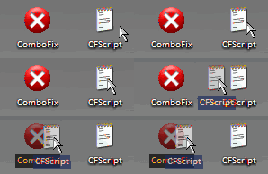
    Posted Image
    Refering to the picture above, drag CFScript.txt into ComboFix.exe
  • When finished, it shall produce a log for you, C:\ComboFix.txt. Post that log in your next reply.
    Note:
    Do not mouseclick combofix's window whilst it's running. That may cause it to stall
  • Additonally, ComboFix will generate a zipped file on your desktop called Submit [Date Time].zip
    Please submit this file via the html page that should popup after running ComboFix.
    Please include a link to this topic in the message.
Step #2
Please post back with a fresh HijackThis log and the ComboFix log. Thanks. 

READ MORE at link

Saturday, August 7, 2010

Desinfectar dispositivos USB

Désinfecter une clé USB ou un disque amovible
De plus en plus, les lieux publics (cyber café, lycées, bibliothèques...) deviennent de vrais nids à infection, ces PC infectés par inadvertance ou malveillance propagent entre autres des infections s'attaquant aux disques amovibles que l'on peut y brancher !
Ce sont donc des infections qui se propagent par supports amovibles : clé USB (cas le plus fréquent), disque dur externe, carte flash, ipod, lecteur MP3, appareil photo, etc...
Tout disque amovible inséré dans un ordinateur infecté sera infecté à son tour si l'infection est active. Autrement dit, l'infection se fera automatiquement par simple connexion si l'exécution automatique est activée pour les lecteurs amovibles.
Le simple fait d'ouvrir le poste de travail et de double-cliquer sur la clé usb / disque dur externe (ré)infectera le système d'exploitation ! La clé infectera à son tour un PC sain. Et ainsi de suite ...
  • Le double-clic pour ouvrir vos supports amovibles infectés ne fonctionne plus.
  • Si vous rendez visible les fichiers et dossiers cachés, vous vous rendrez compte que la clé contiendra plusieurs fichiers et processus inconnus et donc infectés ; ne surtout pas double-cliquer dessus pour les ouvrir car ils rendront active l'infection, si ce n'est déjà fait !
  • L'élément clé pour que l'infection se propage automatiquement de clé en PC et de PC en clé est l'activation de fichier par l'autorun.inf, en faisant un double-clic pour accéder aux fichiers d'une clé !
Méthode de désinfection
Avant de passer l'un de ces outils, assurez-vous d'avoir fermé tous les programmes en cours d'exécution et connectez au PC tous les périphériques externes qui auraient pu être contaminés (disques durs externes, clé USB, iPod...), répétez l'opération de désinfection s'il y a plusieurs disques amovibles susceptibles d'avoir été infectés.
Flash_Disinfector
  • Télécharger Flash_Disinfector (de sUBs) sur le Bureau :
    • Flash_Disinfector
    • Note : Ce programme risque de déclencher une alerte de l'antivirus : si c'est le cas, il faut le désactiver temporairement, c'est une fausse alerte.
    • Double-cliquer sur Flash_Disinfector.exe pour le lancer.
    • Si la clé n'est pas introduite, il sera demandé de la connecter.
    • Quand le message : "Plug in your flash drive & clic Ok to begin disinfection" apparaîtra :
    • connecter les clés USB et/ou périphériques USB externes susceptibles d'avoir été infectés.
    • Puis cliquer sur OK
    • Les icônes sur le bureau vont disparaître jusqu'à l'apparition du message: "Finish"
    • Appuyer ensuite sur "OK", pour faire réapparaître le bureau.
UsbFix 
UsbFix est un programme spécifique en constante évolution, conçu par El Desaparecido et C_XX , son rôle est la suppression d'infection se propageant via les supports amovibles Il rétablit certaines fonctions de sécurité endommagées, comme l'accès au registre, au gestionnaire des tâches, à l'affichage des fichiers cachés etc .
Il est écrit en langage de commandes ( Batch ) et fonctionne uniquement sous Windows XP, Windows Vista et Windows 7.
Vous trouverez sur ce site, des informations détaillées sur l'utilisation de l'outil ainsi que sur l'infection qu'il traite . Il est fortement conseillé en cas d'infection , de ce faire aider par des personnes expérimentées sur des forums existants .
L'outil procède à un backup de la base de registre avant nettoyage , ce backup est situé : C:\UsbFix\Backup .
Tout les fichiers supprimés par l outil sont sauvegardé sous l extension .UsbFix : C:\UsbFix\Quarantine .
Après le nettoyage , UsbFix procédera à la vaccination de vos lecteurs , l'outil créera des dossiers autorun.inf (vaccination) vous protegeant ainsi d'une future réinfection.
Si vous souhaitez vous séparer de cette vaccination ( non conseillé ) , vous pouvez télécharger cet utilitaire
 .


A- Option Scanner d' Usbfix ( recherche )
  • Télécharger UsbFix (d' El desaparecido & C_XX).
  • Important : brancher les sources de données externes au PC (clé USB, disque dur externe, carte SD, etc...) sans les ouvrir.
  • Double-cliquer sur le programme UsbFix.exe sur le Bureau, l'installation se fera automatiquement.
  • /!\ Désactiver la garde de l'antivirus pour éviter tout conflit lors de l'utilisation de l'outil.
  • Cliquer sur le bouton Recherche.
  • Laisser travailler l'outil.
  • Poster le rapport UsbFix.txt obtenu si vous avez créé un sujet sur le forum Virus/Sécurité.
  • Note : le rapport UsbFix.txt est sauvegardé à la racine du disque (C:\UsbFix.txt).
B- Option Suppression d' Usbfix ( nettoyage )
/!\ Avant de passer l'option Suppression, il est recommandé de demander conseil sur le forum Virus/Sécurité. /!\
  • Important : brancher les sources de données externes au PC (clé USB, disque dur externe, carte SD, etc...) sans les ouvrir.
  • Double-cliquer sur le programme UsbFix sur le Bureau.
  • Cliquer sur le bouton Suppression.
  • Le Bureau disparaîtra et réapparaîtra à le fin de la désinfection.
  • Ensuite, poster le rapport UsbFix.txt qui apparaîtra avec le Bureau si vous avez créé un sujet.
  • Note : le rapport UsbFix.txt est sauvegardé à la racine du disque (C:\UsbFix.txt).
Tutoriel sur UsbFix.

RAV d'Evosla


RAV est un soft qui traite les virus et vers qui se trouvent dans les racines des lecteurs fixes et amovibles.
Pour le télécharger, cliquez ici
Désinfecter une clé usb/disque amovible :
  • Télécharger Rav
  • Brancher les disques amovibles sans les ouvrir avant de lancer le Fix
  • Décompresser l'archive sur le bureau
  • Double-cliquer sur RAV.exe pour lancer l'outil
  • Une fois RAV lancé, il scannera automatiquement tous les lecteurs susceptibles d'être infectés
  • S'il y a infection un rapport s'établira, sinon le soft affichera le message : « Votre Ordinateur est sain »
  • Retirer les disques amovibles et redémarrer l'ordinateur.
Autres outils
Voici trois autres outils que vous pouvez utiliser pour compléter la désinfection :
  • L'outil Symantec
    • Sur le bureau, double-cliquer sur le fichier FxRajump.exe
    • Puis cliquer sur Start pour lancer le nettoyage.
    • En fin de nettoyage, une fenêtre s'ouvrira pour signaler la fin de la recherche.
    • Le fichier FxRajump.log sera créé sur le bureau, avec le listing des suppressions de fichiers/clés registre.
  • L'outil McAfee
    • Cliquer sur "Download v3.x.x" pour télécharger le fichier, puis le lancer.
    • Si les lettres correspondant aux périphériques externes n'apparaissent pas automatiquement dans la liste des lecteurs à scanner, les rajouter manuellement en se servant du bouton "Browse" pour les sélectionner.
    • Puis lancer le nettoyage en cliquant sur le bouton "Scan Now".
  • L'outil Autorun Plasma : Télécharger Autorun Plasma
    • Télécharger le fichier ZIP.
    • Placer son contenu à la racine de votre clé USB.
Important : Tant que vous ne serez pas sûr(e) d'avoir éradiqué l'infection, n'ouvrez aucun des disques ou périphériques externes, sous peine de relancer l'infection !
Cas des ordinateurs en réseau
  • Par exemple, le ver Rjump (AdobeR.exe, Ravmonlog...) en plus de se copier sur les périphériques externes, se propage aussi en utilisant les dossiers partagés sur les postes en réseau et ouvre une backdoor (= « porte dérobée ») en configurant à l'insu de la personne, une exception dans le pare-feu de Windows. Il y a donc de fortes chances pour que le ver se soit propagé dans les fichiers partages réseau.
  • Si un PC est en réseau, il faut l'isoler du réseau et vérifier que les dossiers/disques partagés sont propres, ne pas les reconnecter tant que vous n'êtes pas sûr(e) que les autres machines sont propres ou désinfectées elles aussi, sinon vous risquez de voir l'infection se propager de nouveau !
Comment se prémunir au quotidien sur des PC publics ?
  • La plupart des ordinateurs publics, et beaucoup d'ordinateurs privés sont touchés par des infections se transmettant par disques amovibles. Pour éviter ça, une précaution très simple à prendre est de vacciner vos disques amovibles.
  • Il suffit de créer des répertoires portant le nom des fichiers infectieux les plus courants, et surtout des répertoires portant le nom autorun.inf pour bloquer le mécanisme de propagation de ce type d'infection. Une fois ces répertoires verrouillés en lecture seule, l'infection ne pourra écraser un fichier/dossier existant et ne pourra donc pas se propager ! (Merci à Gof pour cette astuce ;-) )
  • Pour faire ces vaccinations, vous pouvez utiliser le programme suivant : VaccinUSB.exe. Il vous suffit de le lancer pour créer des répertoires de vaccination, et vous pourrez ensuite supprimer le fichier VaccinUSB.exe.
  • Cette astuce très pratique vous permettra de garder votre clé USB propre même en la connectant à un pc infecté !
  • /! Lors du téléchargement de ce programme, votre antivirus va se déclencher. Pas de panique, c'est juste une partie du code de VaccinUSB qui est détecté à tord par les antivirus , donc Faux Positif.
  • Autres outils de vaccination:
    • Usbfix déjà présenté permet de vacciner : il suffit de le lancer et de choisir l'option 3 ( l'option 2 de suppression vaccine en même temps les périphériques connectés )
    • Rav d'Evosla déjà présenté permet de vacciner: il suffit de le lancer et de choisir de vacciner son pc puis de redemarrer son pc.
    • Flash Disinfector déjà présenté permet aussi de vacciner sont pc : si vous l'avez lancé il se charge de virer les infections trouvées et de vacciner son pc en créant un fichier autorun à la base du disque.
    • Panda USB and AutoRun Vaccine :
    • Téléchargez Panda USB and AutoRun Vaccine.
    • Installez le logiciel en choisissant les options désirées ("auto-vaccin" de chaque clé dès son branchement, démarrage automatique de l'application, activation du support NTFS ...).
    • Lancez l'application.
    • Vaccinez vos supports USB et votre PC.
    • Usb-set est un outil utilisable pour protéger ses supports externes: tutoriel ici: http://forum.zebulon.fr/usb-set-ver-10-t173063.html
Désactiver l'autorun des supports amovibles en gardant le support pour les CD/DVD
Microsoft met à disposition une mise à jour permettant cette fonction : mise à jour KB 971029.
Pour en savoir plus, consultez la page suivant : http://support.microsoft.com/kb/971029
Choisir le fichier de maj en fonction de vôtre version de Windows.

Friday, March 19, 2010

Pirated Version of Windows 7

Has Malware Built-in
Security researchers are warning that Internet users who install pirated versions of Microsoft's latest Windows 7 operating system may also be installing malicious software, too.
Experts at Atlanta-based security firm Damballa say they first noticed
hacked versions of the Windows 7 release candidate available on peer-to-peer file-sharing networks and newsgroups last week, shortly after the OS was released to developers.
Damballa found that computers with the tainted versions of Windows 7 were programmed to silently reach out to an Internet server to check for further updates, which in this case is a piece of malware that Kaspersky Antivirus calls Win32.Banload.cdk.
"The first thing this does is phone home and get a list of additional malware to install," said Tripp Cox, vice president of engineering at Damballa.
Damballa managed to grab control over the server that's contacted by the pirated Windows 7 versions -- codecs.sytes.net. -- which is how it knows how many new, compromised installations are requesting the malware. As of Monday afternoon, the company had tracked 3,452 compromised systems hitting the site, with a peak of more than 550 new infections per hour on Sunday.
It's a good idea to avoid installing software of any kind -- operating systems in particular -- downloaded from P2P networks. Bundling malware with executable and installer files is an old trick that is still quite useful and effective today. In fact, there are no shortage of shadowy pay-per-install programs that revolve around this concept, granting tiny commissions to affiliates who spread the poisoned files on P2P networks like BitTorrent. The screen shot below shows a popular pay-per-install forum where affiliates of different programs compare methods for making their poisoned installer files more attractive on P2P networks.

Tuesday, July 28, 2009

Malware classification proposal

Thanks to Joanna Rutkowska (Invisiblethings.org)
Type 0: Malware which doesn’t modify OS in any undocumented way nor any other process (non-intrusive)
Type I: Malware which modifies things which should never be modified (e.g. Kernel code, BIOS which has it’s HASH stored in TPM, MSR registers, etc…)
Type II: Malware which modifies things which are designed to be modified (DATA sections)
  • Type 0 is not interesting for us
  • Type I malware is/will always be easy to spot
  • Type II is/will be very hard to find
Type I malware examples
  • Hacker Defender (and all commercial variations)
  • Sony Rootkit
  • Apropos
  • Adore (although syscall tables is not part of kernel code section, it’s still a thing which should not be modified!)
  • Suckit
  • Shadow Walker – Sherri Sparks and Jamie Butler
  • Although IDT is not a code section (actually it’s inside an INIT section of ntoskrnl), it’s still something which is not designed to be modified!
  • However it *may* be possible to convert it into a Type II (which would be very scary)
Type II malware examples
  • NDIS Network backdoor in NTRootkit by Greg Hoglund (however easy to spot because adds own NDIS protocol)
  • Klog by Sherri Sparks – “polite” IRP hooking of keyboard driver, appears in DeviceTree (but you need to know where to look)
  • He4Hook (only some versions) – Raw IRP hooking on fs driver
  • prrf by palmers (Phrack 58!) – Linux procfs smart data manipulation to hide processes (possibility to extend to arbitrary files hiding by hooking VFS data structures)
  • FU by Jamie Butler
  • PHIDE2 by 90210 – very sophisticated process hider, still however easily detectable with X-VIEW...

Sunday, April 5, 2009

Ads popping up at start

Source
By Elvandil Moderator with 33,943 posts (Microsoft MVP)
06-Mar-2009
You can't remove Internet Explorer. It is part of Vista.
Try removing the toolbar.
Toolbar Cop

And check your startup entries with one of these:
Startup Control Panel
MZ Startup Manager
Startup Control Panel (Exe version for Vista)
Emsa Startup Manager
EM Startup Manager
WheresJames Startup Manager

Startup Programs Reference
If you have ads popping up, you are infected.
Scan with your anti-malware apps, and check your startups with a startup manager.
===================================
Free anti-malware scanners:
MalwareBytes trial
A-Squared
PrevX CSI Free Version
Spybot S&D
RunScanner
Ad-Aware 2007
SuperAntiSpyware
Spyware Eliminator
Emco Malware Destroyer
Spyware Doctor
Arovax Anti-spyware
Trend-Micro Rootkit Buster
F-Secure Blacklight
Bootzilla (Bootable anti-malware CD with many other tools.)

List of freeware security software

Tuesday, February 24, 2009

32-bit Windows or 64-bit Windows?

Source
The Microsoft® Windows® Malicious Software Removal Tool is different for 32-bit Windows and 64-bit Windows. Here is how to tell which you are on.

Vista

Option A: Control Panel

  1. Click Start, type system in the Start Search box, and then click system in the Programs list.
  2. Either 64-bit Operating System or 32-bit Operating System appears for the System type under System.

Option B: System Information Window

  1. Click Start type system in the Start Search box, and then click System Information in the Programs list.
  2. Select System Summary in the navigation pane; either x64-based PC or x86-based PC appears for the System type under Item.  x86 is the 32-bit system.

Windows XP

Option A: View System Properties in Control Panel

  1. Click Start, and then click Run.
  2. Type sysdm.cpl, and then click OK.
  3. Click the General tab. Under System, if you see Microsoft Windows XP Professional x64 Edition Version you have a 64-bit system.  If you see only Microsoft Windows XP Professional Version it is the 32-bit system.

Option B: View System Information window

  1. Click Start, and then click Run.
  2. Type winmsd.exe, and then click OK.
  3. Select the System Summary in the navigation pane.
  4. Locate Processor under Item in the details pane.
    • If Processor value starts with x86, it is the 32-bit system.
    • If Processor value starts with ia64 or AMD64,it is the 64-bit system.

Windows Server 2003

Option A: View System Properties in Control Panel

  1. Click Start, and then click Run.
  2. Type sysdm.cpl, and then click OK.
  3. Click the General tab. Under System, if you see ;Microsoft Windows Server 2003 Enterprise x64 Edition you have a 64-bit system.  If you see only Microsoft Windows Server 2003 Enterprise Edition it is the 32-bit system.

Option B: View System Information window

  1. Click Start, and then click Run.
  2. Type winmsd.exe, and then click OK.
  3. Select the System Summary in the navigation pane.
  4. Locate Processor under Item in the details pane.
    • If Processor value starts with x86, it is the 32-bit system.
    • If Processor value starts with ia64 or AMD64,it is the 64-bit system.

Wednesday, October 15, 2008

CoolWWWSearch

My solution:
Do not use IExplorer version<7! Better: uninstall it completely!
Use Firefox, Flock or Opera instead (with webpage-threat advisors as belarcAdvisor, Sitehound, wot and McAfeeSiteAdvisor)
Don't forget NoScript! And hosts related software to protect zonemapping
Use Spybot Searcha&Destroy!


Company:
Product: CoolWWWSearch
Threat: Hijacker
Description
This piece of malware hijacks the IE start page and redirects to its own sites. This will then lead to a malicious web search page causing popup windows while using IE. The sites may also advertise trojans and/or install them directly without user consent.

Smitfraud-C.

My solution:
Do not use IExplorer version<7! Better: uninstall it completely!
Use Firefox, Flock or Opera instead (with webpage-threat advisors as belarcAdvisor, Sitehound, wot and McAfeeSiteAdvisor)
Don't forget NoScript!
And hosts related software to protect zonemapping
Use Spybot Searcha&Destroy!


Company:
Product: Smitfraud-C.
Threat:
Description
This program installs itself through the internet and creates new desktop wallpaper. This wallpaper looks like a Windows 98 blue screen and contains a warning that the computer is infected with viruses, that one should download run a virus scanner and that the computer wouldn't work in normal mode. In addition to this one gets a desktop icon leading to a pretended anti virus application named PSGuard.
Scanning the computer with this software will return a virus found (that was installed by this software itself). In order to remove this virus one has to download the full version for about 20 EUR.
Another unpleasant effect of Smitfraud-C. is that some configuration options in the Control Panel will no longer be available. This way it stops the user from changing the wallpaper and forces him to keep the blue screen. Overall Smitfraud-C is a very sneaky software trying to sell PSGuard by frightening less experienced users.

WindowsSecurityCenter_disabled

My solution:
Do not use IExplorer version<7! Better: uninstall it completely!
Use Firefox, Flock or Opera instead (with webpage-threat advisors as belarcAdvisor, Sitehound, wot and McAfeeSiteAdvisor)
Don't forget NoScript!
And hosts related software to protect zonemapping
Use Spybot Searcha&Destroy!


Company:
Product: ABetterInternet
Threat: Malware
Company URL:
_http://www.abetterinternet.com/_
Company privacy URL:
_http://www.bestoffersnetworks.com/privacy.php_
Description
Installs an IE Browser Helper Object and delivers advertisement and promotional information while the user is surfing through the Internet. Also collects various information about the user like IP address, his operating system and so on.

Company: Media Motor
Product: MediaMotor
Threat: Adware
Company URL:
_http://media-motor.com/_
Description
MediaMotor gets installed through trojan horses. It causes pop up windows on the desktop without user consent. It creates autorun entries in order to be launched on every Windows startup. It changes the Internet Explorer settings by adding the domain media-motor.net to the zonemaps.

Company:
Product: WindowsSecurityCenter_disabled
Threat: Security
Functionality
if the Windows Security Center is disabled this entry will be shown
Description
Malware can disable the Windows Security Center to make your System more vulnerable.
If you have other security software suit installed, this may also deactivate the Windows Security Center to avoid double warning messages.

180Solutions.SearchAssistant --Threat: Spyware

My Solution: Use Spybot Seearch & Destroy!

Company: 180Solutions, Inc.
Product: 180Solutions.SearchAssistant
Threat: Spyware
Company URL:
_http://www.180solutions.com/_
Company product URL:
_http://www.180solutions.com/_
Company privacy URL:
_http://www.180solutions.com/_
Functionality
"180search Assistant" is a permission-based search assistant application that provides access to a wide range of websites, applications and information powered by 180solutions, Inc. ("180solutions"). This means that 180search Assistant will periodically direct you to our sponsors' websites. 180search Assistant will collect information about the websites you visit, but will not collect any information that will be used by 180solutions to identify you personally. The information that 180search Assistant collects and transmits to 180solutions will be used to provide you with access to comparative shopping opportunities at times when we consider them most relevant. 180search Assistant can be uninstalled at any time by going to the "Add/Remove Programs" menu on your computer and clicking the "Remove" button next to the entry or entries for 180search Assistant.
Description
Renaming the zanu.exe to searchassistant.exe causes the file to register itself as searchassistant in Sytemstart. Also the boomerangg.exe is installed in the windowsdirectory under a variable filename, it is also registered in Systemstart with this variable value. Boomerang.exe does not show up on screen. User IS asked for consent prior to installation of searchassistant but not for Boomerang.
Also the searchassistant.exe has no option for shutting itself down. And since it is also in Systemstart it will practically always run and will always look for updates on 180Solutions Server and install them without user consent.
Depending on the filename the searchassitant has, the behavior may differ a bit. Some variant do NOT ask for any consent and they do NOT show any licesense agreement or privacy policy.
Some variants also do not install the Boomerang.exe
filename variants for the searchassistant.exe are:
zanu.exe
zango.exe
msbb.exe
sac.exe
sau.exe
bmrg.exe
saap.exe
180sa.exe
sahra.exe
180ax.exe
samds.exe
sain.exe
saip.exe
sahrb.exe
sahrc.exe
sahrd.exe
Privacy Statement
Opt In Information. Occasionally, 180solutions may display additional questions to you, inviting you to opt in and supply information that may include demographic information. This demographic information may include, but is not limited to, your age, gender, geographic region and interests. This demographic information is linked to your Anonymous User ID, and is not connected or linked to information that will be used to identify you personally. Any answers you supply are covered by this privacy policy. 180solutions uses this information to learn more about its audience and may share this information with third parties. 180solutions also uses this demographic information to provide you with content and information most likely to be relevant to you.
IP Addresses. Your use of the 180search Assistant software will involve the transmission of your Internet protocol address ("IP Address") to 180solutions' servers. This IP Address is necessary for communication with you via the Internet and may be used and stored on our servers. With the cooperation of your Internet service provider, it is possible for your IP Address to be used to identify you personally, however, 180solutions agrees that it will not use it for this purpose, unless required to by law.
Third Party Collection. We may use other third party services to assist us in providing targeted websites to you. These services may place cookies on your hard drive and use the cookies to tailor delivery of these websites to you by profiling your use of a site or advertisements that you select. These services may collect information such as your IP address, your browser type and the date and time that targeted websites were served to you. You should refer to the websites and privacy policies of the services we use, which may include, but are not limited to: Doubleclick, 24/7 Connect, Fastclick, and Commission Junction. To learn about how they collect and use information visit