Bienvenido! - Willkommen! - Welcome!

Bitácora Técnica de Tux&Cía., Santa Cruz de la Sierra, BO
Bitácora Central: Tux&Cía.
Bitácora de Información Avanzada: Tux&Cía.-Información
May the source be with you!
Showing posts with label internet services. Show all posts

Wednesday, February 17, 2010

Hosted Apps Service

SourceForge.net erweitert Angebot um Hosted Apps Service

SourceForge.net, das Webportal zur Verwaltung von Open-Source-Projekte, erweitert sein Angebot um einen Hosted Apps Service. Die Nutzer können so Open-Source-Programme auf den Servern von SourceForge installieren und erhalten dann einen virtuellen zugang. Sie können damit eigenen Webspace sparen und müssen sich auch nicht mehr um die Wartung oder Updates kümmern.
Zum jetzigen Zeitpunkt sind allerdings erst drei verschiedene Programme als Hosted App auswählbar:
- LimeSurvey - Umfrage-Tool
- MediaWiki - Wiki-Software
- phpBB - Foren-Software
Weitere Applikationen können über die Hosted-Apps-Project-Seite hinzugefügt werden.
Wie auf ReadWriteWeb zu lesen ist, wurde der neue Service den SourceForge-Mitgliedern schon vor einigen Wochen vorgestellt. Jetzt aber habe das neue Angebot die nötige Reife erhalten.

Google Docs with DocSyncer: Sync & backup

...
Google Docs is a good choice for users who intend to publish or share Office documents, workbooks or presentations online in the web, so that the documents and files are accessible while on the move. Google also provides generous storage space capacity for the uploaded files, making Google Docs a perfect solution as a free backup solution for offline files. Google Docs Help Center explains that Google Docs saves to a secure, online storage facility, where users can access the documents from any computer, and, in the event of a local hard drive crash, won’t lose the saved content. And Google servers backs up data almost as often as users can manage to change the contents.
However, Google Docs doesn’t have the auto sync feature to automatically transfer and synchronize files and documents between local computer and Google Docs web server. Users will have to upload the files one by one using Google Docs web interface, although it’s possible to download multiple files at once.
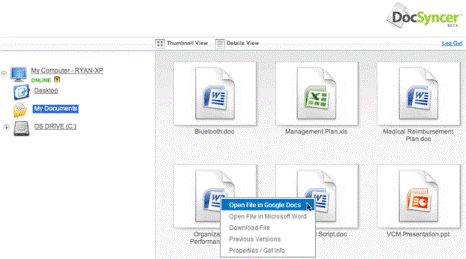
DocSyncer in Action
DocSyncer is the solution the awkward Google Docs upload functionality. DocSyncer, as its name implied, will constantly keep track of any changes and synchronize the documents between local PC hard drive on selected folders, and Google Docs account. If the files do not exist in the web account or local drive, DocSyncer will upload and download the files automatically, including the newly created and saved documents, spreadsheets and presentations. From DocSyncer, users can directly open a document in Microsoft Word, Excel or PowerPoint or open it in Google Docs. It’s also possible to access Previous Versions of the file, although it’s not clear is the feature Vista specific. 
More at:

Google Docs & Google Wave

Google Wave is a personal real-time collaboration and communication platform which allows several users to work on the same tasks together concurrently. Google Docs is another free service from Google which provides web-based word processor, spreadsheet, presentation, and form application.

Google Docs also allows users to to create and edit documents online while collaborating in real-time with other users on the documents, spreadsheets, presentations or forms.
Unfortunately, in Google Wave, -->read more:
How to Share to View or Edit Google Docs and Spreadsheets in Google Wave

Google Docs as storage space

Source: Upload and Store Files In Any Format or Type in Google Docs (Free 1GB GDrive)
It seems like the need to use Gmail storage space as the free online backup storage space and using of Gmail Drive Windows Shell namespace extension to create virtual drive sharing Gmail content may come to an end. Google has officially allowed any type and format of files to be uploaded to Google Docs, effectively make it as long-rumored GDrive.

Previously, only some file formats and extensions that related to Office productivity files are allowed to be uploaded to Google Docs. For example, .HTML file and plain text (.txt), Word document (.doc, .docx), rich text (.rtf), OpenDocument text (.odt), StarOffice (.sxw), PowerPoint presentation (.ppt, .pps), comma separated value (.csv), Excel spreadsheet (.xls, .xlsx) files and OpenDocument Spreadsheet (.ods).
For now on, all file type and file format with any file extension can be uploaded to Google Docs. For example compressed ZIP (.zip), WinRAR archive (.rar), executable (.exe, .msi, .com), and most important, music or song file (.mp3), video file (.avi, .mpg, .rm), photos and pictures (.jpg, .gif, .png) and etc.
All uploaded files can be kept private, made public to share with everybody or selected users only. Some supported file types even can be opened and previewed directly within Google Docs.

The only caveat is that the maximum file size allowed to upload and store on Google Docs is 250 MB.
And Google Docs provides free 1 GB, independent of free  
1 GB for Picasa Web Albums, and still growing free  
7+ GB for Gmail.
Although the free disk space for Google Docs is not big by today standard (Windows Live SkyDrive gives 5 GB free space), Google provides additional storage space to be purchased.
Want to start uploading now? Just head to GDrive Google Docs, and click on “Upload” button.