Bienvenido! - Willkommen! - Welcome!

Bitácora Técnica de Tux&Cía., Santa Cruz de la Sierra, BO
Bitácora Central: Tux&Cía.
Bitácora de Información Avanzada: Tux&Cía.-Información
May the source be with you!
Showing posts with label Mac. Show all posts

Friday, March 22, 2013

Yellow Dog Linux

http://linux.softpedia.com/get/System/Operating-Systems/Linux-Distributions/Yellow-Dog-Linux-10407.shtml
Yellow Dog Linux is the Premier Linux Operating System for PowerPC.
Proven world-wide as the preferred Linux OS for the Power architecture, v4.1 brings Terra Soft into its 8th year of Power Linux development and support. Yellow Dog Linux v4.1 marks a returning point in Terra Soft's effort to again provide a leading desktop Linux OS.
Yellow Dog Linux combines the preferred desktops KDE and Gnome with the latest sound and graphic card support, leading (but not bleeding) edge kernels and stable, functional compilers for code development. And of course, the foundation applications and servers expected of all modern Linux operatings systems for web, database, email, and network services.
What will you do with your PowerMac after Apple switches to Intel?
We have an answer--Faster, more stable, and far more efficient as a desktop OS, Yellow Dog Linux is a solid replacement (not just an alternative) to OSX. Breath new life into your PowerPC G3 and G4, giving it a second wind as a personal workstation, or a new function as a web, email, or data server. Want to see how your G5 runs Linux? You may dual-boot both OSX and Yellow Dog Linux or take the leap and run Yellow Dog Linux alone, taking advantage of the multitude of included, freely available, and commercial applications
Product's homepage
Here are some key features of "Yellow Dog Linux":
· Backlit keys.
· PCMCIA cell phone and modem support.
· Support for Atheros wi-fi cards.
· Dual head config via the GUI.
· Install direct to and boot from FireWire drives.
· USB device auto-mount under both KDE & GNOME.
· Greatly improved sound support.
· Graphical Up2Date package install and update tool.
· Support for the latest Apple Power Books.
· Beta support for Apple G5 PowerMacs with dual core CPUs.
· Beta Extreme driver will be available shortly after release, via YDL.net Enhanced accounts.


What's New in This Release: [ read full changelog ]

· USB boot and install support;
· Linux Kernel 2.6.29 PPC64;
· Linux Kernel 2.6.27 PPC32;
· Added the Xfce 4 desktop environment;
· Updated IMB Cell SDK to version 3.1.0.1;
· Updated the OpenOffice.org office suite to version 3.0;
· Updated Mozilla Firefox web browser to version 3.0.6;
· Improved wireless support;
· Improved Shockwave Flash support;
· Better PS3VRAM support;
· Updated Gnash to version 0.8.4;
· Added Libfreevec.

Thursday, December 8, 2011

Filemaker Pro on Wine

Wine HQ

According to the Wine Application Database (AppDB). Here you can get information on application compatibility with Wine.
Filemaker Pro
Easy to use and program relational database. Currently has native MAC and PC desktop and PC, MAC and Linux native Server Software.
VersionDescriptionRatingWine
version
Test
results
Com
ments
10Version 10Bronze1.1.2920
10 AdvancedFilemaker Pro 10 for developers, the newest Filemaker software, compiled for Windows and Mac. Linux support is oddly missing, although Linux support was present in a previous version of Filemaker Server.Bronze1.1.4420
10 ServerFilemaker Server version 10Garbage1.1.3610
11This version of FileMaker runs well on wine. It is even FAST!Bronze1.3.2046
11 AdvancedVersion 11.0v2Silver1.3.1110
4.0The full 4.0 versionGold1.210
4.1Easy to use and program relational database. Currently has native MAC and PC desktop and PC, MAC and Linux native Server Software.Silver1.0.030
5.0Easy to use database program; nice frontend for 'real' odbc databases. Native mac & windows versions. Mac and Linux server.Gold1.1.4340
5.5Easy to use database program. Native mac & windows versions. Mac and Windows servers available.Silver1.0.130
6 UnlimitedA fantastic Database application, with a very short learning curve.Gold0.9.2.10
6.0According to FileMaker.com this version debuted in 2002 and introduced:Bronze1.0-rc340
8.0Filemaker Pro 8.0 for WindowsBronze0.9.32.30
8.5Database software for Windows and Mac OS.Garbage0.9.40.30
8.5 AdvancedLike the Pro Version, just with some extra features like Runtime Applications.Platinum0.9.46.30
9.0Latest.Gold1.1.3160
9.0 AdvancedThe newest version, including the developer features to create runtime solutionsBronze1.1.840
9.0 DemoDemo of Filemaker Pro v9Gold1.1.4240
----------------
I am able to run Filemaker 10 under Wine v1.1.9. I am running Fedora 10 x86_64. 
----------------
Estoy realmente cansado de todos los problemas que tengo con windows y sus usuarios; altos costos en antivirus y mantenimientos frecuentes por culpa de la gran cantidad de bots y virus imposibles de sacar que viajan en las redes de los clientes.
He instalado la version 8,5 usando wine bajo Ubuntu Hardy. No podía instalar el updater del 8,5 y era muy inestable y funcionaba realmente mal.
sin embargo tuve la idea de copiar los archivos de la carpeta /archivos de programa/filemaker de una instalación nativa de Windows donde ya estaba actualizado el FM en la instalación hecha en wine y el resultado fue sorprendentemente bueno. Funcionan perfectos los archivos alojados en otros host remotos, también funcionan las impresiones.
Pero, no funciona la definición de tablas y campos y aunque no estoy interesado en desarrollar desde linux sino que filemaker funcione perfectamente como cliente. Creo que falta definir algunas fuentes por que el listado de la definición de guiones también sale en blanco.
Es posible que solo sea necesario copiar algunas librerías originales de windows en wine para que todo funcione sin problemas. --por julian.maya » 05 May 2008
-----------------
I installed FMPA 10 on Ubuntu 8.10 desktop (with Wine) and it works slick. I haven't found anything that isn't working. I can hit my server and everything. I am now off to Best Buy to pick up a $199 netbook and to enjoy the new found freedom
-----------------
I have tried to get Filemaker 8,9 and 10 to work in Ubuntu 8.10 with various versions of Wine ranging from 1.0.1 , 1.0.9 , 1.0.13 and the new 1.0.14. I have also tried in openSUSE 11.1 with no luck. With any combination Filemaker Pro installed without errors. When I launch the program the splash screen is a black box with the text showing filemaker loading in the lower right side. It always stops at Mashq
-----------------
Have attempted to use FMP 9 on Ubuntu 8.4 & many updates with Wine 1.0
Was able to install with no issues.
Can open with no issues
Can create tables and fields with some issues:
Not able to see table names as created but can see them in the table/field name area below as I click on the table/field area. "Feel this is an issue with Fonts." Have seen this type of issue in other apps on other platforms in the past.
Also experience lockups in "Layout Mode".
Can create solutions in Ubuntu 8.4 and open them on MS Windows with no issues.
Can create solutions on MS Windows and open them on Ubuntu 8.4 with no issues other than in "Layout Mode".
-------------------
january 2009
I am able to run Filemaker 10 under Wine v1.1.9. I am running Fedora 10 x86_64.
Compare Filemaker under previous version wine and linux, this is by far the flawless i've ever seen.
NO problems connecting to a server over TCP/IP
====================
Originally Posted by Frank Woolf View Post
It seems Filemaker has not followed Apple guidelines as now it doesn't work at all. (it is the only program of hundreds that does not work with leopard!) I have never liked Filemaker due to most file formats being about 20 years out of date, no SQL format, and being generally 1980s style software
I really need to find a good database that will run on a Linux server, can be used by non programmers
Those two things are mutually exclusive, unfortunately. There are tools that can ease the burden but no matter what DB you use, someone is going to have to know something.
As for the DB itself, mySQL is likely to be a pretty good choice- it's free, stable, and there are loads of existing apps available for it (including many good tools). Depending on your application an existing script might be a close fit or you may need to have something modified or coded from scratch
Originally Posted by Frank Woolf View Post
and if possible be able to import the work already done on Filemaker Pro.
There are some conversion options out there for this:
http://dev.mysql.com/tech-resources/...itepaper01.htm
http://www.lassosoft.com/Support/FAQs/index.lasso?7460
http://www.dotcomsolutionsinc.net/su...o_mysql02.html
(These are just the first few I found, but the point is that it can be done.) If all else fails you can export the file in a raw format and then import it into mySQL.
====================
Open source Filemaker Pro alternatives
OpenOffice Base 3.0
Available for: windows mac linux unix java
Maintain your databases or create new ones. Base either connects to your existing database engine - or your can use its built-in HSQL database. For beginners Base offers wizards to help create forms... Read more
Available for: windows mac linux unix java
Kexi strives to be a rapid application development (rad) tool for database driven development. Use Kexi to quick design forms to access and create your data - just as any full features application.... Read more
  Glom
Available for: windows mac linux unix java
Glom is an advanced database system and user interface designer with lots of high-level features. Its advantages include its simplicity and nearly no programming requirements. Loosely based... Read more

Wednesday, September 1, 2010

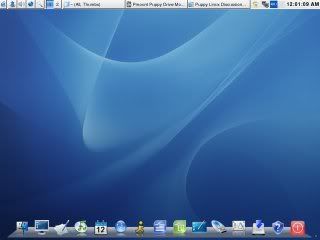
Ubuntu remix with an OSX feeling

Download

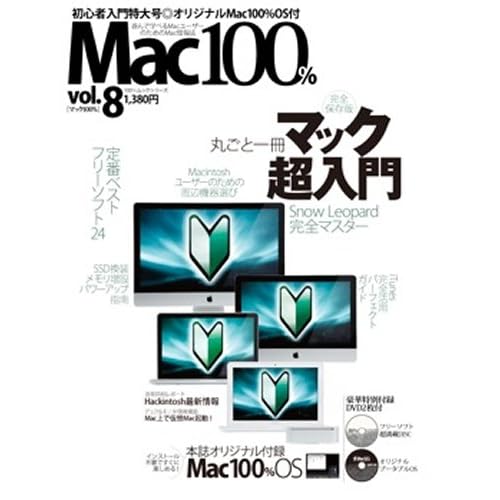
Together with the magazine called Mac 100% Vol was the Mac 100% original OS dvd, an Ubuntu remix based on version 9.04 with an OSX feeling to it (well, at least the doc). 
You get some useful software along with it.
The menus are originally in Japanese, but can easily be changed in system settings like all other Linux distributions.
Because this Ubuntu remix is a bit old I also don't know how it will turn out doing an upgrade from 9.04 to 10.04. But I will get back on this one if no one try it out before me. To upgrade you need to edit the software sources from "never releases" to "normal release" and first then you will be prompted to upgrade using the command sudo update-manager -d in the terminal.

Saturday, April 17, 2010

Installing Madwifi drivers

What is madwifi you may ask? Madwifi is actually a special driver that will allow Ubuntu or another Linux recognize your wireless cards that refuse to be recognized by Ubuntu already. But wait -- madwifi isn't for everyone! madwifi only supports certain chipsets, and if yours isn't supported, it's quite probable that following this installation guide will make no difference on your ability to use your wireless card under Linux. So, if you aren't sure whether your card is supported by this driver, visit the following page:
http://madwifi.org/wiki/Compatibility 

The madwifi install guides we have aren't that good/easy. 
These instructions at the Debian MacBook Wiki are an excellent resource
and I modified these instructions to work on Ubuntu. 
This is for everyone on Feisty Fawn (7.04) that is installing the madwifi set of drivers (unfortunately these instructions don't work in Dapper).
Warning: These instructions don't seem to do any good because newer MacBooks and other laptops with related wireless chipsets require madwifi-hal, so this guide shouldn't be followed anymore! Instead, use these instructions:
http://ubuntuforums.org/showpost.php...9&postcount=25

Tuesday, March 30, 2010

4 Linux Distros Which Look Like Mac OS X

What a week! I’ve been working on my podcast so I’m a bit behind on posting. Here’s an interesting compilation of Linux distribution which resemble Apple’s Mac OS 10. They might not be identical, but you guys who like Apple’s design might appreciate the fact yu can get something like it, with the nice-on-the-inside GNU/Linux kernel, out-of-the-box. For free.
These are only short descriptions, with screen grabs. You will find a lot more info and full screenshots on the official web pages of each distro.
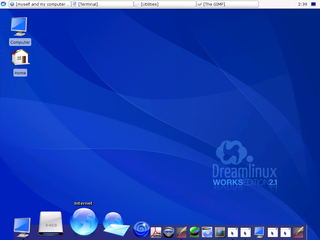
dreamlinux
A Brazilian distribution, full of multimedia tools, oriented at people who like to create. The XFCE Desktop with Rocket Dock makes a nice desktop environment with Mac-like traits. The installer is pretty sleek, because you only have one configuration page. Another good point of Dreamlinux is the Debian base, which is a bit lighter than Ubuntu.
gos
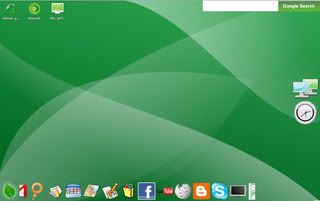
gOS’ user base sky-rocketed because of Walmart’s  phenomenally well-accepted gPC. Although it doesn’t have the ’smart blue’ look (the developers went for a greenish look), gOS still feels pretty sleek (apart from the boot time). I’m not sure  the new gOS Gadgets uses Rocket Dock or AWN, but with LXDE, gOS may become a good choice for net-books. Software-wise, the distro relies heavily on Google Apps.
elive
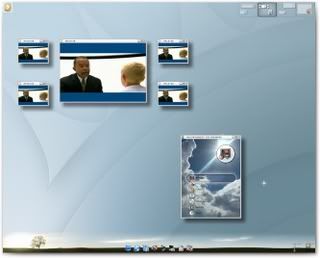
Enlightenment’s official distro is based on Debian Linux. Even though its mission is showcasing the latest E17 Desktop Environment modules, this OS X-like distro has a lot of regular users (at least according to Distrowatch). You can find some cool Enlightenment DR17 goodies, including the ibar dock.
macpup
Puppy Linux is an awesome distro for old computers. A person from the community decided the default desktop isn’t sleek enough and created this genius OS X mod. This modified Puppy gives you speed, simplicity and a tasty Apple, with those cool little Puppy Apps.
More: If you have time and wish to change your own Linux distro’s theme to something more Mac OS X-like, you can maybe take a look at my list of Linux Docks.

Saturday, March 27, 2010

History of Mac OS X

Source
This article is part of the
Mac OS X series.
New features
History
Transition to Intel processors
Architecture
Technologies
List of applications
Components
Mac OS X is the newest of Apple Inc.'s Mac OS line of operating systems. Although it is officially designated as simply "version 10" of the Mac OS, "version 9" had a completely different codebase, file system, design, and hardware support. Mac OS had been Apple's primary operating system since 1984, and the family was backward compatible, so Mac OS X supported an emulated version 9 until version 10.5.
Unlike its predecessor, Mac OS X is a Unix-like operating system built on technology that had been developed at NeXT through the second half of the 1980s and up until Apple purchased the company in early 1997. It was first released in 1999 as Mac OS X Server 1.0, with a desktop-oriented version (Mac OS X v10.0) following in March 2001. Since then, six more distinct "client" and "server" editions of Mac OS X have been released, the most recent being Mac OS X v10.6, which was first made available on August 28, 2009. Releases of Mac OS X are named after big cats; the current version of Mac OS X is nicknamed "Snow Leopard".

Diagram of the relationships between Unix systems including the ancestors of Mac OS X

Saturday, April 5, 2008

Linux über alles!

Actualizando Pirateando sistemas operativos:
Linux vs. Leopard | Vista
Y eso que Ubuntu no es la distribución de Linux más segura, tan sólo la más popular!

Son las circunstancias bajo las que en la Informática me convertiría en un racista encarnizado espiritualizado (u operacionalmente sistematizado)!
Ave, Linux!

Pirateando sistemas operativos

En CanSecWest Vancouver 2008 participaron sistemas operativos de:
  • Comunidad Linux
  • Mac
  • Micro$oft
En los equipos de usuarios con conexión inalámbrica a sus centros de trabajo (typical road-warrior clients):
  • VAIO VGN-TZ37CN running Ubuntu 7.10
  • MacBook Air running OSX 10.5.2 (Leopard)
  • Fujitsu U810 running Vista Ultimate SP1
Condiciones y premios del concurso
Quick Overview:

  • Limit one laptop per contestant.
  • You can't use the same vulnerability to claim more than one box, if it is a cross-platform issue.
  • Thirty minute attack slots given to contestants at each box.
  • Attack slots will be scheduled at the contest start by the methods selected by the judges.
  • Attacks are done via crossover cable. (attacker controls default route)
  • RF attacks are done offsite by special arrangement...
  • No physical access to the machines.
  • Major web browsers (IE7, Safari, Konqueror, Firefox), widely used and deployed plugin frameworks (AIR, Silverlight), IM clients (MSN, Adium, Skype, Pigdin, AOL, Yahoo), Mail readers (Outlook, Mail.app, Thunderbird, kmail) are all in scope.
Resultados Los ganadores aquí
En la red inalámbrica, tiempo necesitado por los corsarios informáticos [crackers y ciertos hackers] para irrumpir por la red en los equipos, aprovechando errores de la seguridad del sistema operativo y sus aplicaciones (exploits):
Mac Leopard: En 2 minutos
M$ Vista: En 2 días
Linux Ubuntu: Siguen probando...