Bienvenido! - Willkommen! - Welcome!

Bitácora Técnica de Tux&Cía., Santa Cruz de la Sierra, BO
Bitácora Central: Tux&Cía.
Bitácora de Información Avanzada: Tux&Cía.-Información
May the source be with you!
Showing posts with label firefox addons. Show all posts

Monday, February 7, 2011

unwanted script in Hotmail Microsoft Live on Firefox 3.6

Script: https://js2.wlxrs.com/_D/F$Live.SiteContent.Messenger/4.2.61210/release/Microsoft.Live.Core.LocalStorage.FF.js:39
Source
  • "Clear the Cache": Tools - Options - Advanced - Network - Offline Storage (Cache): "Clear Now"
  • "Remove the Cookies" from sites that cause problems: Tools - Options - Privacy - Cookies: "Show Cookies"

Start Firefox in Safe Mode to check if one of the add-ons is causing the problem (switch to the DEFAULT theme: Tools - Add-ons - Themes).
  • Don't make any changes on the Safe mode start window.
  • To clear your browsing history, cookies, and temporarily cached files at once, see Clear Recent History.
  • To clear your browsing history, cookies, and temporarily cached files at once, see Clearing private data.
  • To prevent websites from storing cookies on your computer, see Blocking cookies.
 Delete all cookies
To delete all cookies stored on your computer:
  1. Click on the Tools menu and select Clear Recent History....
  2. Set Time range to clear to Everything.
  3. Click on the arrow next to Details to expand the list of history items.
  4. Select Cookies and make sure that other items you want to keep are not selected.

    ab963d736461b221f497eb33a7f09b1a-1260044801-604-2.png


    ab963d736461b221f497eb33a7f09b1a-1260044801-604-1.png
  5. Click Clear Now to clear the cookies and close the Clear Recent History window.
  1. Click on the Tools menu and select Clear Private Data....
  2. Click to select Cookies and make sure that other items you want to keep are not selected.
  3. Click Clear Private Data Now to clear the cookies and close the Clear Private Data window.

Sunday, August 1, 2010

307.to

Why 307? - 307 is a server side temporary redirect code. Used by servers to redirect your web-browser to a new directory or a new web site.
http://307.to/ is a redirect service used to make tiny URLs for a lot of uses.

You can protect redirections or make a multiple links redirections for many purposes.
Información del complemento para 307.to
Actualizados
Página web http://307.to/
Funciona con Firefox 3.0 - 3.6.*

Saturday, February 27, 2010

Windows Media Player Firefox Plugin

To play Windows media in Firefox, Firefox needs the Windows Media Player browser plugin installed. There are two different versions:
  • The original, which is usually included with Windows from 98 up to XP Home/Professional
  • The new version, which is specifically for Windows XP and Windows Vista and is only available by download.
Many Windows XP users will have the old plugin already, but it is recommended that you install the new plugin anyway.
This article describes how to check for and install the Windows Media Player plugin in Windows XP/Vista. XP users may already have the old plugin, but the new plugin is recommended.

Download Now
You must close all other browser windows before installing.

Platforms:
  • Windows XP SP2 (x86)
  • Windows XP SP2 (x64)
  • Windows Vista (x86)
  • Windows Vista (x64)
Browsers: Firefox
Date Posted: 4/13/2007
Installation Instructions
  1. Installation of the Windows Media Player Firefox Plugin may require administrative access to your PC. It is recommended that you close all other open browser windows before continuing with the installation.
  2. Click the Install button to automatically download and install the Windows Media Player Firefox Plugin.
  3. Depending on your security settings, you may see a Security Warning dialog box. Click Install to install the plugin.

Wednesday, February 17, 2010

Google Docs with DocSyncer: Sync & backup

...
Google Docs is a good choice for users who intend to publish or share Office documents, workbooks or presentations online in the web, so that the documents and files are accessible while on the move. Google also provides generous storage space capacity for the uploaded files, making Google Docs a perfect solution as a free backup solution for offline files. Google Docs Help Center explains that Google Docs saves to a secure, online storage facility, where users can access the documents from any computer, and, in the event of a local hard drive crash, won’t lose the saved content. And Google servers backs up data almost as often as users can manage to change the contents.
However, Google Docs doesn’t have the auto sync feature to automatically transfer and synchronize files and documents between local computer and Google Docs web server. Users will have to upload the files one by one using Google Docs web interface, although it’s possible to download multiple files at once.
DocSyncer in Action
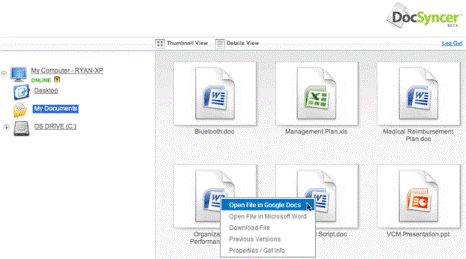
DocSyncer is the solution the awkward Google Docs upload functionality. DocSyncer, as its name implied, will constantly keep track of any changes and synchronize the documents between local PC hard drive on selected folders, and Google Docs account. If the files do not exist in the web account or local drive, DocSyncer will upload and download the files automatically, including the newly created and saved documents, spreadsheets and presentations. From DocSyncer, users can directly open a document in Microsoft Word, Excel or PowerPoint or open it in Google Docs. It’s also possible to access Previous Versions of the file, although it’s not clear is the feature Vista specific. 
More at:

OutWit Docs

Source
Your Webtop document harvester.
With OutWit Docs you will find text documents, datasheets, PDF files, presentations from multiple online sources.
Outwit Docs will automatically explore large series of Web pages or search engine results and download the files for you.
Firefox addon