Quelle
FreedomStick EvilTux Edition (FS ETE): Ermöglicht das unzensierte Surfen im Internet von überall aus; installiert vorkonfigurierte Versionen von Tor, einem Netzwerk voller virtueller Tunnel zum Anonymisieren, und Firefox auf einem USB-Stick; nach Einstecken des Sticks wird automatisch eine Verbindung in das zensurfreie Tor-Netzwerk erstellt; Anbieter stellt ein Update-Pack zur Verfügung, um Datenverlust bei Softwareupdates vorzubeugen
Showing posts with label internet access. Show all posts
Showing posts with label internet access. Show all posts
Wednesday, October 21, 2009


Monday, October 12, 2009
Freedom Not Fear 2009
A broad movement of civil rights defenders is calling upon everyone to participate in actions directed against the ongoing spread of excessive surveillance measures on the part of businesses, administrations and governments. On Saturday, 12th September 2009, concerned citizens in numerous countries around the world will gather to show protest under the motto “Freedom not Fear 2009 – Stop Surveillance Mania!”
Join in, defend your rights!
This is most important in countries where repression by censorship and surveillance is only beginning -- these things must be nipped in the bud!
Digital Security and Privacy for Human Rights Defenders
Source: FrontLine Human Rights Defenders
1.1 Security and Insecurity

ECHELON intercept station at Menwith Hill, England.
Source: www.greaterthings.com
1.1 Security and Insecurity
Computers and the Internet are all about information seeking, storage and exchange. Hence, the topic of security in the digital realm relates to the security of information. We need to operate in a climate where our information is not stolen, damaged, compromised or restricted. The Internet, in theory, provides everyone with an equal opportunity to access and disseminate information. Yet, as many incidents have shown, this is not always the case. Governments and corporations realise the importance and value of controlling information flows, and of being able to decide when to restrict them. The security of information is further complicated by malicious individuals creating computer viruses and hacking into computer systems, often with no other motive than causing damage.
Confusion is enhanced by the abundance of software, hardware andelectronic devices designed to make the storage and exchange of information easier. An average computer today contains millions of lines of complex code and hundreds of components which could malfunction and damage the system at any time. Users have to immerse themselves in concepts and technology that seem to be far removed from the real world. The security of your computer falls first and foremost upon your shoulders and requires some comprehension of how its systems actually work.The race to reap profits from the Internet has resulted in the appearance of numerous financial services and agencies. You can now book a flight, buy a book, transfer money, play poker, do shopping and advertise on the Internet. We have increased our capacity for getting more things done more quickly, yet we have also created a myriad of new information flows, and with them – new concepts of insecurity we do not yet know how to deal with. Marketing companies are building profiles of users on the Internet hoping to turn your browsing experience into a constant shopping trip. Personal information, collected by governments and social agencies, is then sold to data mining companies, whose aim is to accumulate as much detail as possible about your private life and habits. This information is then used in surveys, product development or national security updates. Our email accounts are cluttered with useless and unsolicited messages, causing a huge disruption to our work, the Internet connectivity and computer reliance.It appears that chaos has come to rule our digital world. Nothing is certain and everything is possible. Most of us just want to get on with writing our document or sending an email, without considering the outcomes of insecurity. Unfortunately, this is not possible in the digital environment. To be a confident player in this new age of information highways and emerging technologies, you need to be fully aware of your potential and your weaknesses. You must have the knowledge and skills to survive and develop.
Methods and trends of surveillance, censorship and electronic attack
Confusion is enhanced by the abundance of software, hardware andelectronic devices designed to make the storage and exchange of information easier. An average computer today contains millions of lines of complex code and hundreds of components which could malfunction and damage the system at any time. Users have to immerse themselves in concepts and technology that seem to be far removed from the real world. The security of your computer falls first and foremost upon your shoulders and requires some comprehension of how its systems actually work.The race to reap profits from the Internet has resulted in the appearance of numerous financial services and agencies. You can now book a flight, buy a book, transfer money, play poker, do shopping and advertise on the Internet. We have increased our capacity for getting more things done more quickly, yet we have also created a myriad of new information flows, and with them – new concepts of insecurity we do not yet know how to deal with. Marketing companies are building profiles of users on the Internet hoping to turn your browsing experience into a constant shopping trip. Personal information, collected by governments and social agencies, is then sold to data mining companies, whose aim is to accumulate as much detail as possible about your private life and habits. This information is then used in surveys, product development or national security updates. Our email accounts are cluttered with useless and unsolicited messages, causing a huge disruption to our work, the Internet connectivity and computer reliance.It appears that chaos has come to rule our digital world. Nothing is certain and everything is possible. Most of us just want to get on with writing our document or sending an email, without considering the outcomes of insecurity. Unfortunately, this is not possible in the digital environment. To be a confident player in this new age of information highways and emerging technologies, you need to be fully aware of your potential and your weaknesses. You must have the knowledge and skills to survive and develop.
Methods and trends of surveillance, censorship and electronic attack
ECHELON intercept station at Menwith Hill, England.
Source: www.greaterthings.com
The right to privacy is a contentious issue in the modern world.
Does anyone have the right to access our private information? In the aftermath of the 9/11 attacks in the USA, most governments seem to think they should have full control of our communications and the ability to monitor and access our computers. Many countries have implemented legislation and introduced the technology that increased their power of surveillance to previously unseen levels. The ECHELON project, for instance, is a global surveillance system, able to record and process telephone, Internet and satellite communications.I
n May 2001, the European Parliament’s Temporary Committee on the Echelon Interception System (established in July 2000) issued a report concluding that “the existence of a global system for intercepting communications . . . is no longer in doubt.” According to the committee, the Echelon system (reportedly run by the United States in cooperation with Britain, Canada, Australia and New Zealand) was set up at the beginning of the Cold War for intelligence gathering and has developed into a network of intercept stations around the world. Its primary purpose, according to the report, is to intercept private and commercial communications, not military intelligence.1
The right to freedom of expression and information has also been attacked and suppressed on the Internet. The ability to access information from any Internet connection point on Earth, regardless of where this information is stored, has resulted in many governments –not ready or willing to provide this type of freedom to their citizens– scrambling to restrict such free access. Huge resources have been poured into developing country-specific filtering systems to block the Internet information, deemed inappropriate or damaging to the local country’s laws and ‘national morale’.
In China, a system known as the “Great Firewall” routes all international connections through proxy servers at official gateways, where the Ministry for Public Security (MPS) officials identify individual users and content, define rights, and carefully monitor network traffic into and out of the country. At a 2001 security industry conference, the government of China announced an ambitious successor project known as “Golden Shield.” Rather than relying solely on a national Intranet, separated from the global Internet by a massive firewall, China will now build surveillance intelligence into the network, allowing it to “see,” “hear” and “think.” Content-filtration will shift from the national level to millions of digital information and communications devices in public places and people’s homes. The technology behind Golden Shield is incredibly complex and is based on research undertaken largely by Western technology firms, including Nortel Networks, Sun Microsystems, Cisco and others.2
These filters undermine our ability to take advantage of the Internet and to cross geographical boundaries in our quest for learning and communication. They are also in breach of several articles in the Universal Declaration of Human Rights (UDHR) guaranteeing every person rights to privacy and free expression. Significantly, these systems were developed only after the growth and potential of the Internet as the global information exchange was noticed. They were not part of the original idea behind the development of the Internet.
Does anyone have the right to access our private information? In the aftermath of the 9/11 attacks in the USA, most governments seem to think they should have full control of our communications and the ability to monitor and access our computers. Many countries have implemented legislation and introduced the technology that increased their power of surveillance to previously unseen levels. The ECHELON project, for instance, is a global surveillance system, able to record and process telephone, Internet and satellite communications.I
n May 2001, the European Parliament’s Temporary Committee on the Echelon Interception System (established in July 2000) issued a report concluding that “the existence of a global system for intercepting communications . . . is no longer in doubt.” According to the committee, the Echelon system (reportedly run by the United States in cooperation with Britain, Canada, Australia and New Zealand) was set up at the beginning of the Cold War for intelligence gathering and has developed into a network of intercept stations around the world. Its primary purpose, according to the report, is to intercept private and commercial communications, not military intelligence.1
The right to freedom of expression and information has also been attacked and suppressed on the Internet. The ability to access information from any Internet connection point on Earth, regardless of where this information is stored, has resulted in many governments –not ready or willing to provide this type of freedom to their citizens– scrambling to restrict such free access. Huge resources have been poured into developing country-specific filtering systems to block the Internet information, deemed inappropriate or damaging to the local country’s laws and ‘national morale’.
In China, a system known as the “Great Firewall” routes all international connections through proxy servers at official gateways, where the Ministry for Public Security (MPS) officials identify individual users and content, define rights, and carefully monitor network traffic into and out of the country. At a 2001 security industry conference, the government of China announced an ambitious successor project known as “Golden Shield.” Rather than relying solely on a national Intranet, separated from the global Internet by a massive firewall, China will now build surveillance intelligence into the network, allowing it to “see,” “hear” and “think.” Content-filtration will shift from the national level to millions of digital information and communications devices in public places and people’s homes. The technology behind Golden Shield is incredibly complex and is based on research undertaken largely by Western technology firms, including Nortel Networks, Sun Microsystems, Cisco and others.2
These filters undermine our ability to take advantage of the Internet and to cross geographical boundaries in our quest for learning and communication. They are also in breach of several articles in the Universal Declaration of Human Rights (UDHR) guaranteeing every person rights to privacy and free expression. Significantly, these systems were developed only after the growth and potential of the Internet as the global information exchange was noticed. They were not part of the original idea behind the development of the Internet.
Surveillance and monitoring techniques have passed from the hands of intelligence personnel to the hardware and software systems, operated by private companies and government agencies. Phone bugging and letter opening has been superseded by the technology that allows monitoring of everyone and everything at once. The popularity of the Internet and its integration into our daily life has made that possible. Previously, someone considered dangerous to national security was spied upon. Now, we are all under suspicion as a result of the surveillance and filtering systems our governments install on the Internet. The technology does not often differentiate between users as it waits for certain keywords to appear in our email and Internet searches, and when triggered, alerts surveillance teams or blocks our communications. In 1998, the Russian government passed a law stating that all Internet Service Providers (ISPs) must install a computer black box with a link back to the Russian Federal Security Services (FSB) to record all the Internet activity of their users.
I have witnessed such Internet-based filtering repeatedly. In the days following the attacks on the New York Trade Centre, while working for a global computer company, I had an urge to explore the obscure world of religious fundamentalism. After browsing through certain extremists websites, I was approached by two of the company’s security guards who asked me why I was looking for that particular information. At first, I was dumbfounded – how did they find out? Then I asked the guards who gave them the right to question me. The next day, a company memo banned all staff from visiting websites that contradicted “the organisation’s ethics and policy’”.
The debate about controlling the Internet and information flows for the purposes of countering terrorism is outside the boundaries of this manual. It has to be said, however, that such practices have reduced freedom of expression, association and privacy all over the world, in direct contravention of the UDHR. Governments have installed systems to monitor their citizens on the scale far beyond the measures to fight terrorism. Information on human rights, freedoms of the media, religion, sexual orientation, thought and political movements, to name just a few, has been made inaccessible to many.
I have witnessed such Internet-based filtering repeatedly. In the days following the attacks on the New York Trade Centre, while working for a global computer company, I had an urge to explore the obscure world of religious fundamentalism. After browsing through certain extremists websites, I was approached by two of the company’s security guards who asked me why I was looking for that particular information. At first, I was dumbfounded – how did they find out? Then I asked the guards who gave them the right to question me. The next day, a company memo banned all staff from visiting websites that contradicted “the organisation’s ethics and policy’”.
The debate about controlling the Internet and information flows for the purposes of countering terrorism is outside the boundaries of this manual. It has to be said, however, that such practices have reduced freedom of expression, association and privacy all over the world, in direct contravention of the UDHR. Governments have installed systems to monitor their citizens on the scale far beyond the measures to fight terrorism. Information on human rights, freedoms of the media, religion, sexual orientation, thought and political movements, to name just a few, has been made inaccessible to many.
...“The Uzbekistan government has reportedly ordered the country’s internet service providers (ISPs) to block the website www.neweurasia.net, which hosts a network of weblogs covering Central Asia and the Caucasus. The government’s decision to block all national access to www.neweurasia.net is believed to be the first censoring of a weblog in Central Asia...”3
... “The Socialist Republic of Vietnam regulates access to the Internet by its citizens extensively, through both technical and legal means. According to the study by the OpenNet Initiative (ONI), the Vietnamese state attempts to stop citizens from accessing political and religious material deemed to be subversive along various axes. The technical sophistication, breadth, and effectiveness of Vietnam’s filtering are increasing with time, and are augmented by an ever-expanding set of legal regulations and prohibitions that govern on-line activity. Vietnam purports to prevent access to the Internet sites primarily to safeguard against obscene or sexually explicit content. However, the state’s actual motives are far more pragmatic:
while it does not block any of the pornographic, it filters a significant fraction - in some cases, the great majority - of sites with politically or religiously sensitive material that could undermine
Vietnam’s one-party system...”4
Encryption has become one of the last resorts of privacy on the Internet. It enables us to make our messages and communications unreadable to all but the intended party. A layer of encryption was even built into the Internet structure to allow for secure financial transactions (SSL). When this system began to be applied for securing other, non-financial, information, it was met with strong opposition inmany countries. At first, the US government tried to ban all SSL encryption of the complexity higher than they could decrypt. In 2000, Britain, in her turn, introduced the Regulation of Investigatory Powers Act (RIP) which made no provisions for one’s right to encrypt information, but stated that a user must surrender his passwords when asked to do so by the investigative forces or face 6-month imprisonment. In 1998, the government of Singapore passed the Computer Misuse Act that allowed the country’s security services to intercept email messages, decrypt encoded messages and confiscate computers without a warrant in the course of investigations5.
Some countries, like Turkmenistan have banned encryption altogether. A world-wide monitoring system, like ECHELON (or any other), will probably collect all encrypted emails for further inspection, simply because they were encrypted in the first place. Any attempt at privacy will therefore be seen as an intention to hide something.
Specific threats faced by human rights defenders Human rights defenders often become targets of surveillance and censorship in their own country. Their right to freedom of expression is often monitored, censored and repressed. Often they are facing heavy penalties for continuing their work. The digital world has been both a blessing and a curse for them. On the one hand, the speed of communications has brought them closer to their colleagues from around the world, and the news of human rights violations spreads around within minutes. People are being mobilised via the Internet, and many social campaigns have moved online. The negative aspect of the widespread use of computers and the Internet lies in over reliance on complex technology and the increased threat from targeted electronic surveillance and attacks. At the same time, the defenders in poorer countries who do not have computers and/or access to the Internet have found themselves left out of global focus and reach – another example of the imbalance caused by the digital divide. Over the years, HRDs have learnt to operate in their ownenvironment and have developed mechanisms for their own protection and prevention of attacks. They know their countries’ legal systems, have networks of friends and take decisions based on everyday wisdom.
Computers and Internet, however, constitute a whole new world to discover and understand. It is their lack of interest or capacity to learn about electronic security that has lead to numerous arrests,
attacks and misunderstandings in the HR community. Electronic security and digital privacy should become not just an important area for comprehension and participation, but also a new battleground in the struggle for the worldwide adherence to the principles of the UDHR.
Emails do not arrive at their destination, Internet connection is intermittent, computers are confiscated and viruses damage years of work. These problems are commonplace and familiar. Another common phenomenon is the increasing attention of those in power to online publishing. The authorities are actively searching through Internet news sites, blogs and forums – with swift retribution in cases when “undesired” material originating from a HRD is discovered. Take the case of Mohamed Abbou, who is serving a 3,5 year prison term in Tunisia for publishing online an article that compared Tunisian prisons to Abu Ghraib6. In China, 48 journalists are in prison because of their Internet-related activities7.
Human rights defenders need to secure their work by learning about the technology and concepts of the computer and Internet operations. This will make them more effective in protecting themselves and in promoting the rights of those they try to defend.
1 European Parliament, Temporary Committee on the Echelon
Interception System (2001) Report on the Existence of a Global System
for the Interception of Private and Commercial Communications (ECHELON
interception system), May 18, 2001. (2001/2098(INI)) (adopted July 11,
2001) Available at http://www.fas.org/irp/program/process/prechelon_en.pdf
2 Privacy International – Privacy and Human Rights Report 2004 – The Threats to Privacy
3 http://www.newseurasia.net July 6th, 2006
4 Internet Filtering in Vietnam in 2005-2006: A Country Study
http://www.opennet.net/studies/vietnam
5 Reporters sans frontières – Annual Report 2006, Internet
6 Front Line http://www.frontlinedefenders.org/news/2081
7 Reporters sans frontières – Annual Report 2006, Internet
Wednesday, September 9, 2009
Psiphon
Psiphon is a web proxy designed to help Internet users securely bypass the content-filtering systems used to censor the internet. Psiphon was developed by the Citizen Lab at the University of Toronto, building upon previous generations of web proxy software systems, such as the "SafeWeb" [1] and "Anonymizer" systems.
In 2008 Psiphon was spun off as a Canadian corporation that continues to develop advanced censorship circumvention systems and technologies. Psiphon maintains its research and development lab and computer network "red team" at The Citizen Lab, Munk Centre for International Studies, University of Toronto.
There are currently two branches of Psiphon development: psiphon open source, and a commercial version that includes the managed proxy cloud and proprietary anti-counter circumvention system.
Psiphon open-source's recommended use is among private, trusted relationships that span censored and uncensored locations (such as those that exist among friends and family members, for example) rather than as an open public proxy. Traffic between clients and servers in the Psiphon system is encrypted using the https protocol. Released under the GNU General Public License, Psiphon open-source is free software.
Wednesday, July 29, 2009
Monday, April 27, 2009
Registry Key to deny internet access
Source
There are 2 easy ways to do this by GPO. The 1st is User Configuration > Windows Settings > Internet Explorer Maintenance > Connections > Proxy Settings. Check the Enable Proxy Settings box, for the proxy server address choose 10.0.0.1 Check Use same proxy server for all addresses and un-check Do Not Use Proxy Server for intranet addresses. I use this for several classes of users and it works well. The advantage of doing it in this manner is that in the event you need to add sites to allow these users to go to you can add them to the exception list.
The second way is do dis-allow iexplore.exe via GPO. That policy is located in User Configuration > Administrative Templates > System > Don't run specified Windows applications. Then you would enable that policy and add iexplore.exe.
There are also 3rd party applications like app-sense that you can use as well but I think the GPO method will work for you.
Charlie
The second way is do dis-allow iexplore.exe via GPO. That policy is located in User Configuration > Administrative Templates > System > Don't run specified Windows applications. Then you would enable that policy and add iexplore.exe.
There are also 3rd party applications like app-sense that you can use as well but I think the GPO method will work for you.
Internet Explorer blocking
Source
Source
Internet Explorer blocking (per user account)
Create a new "OU" call it something like "Restricted" then create a gpo and call it "No_Internet" then add the following policies:
1. user configuration\windows settings\internet explorer
maintenance\connection then choose proxy settings put a check box in proxy settings and put a dead ip or server name in the field and change the port to 8080 (set all fields to use these parameters)
2. administration template\windows components\internet explorer\internet
control panel enable "disable connection page."
3. move the few restricted users into the restricted ou they should inherit the parent gpo (if any)
NOTES
refresh the client gp by rebooting or typing for winxp gpupdate /target:user or win2k secedit /refreshpolicy
READCreate a new "OU" call it something like "Restricted" then create a gpo and call it "No_Internet" then add the following policies:
1. user configuration\windows settings\internet explorer
maintenance\connection then choose proxy settings put a check box in proxy settings and put a dead ip or server name in the field and change the port to 8080 (set all fields to use these parameters)
2. administration template\windows components\internet explorer\internet
control panel enable "disable connection page."
3. move the few restricted users into the restricted ou they should inherit the parent gpo (if any)
NOTES
refresh the client gp by rebooting or typing for winxp gpupdate /target:user or win2k secedit /refreshpolicy
I am the Admin for a Windows 2000 pro computer with two power user accounts.
This PC is not on a domain controller.
I need a solution that will allow power user A to have internet access via internet explorer and disallow power user B internet access via internet explorer. I am looking for the solution to limit internet access (If need be network access) when power user B is logged on the PC. Both accounts need to be operating as power user because of the graphics software won't operate otherwise. Someone of the part-time employees downloading spyware junk atomic clock and calendar with gator.com operating in the background and I want to put an end to that with my request as stated above.
"Curtis Clay III [MSFT]"
you maybe able to configure a local group policy wich denies access to the internet and then deny access to that policy for the user and administrator so that you 2 can have internet access.
See below...
Deny Read and Execute to the Administrator and Power User accounts to the following files
%systemroot%\system32\Group Policy\gpt.ini
%systemroot%\systerm32\GroupPolicy\User\Registry.pol
Create a second administrator account called GPOADMIN. This account will continue to get policy but will be able to administer and change the policy, since the original Administrator account will get access denied when trying to open the policy in the MMC. Use the GPOADmin account only to change or edit the policy.
If the original administrator account gets read and execute permissions restored, it will immediately begin to download and apply policy.
If the policy locks down the desktop, make sure to place a shortcut to the mmc and Group Policy snap in on the desktop of the GPOAdmin profile so he can access the policy. (i.e. the run and program menus are restricted by the policy)
This PC is not on a domain controller.
I need a solution that will allow power user A to have internet access via internet explorer and disallow power user B internet access via internet explorer. I am looking for the solution to limit internet access (If need be network access) when power user B is logged on the PC. Both accounts need to be operating as power user because of the graphics software won't operate otherwise. Someone of the part-time employees downloading spyware junk atomic clock and calendar with gator.com operating in the background and I want to put an end to that with my request as stated above.
"Curtis Clay III [MSFT]"
you maybe able to configure a local group policy wich denies access to the internet and then deny access to that policy for the user and administrator so that you 2 can have internet access.
See below...
Deny Read and Execute to the Administrator and Power User accounts to the following files
%systemroot%\system32\Group Policy\gpt.ini
%systemroot%\systerm32\GroupPolicy\User\Registry.pol
Create a second administrator account called GPOADMIN. This account will continue to get policy but will be able to administer and change the policy, since the original Administrator account will get access denied when trying to open the policy in the MMC. Use the GPOADmin account only to change or edit the policy.
If the original administrator account gets read and execute permissions restored, it will immediately begin to download and apply policy.
If the policy locks down the desktop, make sure to place a shortcut to the mmc and Group Policy snap in on the desktop of the GPOAdmin profile so he can access the policy. (i.e. the run and program menus are restricted by the policy)
Source
Disable Internet Access (All Windows)
This tweak can be easily applied using WinGuides Tweak Manager.
Download a free trial now!
By using this tweak you are able to restrict access to the Internet when using Internet Explorer and other Microsoft compatible products such as Office.
Open your registry and find the key below.[HKEY_CURRENT_USER\Software\Microsoft\Windows\CurrentVersion\Internet Settings]
Change the value of "ProxyEnable" and set it to "1". Change the value of "ProxyServer" and set it to an IP address and port that is invalid on your network such as "10.0.0.1:5555" (i.e. "IP:Port").
By changing these settings Internet access will be disabled for any applications that rely of the Microsoft proxy server information such as Internet Explorer, Microsoft Office, Opera browser.
To stop users from modifying the proxy settings add these restrictions to disable changes to the Internet configuration.
Find or create the key below:
[HKEY_CURRENT_USER\Software\Policies\Microsoft\Internet Explorer\Control Panel]
Create two DWORD values named "Connection Settings" and "Connwiz Admin Lock" and set them both to "1".
To remove the restriction, set the proxy settings back to their original values and delete the policy values.
Note: The change will take effect immediately for any new browser windows, existing Internet Explorer sessions will not be affected until the browser is closed and reopened.
 |
 |  |  |  |  | |
|  | (Default) | REG_SZ | (value not set) | |
|  | ProxyEnable | REG_DWORD | 0x00000001 (1) | |
| | ProxyServer | REG_SZ | 10.0.0.1:5555 | |
 | ||
| HKEY_CURRENT_USER\Software\Microsoft\Windows\CurrentVersion\... |  |
 | ||
Registry Settings
User Key: [HKEY_CURRENT_USER\Software\Microsoft\Windows\CurrentVersion\
Internet Settings]
Value Name: ProxyEnable, ProxyServer
Internet Settings]
Value Name: ProxyEnable, ProxyServer
Group Policy to restrict Internet Access
Internet Explorer Maintenance is used to manage and customize Internet Explorer on computers running Windows 2000 or later. You can enable Internet access options such as the Browser UI, connections, URLs, proxy settings, security zones, Favorites, and Internet Explorer Enhanced Security Configuration component.
This article descript how to use Group Policy to restrict Internet Access by assigning a fake IP to proxy. In our case, you have some clients accessing your system using Terminal Services and would like to restrict them to access the Internet except local Web server from the TS server.
To setup Group Policy to restrict Internet Access, follow these steps.
1. Open Group Policy by running gpedit if you use local group policy or running Active Directory Users and Computers to create a group policy.
2. Click User configuration>Windows Settings>Internet Explorer Maintenance>Connection (Figure).
3. Right-click on Proxy Settings and then Properties.
4. Check enable proxy Settings and type a fake IP address, for example 192.168.2.100 on HTTP (you don't have a proxy server or the proxy server is using the different IP).
5. Under exception, type the web server IP address, for example 192.168.2.10 (Figure).
6. Test it.
Related Topics
Disabling (serverside) Internet access on clients
- Source
- So Many Roads
- Corporate employee policy is absolutely necessary for this (and plenty of other IT-related) issue(s). Enforcement in a cubicular environment obviously depends on a variety of factors.
A proxy-defining script is very attractive. I've met with good success with security by obscurity, not the least notable of which has been renaming Explorer.exe (&/or Netscape) and/or assigning appropriate rights to the file. You can also use your firewall/AV app to monitor downloads or iterations of alternate browsers. - Why not keep it simple
- Just give static addresses and do not specify any gateways or DNS. Adjust priviledges so they can't change these settings and they can still use shared printers and resources, but cannot get off of the network. This should be sufficient for the average user that has very little knowledge of how the network is put together.
- Simple is fun
- add an entry to the PC's hosts file pointing the proxy server to null
127.0.0.1 yourproxyserver
users do not have rights to edit the file. - how about?
- when I want keep the kids from spending the night on the net, I go to RUN>CMD>IPCONFIG/RELEASE to stop the browser.
- When I want to turn it back on,
- RUN>COM>IPCONFIG/RENEW
- Try GPEDIT.MSC...
- Edit the local group policy on the PC to dis-allow iexplore.exe from running, use 'Add/Remove Programs' to remove all access to Internet Explorer and move the shortcut to Windows Update from the '\Documents and Settings\All Users\Start Menu' to the desktop of the local administrator's profile.
All of my users are running as 'Restricted Users' (no user should even have 'Power User' rights), so this works very well. - block port 80
- Hi. If you are using XP, you can create a security policy in computer management to block all traffic on port 80. This will kill internet access and nothing else (and requires admin rights to change) and does it does not matter what browser you use.
- Account restrictions
- Simply applying your GPO & even some of the other tips here without applying account restrictions does not deal with Domain Accounts with mail services.
The easiest way would be to simply setup a domain local group for firewall users & that would end the surfing.
- Yeah, well that's all fine and dandy...
- You can also cut the wave out from underneath most surfers just by not allowing iexplore.exe to be run in gpedit.msc.
We are implementing SharePoint and blocking port:80 and cutting off gateways and using bogus proxy servers won't cut it for us.
Simple is good, but (as I've tried these solutions before) I find I wind up hosing somebody in the all-or-nothing solutions.
XP SP2 offers solutions for this. Of the hundreds of NEW GPO settings, cutting off Internet access (or portions thereof) is now available. (Note: you could do it before via restricting zone settings yada yada, but now there's a one-stop-shop block Internet settings GPO)
With some experimentation, you can cut off the IntErnet without cutting off the IntrAnet, per user or per computer (per OU actually) and still allow for WUS updating and other apps that need port:80 access or some other internet functions.
I can actually make it so the forklift driver can't get on the 'net on any machine, meanwhile the secretary can...on the same machine. Pretty nifty.
You should be able to do this with the local gpedit.msc too if you don't have an AD network.
The catch is..naturally, it doesn't work unless you have WinXP SP2 clients.
- MS Content Advisor - No Access option
- Microsoft has a rating you can use called noaccess.rat and is activated through the Tools/Internet Options/Content area. It will block all outside Internet access in IE, but allow only Intranet access. I have customized our Company's Browser and include this file along with a couple other rating files that I can turn on and off whenever the need arises. If I turn on the No Access, I usually will also uncheck the box for allowing users to see site with no ratings under the General Tab just to be safe.
- I guess this would be outdated, but... Based on the replies you've gotten thus far, this is a much less sophisticated option, but for our small customers who wish to have some clients off the net our solution is twofold:
1. As mentioned before, remove all indications of Internet Explorer from the computer - go to the Control Panel and in Add/Remove choose the "Add/Remove Windows Components" option on the left pane and deselect Internet Explorer. (By the way, nosy users will still be able to browse the Internet by typing the URL in the Windows Explorer address bar, that's why there's step two)
2. Find on the web (or I can send a copy to you) "Noaccess.rat". This is an Internet Explorer ratings file that you can load in your "%SystemRoot%\System32" folder, then enable in the Internet Options section of Internet Explorer [TOOLS>>INTERNET OPTIONS] on the menu bar. Choose the "Content" tab at the top and select "Enable". There you will see the default rating scheme and the "Noaccess" scheme. If you are absolutely sure you want to do this, then remove the default scheme (the other .rat file in %SystemRoot%\System32) and configure your noaccess.
Problem is this only works for IE, and I said, if a user is a little too smart for his/her britches then they'll probably just download firefox or load it from a CD.
The second part of the solution (I don't really care for the first one, it's to easy for a user to figure out) given by Zaferus is really the most ideal "set the Internet router to deny all port 80 traffic to the WAN from the IP address of the client PC you want to block."
interesting conundrum
That sort of carefully controlled environment is difficult to achieve with a Windows network. You could probably do it by segmenting the network and controlling traffic between network segments with a tiered Windows update deployment setup, so that individual machines aren't getting direct access to the Internet, and with a proxy server that grants access to some user accounts but not others (I think it'd have to be a non-Windows proxy server, like Squid on Linux, to work properly, though I'm not sure about that).
If you were running Linux systems, it would be much, much easier, since Linux (like any Unix) is an inherently multi-user system. All you would have to do is create user accounts with specifically tailored application access for the users that you don't want doing anything except what is directly required for their jobs. This sort of thing is sorta possible in a Windows network, but it tends to require jumping through a lot of hoops, tying OS configuration into knots, and a lot of server-side monkeying around.
That sort of carefully controlled environment is difficult to achieve with a Windows network. You could probably do it by segmenting the network and controlling traffic between network segments with a tiered Windows update deployment setup, so that individual machines aren't getting direct access to the Internet, and with a proxy server that grants access to some user accounts but not others (I think it'd have to be a non-Windows proxy server, like Squid on Linux, to work properly, though I'm not sure about that).
If you were running Linux systems, it would be much, much easier, since Linux (like any Unix) is an inherently multi-user system. All you would have to do is create user accounts with specifically tailored application access for the users that you don't want doing anything except what is directly required for their jobs. This sort of thing is sorta possible in a Windows network, but it tends to require jumping through a lot of hoops, tying OS configuration into knots, and a lot of server-side monkeying around.
Sunday, October 12, 2008
LSP-Fix
Source Thanks!
Repairs Winsock 2 settings, caused by buggy or improperly-removed Internet software, that result in loss of Internet access
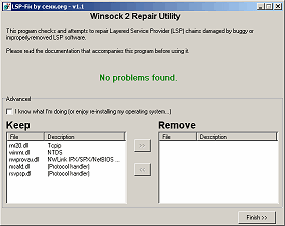
LSP-Fix is a free Windows utility to repair a loss of Internet access associated with certain types of software. This type of software, known as a Layered Service Provider or LSP, typically handles low-level Internet-related tasks, and data is passed through a chain of these programs on its way to and from the Internet. However, due to bugs in the LSP software or deletion of the software, this chain can get broken, causing the Internet connection to become inaccessible.
LSP-Fix is a free Windows utility to repair a loss of Internet access associated with certain types of software. This type of software, known as a Layered Service Provider or LSP, typically handles low-level Internet-related tasks, and data is passed through a chain of these programs on its way to and from the Internet. However, due to bugs in the LSP software or deletion of the software, this chain can get broken, causing the Internet connection to become inaccessible.
Unfortunately, problematic LSP software, including malware/spyware, is sometimes quietly installed by unrelated products such as file-sharing programs, sneaking onto a system unannounced. In fact, in many cases, the user does not know of its existence until something goes wrong, and he/she can no longer access Web sites. Historically, New.net* (NEWDOTNET) and WebHancer* (often bundled with file-sharing utilities, DVD player software, and other free downloads) have been the worst offenders, but the problem can be caused by any improperly-written Layered Service Provider software, or the deletion of any LSP program's files. LSP-Fix repairs the LSP chain by removing the entries left behind when LSP software is removed by hand (or when errors in the software itself break the LSP chain), and removing any gaps in the chain.
LSP-Fix is not a malware removal utility and does not target specific products. LSP-Fix does not delete any files.
Download:: (All downloads will fit easily on a floppy disk.)
- LSP-Fix * (.zip) v1.1 - includes the program, documentation and source code.
If you are using the program on a machine that cannot open .zip files, or are downloading for a friend whom you're not sure can read .zip files, download the uncompressed files below instead. It will take a bit longer, but this way the program can be used as-is (e.g. from a floppy disk).
New in this version:
- LSP chains entirely verified on program start, and status (errors / no errors) now displayed on the program main window.
- If Winsock2 registry keys are inaccessible, LSP-Fix now warns the user to log in as Administrator and retry, rather than reporting the key as missing.
- Released under the GNU General Public License.
Screen Shot
Third Party Winsock Repair Tools
Following is a list of additional LSP/Winsock repair utilities written by others. These are provided for convenience, and are not written or tech-supported by cexx.org. Please direct support inquiries at the original authors! Thanks.
http://www.bu.edu/pcsc/internetaccess/winsock2fix.html Winsock repair utility designed for Windows 98, 98SE, and ME.
http://digital-solutions.co.uk/lavasoft/whndnfix.zip - Winsock repair utility for Windows 95/98/98SE/ME.
http://www.iup.edu/house/resnet/WinsockXPFix.exe - Winsock repair utility designed for Windows XP.
http://digital-solutions.co.uk/lavasoft/whndnfix.zip - Winsock repair utility for Windows 95/98/98SE/ME.
http://www.iup.edu/house/resnet/WinsockXPFix.exe - Winsock repair utility designed for Windows XP.
Reparar acceso a internet
Source (Modificado por ceb)
No es posible navegar, pese a que están configurados los DNS server IP (openDNS: 208.67.222.222 208.67.220.220)
 Realiza un examen del disco(scandisk).
 Ejecuta RegUnlocker, úsala de la siguiente manera:
- Selecciona Eliminar restricciones del sistema
- Selecciona Eliminar restricciones del explorador.
- Seleccionas todas las casillas correspondientes a Internet.
Y das click en Unlock.
 Ejecuta XP- FIX.
===============================
Posible solución alternativa:
Reparar el Layered Service Provider
Usar LSP-Fix
No es posible navegar, pese a que están configurados los DNS server IP (openDNS: 208.67.222.222 208.67.220.220)
Realiza un examen del disco(scandisk). Ejecuta RegUnlocker, úsala de la siguiente manera:- Selecciona Eliminar restricciones del sistema
- Selecciona Eliminar restricciones del explorador.
- Seleccionas todas las casillas correspondientes a Internet.
Y das click en Unlock.
Ejecuta XP- FIX.===============================
Posible solución alternativa:
Reparar el Layered Service Provider
Usar LSP-Fix
Subscribe to:
Posts (Atom)


 LibreOffice
 Firefox


