Dell Command Line Interface (linux)
Intel Matrix Storage Manager
Recomendations on RAID controller
Source
Update Jun 11, 2007: I have now experienced the downside to RAID and want to share my experiences here. I had disaster strike in April 2007. One of my two RAID drives was a refurbished drive and failed without warning. I do NOT recommend using a refurbished drive in any RAID array. I ended up with one after ordering an 'Open Box' item from Newegg. Apparently the term 'Open Box' can also mean 'Refurbished' - be careful!
See A Case of Maxtaken Identity for the whole story.
The POST RAID Screen Showing RAID Failure
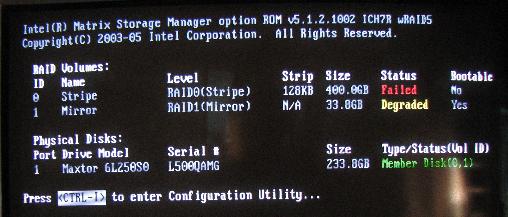
The Intel Matrix POST Setup Screen Showing RAID Failure
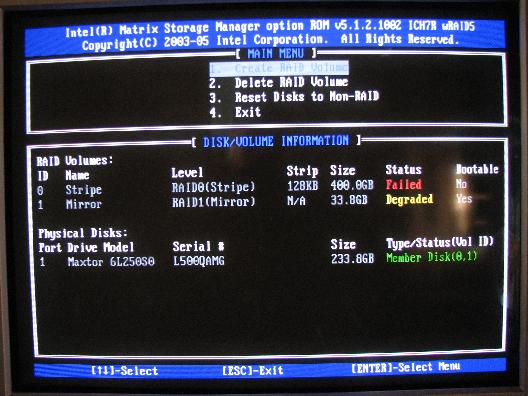
Normally all one would have to do at this point is to plug it in, reconfigure the new drive in the Intel Matrix POST setup screen, reinstall Windows and let Windows rebuild the mirrored volume, but I took the opportunity to reconfigure my volumes. I learned from experience that my initial thoughts to maximize my disk space were flawed. I had a very large striped volume, but I just didn't have that much data that I was willing to lose. I backed up all of my data and set up the mirrored and striped volumes so that each had roughly half of the total final volume space. For my two 250 GB drives, this ended up being 150 GB for the striped volume and 158.7 GB for the mirrored volume.
As expected, everything on my striped volume (Vista and my installed apps) was lost. Nothing on the mirrored volume was lost, but I continue to follow a strict backup plan. I have my important files backed up to a third drive and also to DVD. I also export my MS Mail emails to the mirrored volume every week or two. The hard drive failure could have been a disaster, but thanks to my RAID and backup strategy, it was relatively painless to get everything back to normal again.
The downside to RAID? I have found that while writing to a file on a mirrored volume in Vista and a system failure or reboot occurs, the RAID volume may be in a 'Verify' state. When this occurred to me, one of the mirrored drives had to be verified or rebuilt. Vista took forever to start and when it did WIndows Aero was gone. It took over an hour to rebuild the 158.7 GB of hard disk space. I don't know what would have happened if the system shut down while writing to a striped volume, but I suspect it wouldn't be good and I have no desire to find out.
Another downside occurs if you cannot find a matching drive to replace the failed drive. If another Maxtor 250 GB 6L250S0 drive was not available, I would have had to buy two new drives to insure the proper operation of the RAID volumes. Also, if the motherboard were to die, I would have to find another motherboard with the same ICH7R Southbridge chipset in order to access the data on my RAID volumes/drives.
Both of these constraints are acceptable to me. I had a choice to go back to a non-RAID hard disk setup after the hard drive failure but I didn't. I really like using RAID and I can't tell you how happy and relieved I am to have my RAID working again.
Update Aug 16, 2007: I had to pull out my ancient Micron Milennium Pentium II PC and pull the 30 GB Seagate PATA drive out of my new computer and install it in the backup PC. See Adding Two GB of OCZ Platinum 4-5-4-15 Rev 1 SDRAM for the reason why. I had to wipe the drive and resort to installing NT on the hard drive. Since this was my boot drive in the new system, I had figure out how to get my boot loader reinstalled. I have both Vista RC1 and Server 2008 installed on separate partitions on two Maxtor drives configured as RAID 0 and RAID 1.
I have tried to repair my boot drive unsuccessfully in the past. This time I was determined to fix the boot loader without having to reinstall Windows. I found that I had to load the proper Intel AHCI RAID drivers before Windows Startup Repair could successfully fix the boot loader. If you have RAID installed, remember that you will need to do this every time you have to repair Windows startup.
Update Nov 4, 2007: A post to alt.comp.hardware was asking what the advantage was, if any, to having the Intel Matrix Storage Manager installed in Windows. I had been running a beta version of Server 2008 and after the last install forgot to load the Intel Matrix Storage Manager in the OS. I had been running Windows without the Storage Manager and without any problems for several months. So why would I want to install it? I decided to do a little bit of experimenting to find out what those benefits might be.
I have the OS on a striped RAID 0 volume. I downloaded the latest version of the Intel Matrix Storage Manager. It is a good idea to check there for the latest version.
I installed it and simulated a drive failure by unplugging the data cable to one of my SATA drives (don't try this at home - I am a highly trained professional, err rather a beta tester aka high risk taker) and not surprisingly the system locked up when trying to access Explorer. The storage manager did not tell me that one drive was missing from the array. This behavior may be different on a mirrored volume OS install.
So, no benefit there for me having the Storage Manager installed.
I rebooted the computer and noticed that the BIOS RAID screen showed RAID 0 as failed and RAID 1 as degraded. I entered the BIOS RAID configuration screen and there were no options there for me to 'fix' the volume errors.
I then continued to load Windows and got a balloon notification that one of the RAID volumes had errors. First I did a backup of my important data and then I started the Intel Matrix Storage Manager. It took a while for me to figure out how to 'fix' the arrays. I eventually figured out that I could Right Click on the hard drive that had an 'X' next to it and Left Click 'mark as normal'. I knew there had been no data lost (I was doing reads only) so this option should be safe. The missing drive and RAID 0 volume was marked as normal and the RAID 1 volume started the rebuild process.
I need to backtrack for a moment and explain what happens to your system when the RAID manager thinks that there is an error and you *don't* have the Intel Matrix Storage Manager installed in Windows. Anytime you have an abnormal shutdown and disk activity is occurring a subsequent restart of the RAID array will likely result in a rebuild of the RAID 1 mirrored array. While this process is going on, Windows will take about 15 minutes to start. In Vista, when it finally did start, the Aero interface was missing. For my 158 GB RAID 1 array, the rebuild process takes a full hour to complete.
I made the mistake of shutting down the computer during the restart after a BSOD. The next time I started the computer the dreaded mirrored RAID rebuild process started.
With the Storage Manager installed you can initiate this rebuild process from within the storage manager and *not* automatically during Windows startup. This alone is an excellent reason to install the Storage manager.
The storage manager has good information about your drives and RAID arrays. The storage manager also allows you to create a RAID array and a RAID array from an existing drive.
I would highly recommend that you install the Storage Manager in Windows because sooner or later your system will not shut down normally. When that happens you don't want to wait for the array rebuild process to grind on and on and on before you can start using your computer.
Oh yes - one more thing. When I loaded the latest version of the Intel Matrix Storage Manager, Windows told me that I had 3 days to activate due to a hardware change. There was no hardware change, but the good news is that the activation from within Windows worked without having to make that annoying activation call to Microsoft.
Back To Top
Editorial Privilege
This is the section where I am allowed to stray from the facts, give my opinions and feelings, ramble a bit and make speculations and inferences.I narrowed my choice of motherboards down to a final three:
MSI P975X Platinum
Foxconn 975X7AB-8EKRS2H
GIGABYTE GA-965P-DQ6
I sent emails to the technical support people of each manufacturer. They all basically said the same (I believe accurate) information that the motherboard may not be stable with the memory running at 800 MHz and for the 975X boards, the memory was not technically supported by the Intel chip and for the 965, the memory would have to be overclocked and may not be stable. But none of them told me what I was looking for. To their credit, all three were honest and quick with their replies.
The matrix I had built pointed to the Foxconn as the best choice, but I threw that out for a while and considered them separately based on my Internet research. The MSI customers had reported a lot of BIOS problems and the Gigabyte looked promising, but overpriced. I really wanted the DS4 and not the DQ6, but that motherboard was not available in North America as of late September 2006.
The long name of the motherboard ultimately leads one to shorten or nickname the name when referring to it. I call this the Abbie Kersh board. Actually, all of those letters and numbers mean something:
975X7AB-8EKRS2H
The Intel 975X Northbridge chip does not technically support DDR2 800. This means that in order to run any DDR2 800 memory, you are over-specing any 975X motherboard. From my ECS P965T-A webpage:
So who is to blame for all of this memory / motherboard compatibility issues? Newer BIOS releases have improved this problem greatly, but end users are still reporting problems. The retail sites should include any memory voltage requirements with a disclaimer that memory modules requiring more than 1.8 Volts are not technically supported by the Intel 975 chip and that they memory may or may not be supported by the motherboard by overclocking the memory to the manufacturers specs. And they should note that the Intel 965 chip will support DDR2 800 memory, but not all motherboard BIOS default settings will properly recognize the RAM at the 800 MHz speed. The manufacturers should include installation instructions with their memory showing how to generically change the BIOS DIMM voltage settings and end users should be aware that some motherboards without DIMM voltage adjustments in the BIOS simply aren't supported at the 800 MHz speed and that even when the DIMM voltage adjustments are available in the BIOS, compatibility issues still exist and they may be required to flash their BIOS to a newer version or, worst case, to find a new motherboard / memory combination.
I was pleased to see that the MSI, Gigabyte and Foxconn technical support were up front with me about my memory compatibility issues. It wasn't the answer I wanted to hear, but it was the right answer.
I modified the board a bit to show the Foxconn logo on the Northbridge fan correctly. I removed the four screws that hold the logo plate and fan on the Northbridge heat sink. I then rotated the fan 180° so the power cable was closer to the fan header and rotated the logo shield 90° clockwise so the logo was oriented properly. The screws holding the logo shield and fan in place don't fit into a hole, they lightly grip the heat sink ribs, so the assembly is lightly held in place. I could not do the same with the Southbridge. The logo is on the heat sink itself and the way it is secured to the motherboard does not allow it to be turned clockwise the 90° needed for the proper orientation. See View The Foxconn 975X7AB-8EKRS2H Build Page for pictures of the motherboard.
I also took the useless Power LED on the front panel of my case and zip-tied it to the drive bay to illuminate the motherboard. The yellow and green PCIe slots, USB headers and IEEE 1394 header really stand out!
- RAID 5 and Proper Boot Disc/Partition
- Degraded RAID 5, accidentally added boot drive to Rebuild
- Stupid newbie RAID 5 question
- ICH9R; RAID 5; cannot re-add drive to volume
- Raid 5 Issues
- A RAID that just works - no matter what
- Motherboard with RAID 5?
- Need to resize a RAID 5 config. Anyone successful with this?
- Recommendations on Raid Controller
- Motherboard that supports booting from larger than 2.0TB raid...
- RAID with minimal (but really big) hard drives
- How 2 configure ASUS P6T w/lone SSD + SATA RAID?
- P7P55D EVO Raid
- Can you have a single volume larger than 2TB?
| RAID Type | Drives Needed (min) | Strategy | Advantages | Disadvantages | Implementation |
|---|---|---|---|---|---|
| 0 | 2 | Speed, Maximize Storage Space | Allows data to be stored and accessed orstriped acrosstwo drives. Faster read and write speeds. | Your risk of data loss is essentially double that of a single drive implementation and, like a single drive implementation, there is no data backup. Data loss occurs when a drive fails. With two drives, that risk increases nearly times two. | Store data on a striped drive that you want fast access speeds (the OS is a perfect example of this). Any programs or data that can be easily reloaded, downloaded, replaced, retrieved or restored is a good candidate for a striped volume. You can also consider any data that is easily recreated or you don't mind it if you lose it. |
| 1 | 2 | Speed For Reads, Data Safety | Allows data to be duplicated ormirrored acrosstwo drives. Both drives appear to be one large drive to your system. Read speeds are faster. | Essentially reduces your effective volume size to 1/2. Since your data is stored physically twice, a 500 MB has only 250 MB of effective storage. You get some performance increase for reading files only. | If a drive fails, you can be up and running in a very short time. Since all data is duplicated, in theory, nothing should be lost. |
| 10 | 4 | Speed and Data Safety | Provides good performance and data safety. | Requires four drives, too expensive for most desktop users. It may be overkill for most users. Not all motherboards will support four drives, IDE or SATA, though you should go with SATA if possible. | All essential data that you don't want to lose should go here. Examples would be any home movies or pictures, emails, IM chats you want to keep, personal spreadsheets, text files, Word documents and personal databases are all candidates for a mirrored volume. |
| Intel Matrix | 2 | Speed, Maximize Storage Space and Data Safety | Allows data to be accessed orstriped acrosstwo drives and duplicated ormirrored acrossthe same two drives. | The effective storage size for the RAID 1 volume is 1/2 the space remaining to be allocated. Example: You have 233.4 GB x 2 to allocate (466.8 GB total). You set up volume 0 as striped with 300 GB allocated. That leaves 166.8 GB to allocate. Volume 1 is set up as mirrored with 166.8 GB allocated with an effective storage size of 83.4 GB (166.8 divided by two). | The best of both worlds. You can implement RAID 0 and RAID 1 with only two drives. All non-essential data that you don't mind losing should go on the striped volume. All essential data that you don't want to lose should go on the mirrored volume. |








 LibreOffice
 Firefox


